
Salesforce Opportunity helps businesses track potential sales and manage their sales pipeline. An opportunity in Salesforce represents a deal or potential sale with a customer.
Opportunities play a big role in sales processes. They let teams record important details about deals, such as their value, expected close date, and current stage. Sales reps can use this information to focus on the most promising leads.
Salesforce Opportunity stages show where a deal is in the sales process. Common stages include “Needs Analysis,” “Proposal,” and “Closed Won.” Each stage has a probability of success.
This helps sales teams predict future revenue. By using opportunities, companies can improve their sales strategies and boost their bottom line.
In this article, we will learn about the opportunity object in Salesforce. I will explain about opportunities, fields, features, and how the opportunity object helps in Salesforce.
Understand Opportunity Object in Salesforce
Salesforce opportunities are key tools for tracking and managing potential deals. They help sales teams monitor progress and increase chances of closing sales.
Opportunities in Salesforce are deals in progress. They represent potential sales and track key details for each deal, including the account involved, key players, and potential sale amounts.
Opportunities are more specific than leads. They show real chances to make sales, and sales teams use them to monitor deals as they progress.
Opportunities link to other parts of Salesforce, connecting to accounts, contacts, and products. This gives a full picture of each potential sale.
Importance of Opportunity Object in Salesforce Sales Cycle
Opportunities play a big role in the sales process. They help teams track deals from start to finish. Each opportunity moves through stages as the sale progresses.
These stages might include:
- Prospecting
- Qualification
- Proposal
- Negotiation
- Closed Won or Closed Lost
Tracking opportunities helps sales teams:
- Know which deals need attention
- Predict future income
- See where deals might get stuck
- Focus on the most promising leads
Opportunities provide clear data on sales efforts. This helps managers make informed decisions about where to allocate resources.
Sales Process in Salesforce
Salesforce provides a structured approach to managing sales activities. It guides users through key stages, from initial contact to closing deals.
1. Prospecting and Lead Management in Salesforce
Prospecting involves finding potential customers. Salesforce helps track these leads. Users can enter contact details and other important information, and the system makes it easy to organize leads.
Lead scoring helps prioritize prospects. This feature rates leads based on set criteria, helping sales teams focus on the most promising leads first.
Salesforce also offers lead nurturing tools, such as email campaigns and task reminders. These tools keep leads engaged until they’re ready to buy.
2. Qualifying Leads in Salesforce
Lead qualification determines whether a prospect is likely to become a customer. Salesforce provides fields to capture key qualification data, including budget, authority, need, and timeline.
Users can create custom fields for specific qualification criteria, allowing businesses to tailor the process to their needs.
Salesforce can automate parts of the qualification process. It can assign scores or trigger actions based on certain criteria, saving time and ensuring consistent lead evaluation.
3. Needs Analysis in Salesforce
Needs analysis involves understanding a customer’s requirements. Salesforce offers features to document these needs. Users can create custom fields to capture specific details.
The platform allows for easy collaboration. Sales teams can share insights about customer needs, helping to create a complete picture of the customer’s situation.
Salesforce can link needs analysis data to product catalogs, helping sales reps suggest the right solutions and streamlining the matching of products to customer needs.
4. Creating an Opportunity in Salesforce
An opportunity in Salesforce represents a potential sale. Users create these when a lead shows serious buying intent. The opportunity record tracks key deal information.
Salesforce allows customization of opportunity fields. Businesses can add fields to capture key deal data, such as the expected close date, deal size, or competitors.
The system can automate opportunity creation. It can trigger this step based on certain lead actions or scores, ensuring a smooth transition from lead to opportunity.
Opportunity Stages in the Sales Process in Salesforce
Opportunity stages are key steps in the sales process that help track deal progress. They provide visibility into pipeline health and guide sales activities. Let’s explore standard stages, customization options, and best practices.
Standard Salesforce Opportunity Stages
Salesforce provides default opportunity stages to help teams get started quickly. These include:
- Prospecting
- Qualification
- Needs Analysis
- Value Proposition
- Id. Decision Makers
- Proposal/Price Quote
- Negotiation/Review
- Closed Won
- Closed Lost
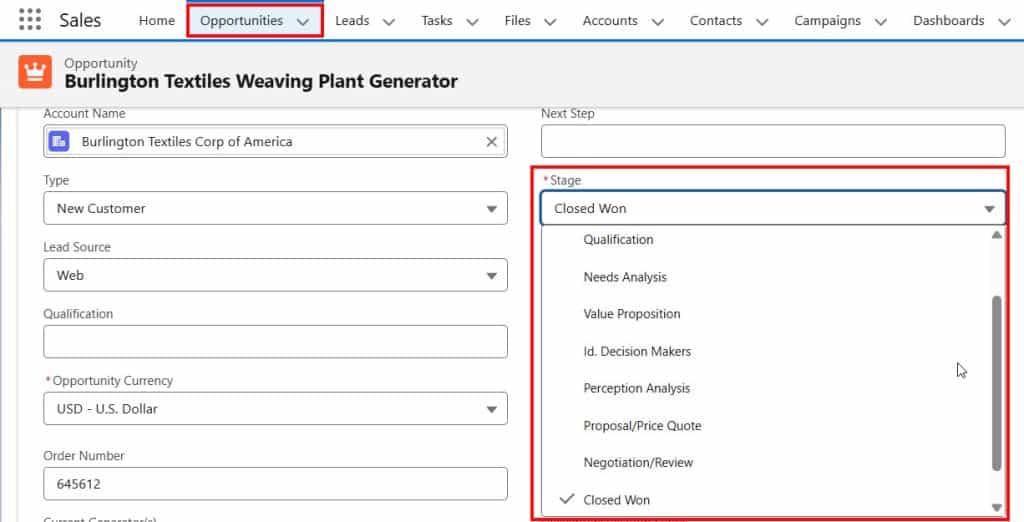
Each stage has a set probability of closing. For example, “Prospecting” might have a 10% chance, while “Proposal/Price Quote” could have a 75% chance.
Sales reps move deals through these stages as they progress. This helps managers forecast revenue and spot bottlenecks in the sales process.
Customizing Opportunity Stages in Salesforce
Companies can tailor opportunity stages to fit their unique sales process. To create a custom stage:
- Go to Setup > Object Manager > Opportunity
- Click Fields & Relationships > Stage
- In “Opportunity Stages Picklist Values,” click New

- Add a Stage Name and choose a Type (Open, Closed/Won, Closed/Lost)
- Set a probability and description
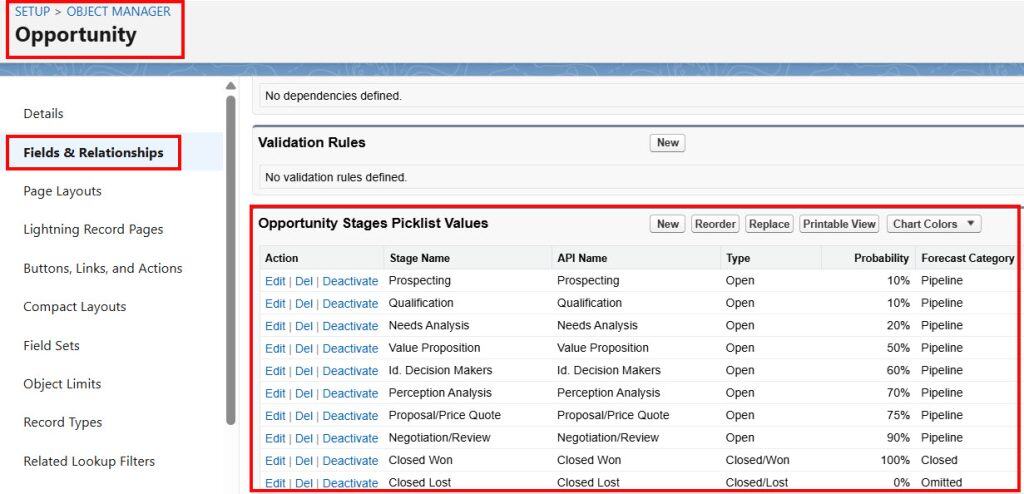
Custom stages let teams track specific milestones. For example, a software company might add a “Free Trial” stage between Qualification and Needs Analysis.
It’s wise to limit the number of stages to 5-7 in total. Too many can confuse reps and slow down the sales process.
Opportunity Stage Best Practices in Salesforce
To make the most of opportunity stages:
- Train reps on stage definitions and exit criteria
- Use automation to update stages based on activity
- Set up validation rules to ensure data quality
- Review and update stage probabilities regularly
Managers should monitor the time spent in each stage. This helps spot stuck deals that need attention.
Make sure stages align with buyer actions, not just seller tasks. This gives a more accurate view of the deal’s progress.
Use reports and dashboards to track conversion rates between stages. This shows where deals often fall out of the pipeline.
Opportunity Management in Salesforce
Opportunity management is key to successful sales in Salesforce. It helps track deals, guides reps through the sales process, and provides leadership with insight into the pipeline.
Tracking Sales Activities
Sales reps use Salesforce to log their activities related to opportunities. They can record calls, emails, and meetings with prospects. This tracking helps teams stay organized and focused on advancing deals.
Salesforce allows reps to set tasks and reminders for follow-ups. They can also add notes about meaningful conversations or decision-maker preferences.
The platform offers reports and dashboards to analyze sales activities. Managers can see which actions lead to closed deals and coach their teams accordingly.
Managing Engagement
Keeping prospects engaged is crucial to the success of opportunities. Salesforce tools help reps maintain regular contact with potential customers.
Reps can use email templates to quickly send personalized messages. They can also set up automated follow-ups based on prospect actions or timeframes.
Salesforce Einstein AI can suggest the best times to contact contacts. It analyzes past interactions to predict when prospects are most likely to respond.
Engagement scoring helps prioritize opportunities. Reps can focus on deals with high engagement levels, which are more likely to close.
Closing Opportunities
The final stage of opportunity management is closing the deal. Salesforce guides reps through this critical phase.
Reps can update the opportunity stage as deals progress. This helps forecast sales and identify any bottlenecks in the process.
Salesforce allows teams to create quotes and proposals directly within the platform. This streamlines the closing process and keeps all deal information in one place.
When a deal is won or lost, reps mark it as Closed Won or Closed Lost in Salesforce. This triggers the next steps, like order processing for wins or feedback collection for losses.
Opportunity Collaboration
Sales often require teamwork. Salesforce supports collaboration on opportunities.
Teams can use Chatter, Salesforce’s built-in communication tool, to discuss deals. They can share updates, ask questions, and tag colleagues for input.
Salesforce allows multiple users to be assigned to an opportunity. This is helpful for complex deals that need different experts.
Deal rooms in Salesforce let teams gather all relevant documents and communications in one place. This ensures everyone has the latest information when working on an opportunity.
Managers can use Salesforce to track team performance on opportunities. They can see who’s contributing to deals and identify areas for improvement.
Forecasting with Opportunities in Salesforce
Salesforce opportunities play a key role in sales forecasting. They help predict revenue and give insights into the sales pipeline. Forecasting with opportunities lets sales teams plan and make smart decisions.

Understanding Forecast Categories
Forecast categories in Salesforce indicate the likelihood of an opportunity closing. Each sales stage links to a forecast category, helping sales reps and managers predict which deals are likely to close.
The main forecast categories are:
- Pipeline
- Best Case
- Commit
- Closed
Sales reps update these as deals move through stages, helping keep forecasts accurate. Managers can see which deals are most likely to close and focus on them.
Revenue Projection in Salesforce
Salesforce uses opportunities to project future revenue. It looks at the amount and close date of each opportunity to help create a picture of expected income.
Key factors in revenue projection:
- Opportunity amount
- Close date
- Probability of closing
Sales teams can see projected revenue by month, quarter, or year. This helps with setting goals and planning resources. Accurate data entry is crucial for good projections.
Improving Pipeline Visibility in Salesforce
Good pipeline visibility helps sales teams spot trends and issues. Salesforce offers tools to improve this visibility.
Ways to boost pipeline visibility:
- Use custom fields to track key data
- Set up dashboards to show pipeline health
- Use reports to analyze opportunity trends
Regular pipeline reviews help keep data clean, leading to more accurate forecasts. Teams can also spot deals that need attention and act quickly.
Sales managers can use this info to coach their teams. They can focus on deals that need help to close. This improves overall sales performance.
Enhancing Sales Strategy with Opportunity Object in Salesforce
A strong sales strategy boosts Salesforce opportunities. It helps teams focus on key areas to close deals faster and more often.
Effective Value Propositions in Salesforce
A value proposition explains why a product or service is worth buying and points out its benefits to the customer. In Salesforce, sales reps can add value propositions to opportunity records.
This helps track what matters most to each buyer. Good value props focus on solving customer problems. They highlight unique features and show clear advantages over competitors.
Sales teams can use this info to tailor their pitch. They can stress the points that align with customer needs.
Involving Decision Makers in Salesforce
Knowing who makes buying choices is crucial. Salesforce lets teams track key contacts for each opportunity, including their roles and influence levels.
Sales reps can plan how to reach each person. They might set up demos or send custom info packets. The goal is to address the concerns of all decision-makers.
Keeping notes on each interaction helps. Teams can see what’s been discussed and what still needs attention, ensuring no one is left out of the sales process.
Perception and Proposal Analysis in Salesforce
Understanding how customers see your offer is key. Salesforce tools can help gather and analyze feedback, revealing which parts of a proposal work well and which need improvement.
Teams can track common objections and questions. They can then update their sales materials to address these points upfront, saving time and improving success rates.
Based on this feedback, price quotes can be adjusted. Salesforce makes it easy to create and send updated proposals. Teams can see which versions get the best response and use that information for future deals.
Salesforce Configuration for Opportunities
Salesforce offers flexible options to tailor opportunities to your business needs. You can customize record types and link related records to capture key deal information.
Customizing Record Types in Salesforce
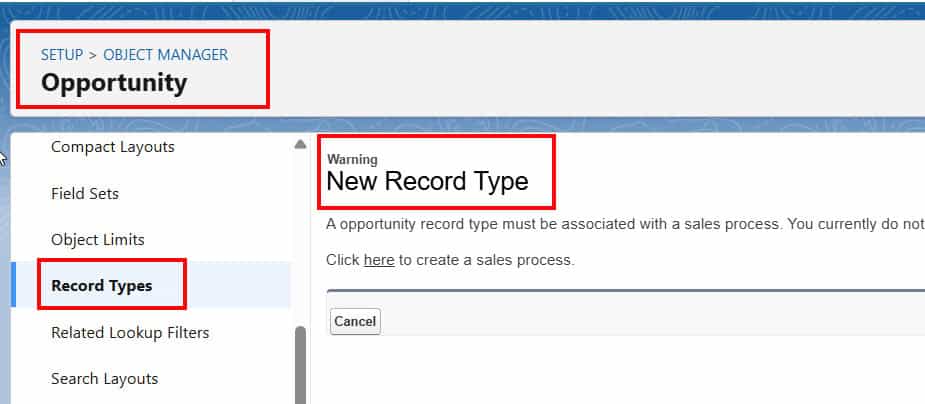
Record types let you create different opportunity layouts and processes. You can set up types like “New Business” and “Renewal” with specific fields and stages. This helps sales teams track the right info for each deal type.
To make a new record type:
- Go to Setup
- Find “Record Types” under Opportunities
- Click “New”
- Name it and pick a page layout
- Choose which profiles can use it
You can also set default record types for users or queues. This saves time and ensures consistency when creating new opportunities.
Related Records and Information in Salesforce
Opportunities connect to other Salesforce objects. You can link accounts, contacts, products, and custom objects, giving a full view of each deal.
Some key related records:
- Accounts: The company you’re selling to
- Contacts: People involved in the deal
- Products: Items being sold
- Quotes: Pricing details
You can add custom fields to track extra info. Popular options include:
- Deal source
- Competitors
- Next steps
Use page layouts to organize fields and related lists. This makes it easy for sales reps to find and update important details.
Success Metrics and Analysis in Salesforce
Tracking and analyzing sales data is crucial for optimizing opportunities in Salesforce. Key metrics help teams measure performance and identify areas for improvement. Sales leaders can use this information to refine strategies and boost results.
Measuring Opportunity Success
Win rate is a key metric for the success of opportunities. It shows the percentage of closed deals relative to total opportunities. Teams can track win rates by product, sales rep, or customer segment.
Another important measure is sales cycle length. This tracks how long it takes to close a deal. Shorter cycles often mean more efficient sales processes.
Conversion rate measures the percentage of leads that turn into opportunities. A higher rate suggests a better lead quality or more effective sales tactics.
Average deal size helps gauge the value of opportunities. Larger deals may need different strategies than smaller ones.
Analyzing Sales Data in Salesforce
Sales pipeline analysis gives a snapshot of all active opportunities. It shows deals at each stage of the sales funnel. This helps forecast future revenue and spot bottlenecks.
Probability scores estimate the likelihood of closing each deal. Sales reps update these as opportunities progress. Higher scores mean a better chance of winning.
Revenue by product or service helps identify top performers. It can guide decisions on where to focus sales efforts.
Customer acquisition cost tracks spending to win new business. Lower costs often mean more profitable sales.
Salesforce dashboards make it easy to visualize these metrics. Teams can spot trends and act quickly on insights.
Conclusion
Salesforce opportunities are a key tool for managing sales pipelines. They help track potential deals from start to finish.
Sales teams use opportunities to organize customer information and monitor deal progress. This allows for better forecasting and decision-making.
Customizing opportunity stages lets companies tailor the process to their needs. Adding probability percentages to each stage improves prediction accuracy.
You may like to read:
- Salesforce Opportunity Picklist Values Explained [Stages & Sales Processes]
- Display Account Fields on an Opportunity Record Page in Salesforce
- Create An Opportunity Stage Conversion Report in Salesforce
- Create a Report on Opportunities Stage Duration in Salesforce

Shubham is a Certified Salesforce Developer with technical skills for Building applications using custom objects, approval processes, validation rules, Salesforce flows, and UI customization. He is proficient in writing Apex classes, triggers, controllers, Apex Batches, and bulk load APIs. I am also familiar with Visualforce Pages and Lightning Web Components. Read more about me.