
It is achievable to become a Salesforce Developer with no coding experience. The Salesforce ecosystem offers pathways for individuals to enter the field and build successful careers.
Many people start as Salesforce Administrators, learning the platform’s core features before transitioning into development roles.
Salesforce provides tools such as Lightning, a low-code platform that enables users to create applications through visual interfaces.
This makes it easier for those without traditional programming backgrounds to get started.
As skills grow, aspiring developers can take on more complex tasks and gradually learn coding concepts specific to Salesforce.
Let’s understand how to get started to become a Salesforce developer with No Coding experience.
Understanding Salesforce
Salesforce is a powerful customer relationship management (CRM) platform. It offers many tools to help businesses manage customer data and improve sales processes.
Overview of the Salesforce Ecosystem
Salesforce has a large ecosystem of products and services. The platform includes apps for sales, customer service, and marketing, as well as tools for building custom apps.
Salesforce’s main product is its CRM system, which helps companies track customer interactions and sales opportunities.
The ecosystem also includes AppExchange, a marketplace for third-party apps that work with Salesforce.
Salesforce’s development tools allow developers to create custom solutions. These tools let users build apps without extensive coding knowledge.
Key Features of Salesforce CRM
Salesforce CRM provides numerous features to help businesses effectively manage customer relationships. Some key features include:
- Contact management
- Lead tracking
- Sales forecasting
- Workflow automation
- Reporting and analytics
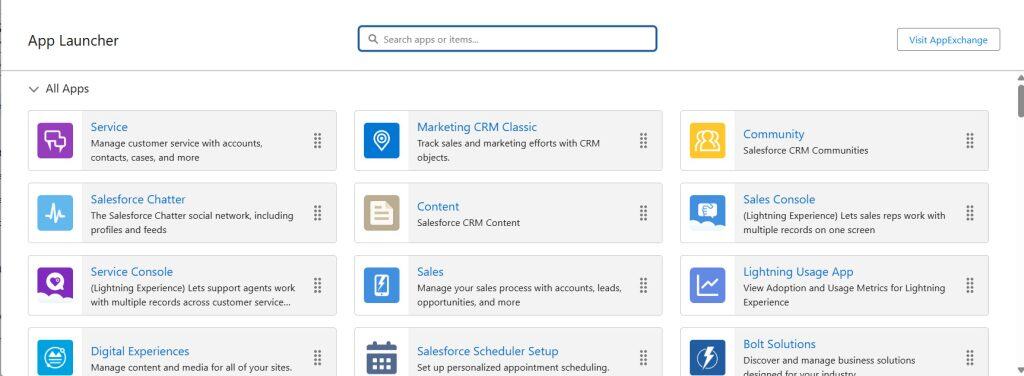
The platform is cloud-based, so users can access it from anywhere. It also integrates with many other business tools and systems.
Salesforce uses a point-and-click interface for many tasks. This makes it easier for non-technical users to customize the system.
Salesforce Clouds: Sales and Service
Salesforce offers various “clouds” tailored to specific business needs. The two main clouds are Sales Cloud and Service Cloud.
Sales Cloud helps sales teams manage leads, track deals, and close sales. It includes tools for:
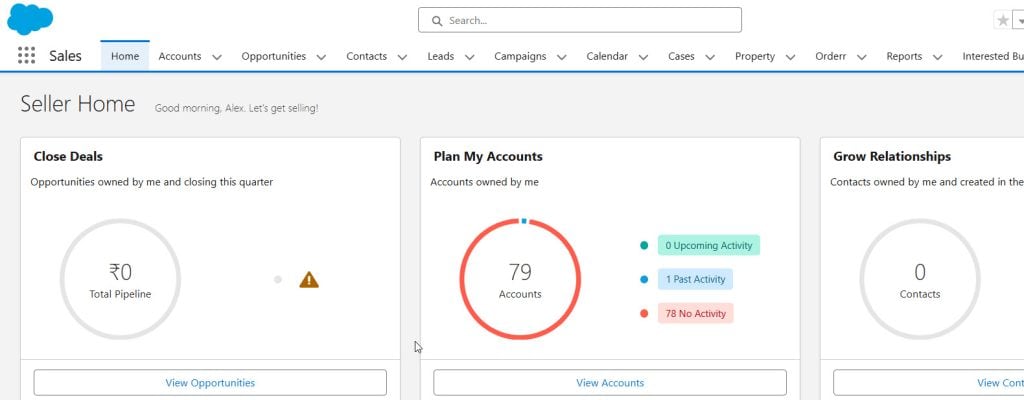
- Lead management
- Opportunity tracking
- Quote generation
- Sales forecasting
Service Cloud focuses on customer support. It helps companies manage customer issues and improve service quality. Key features include:
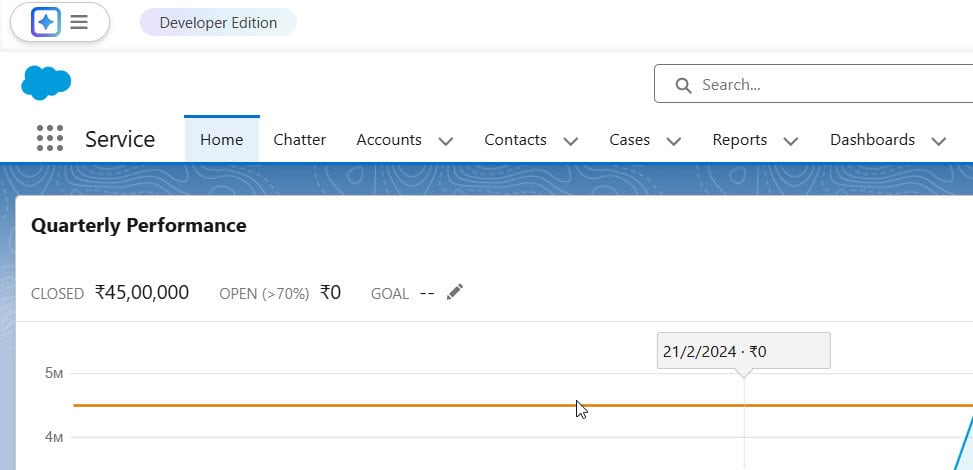
- Case management
- Knowledge bases
- Omni-channel routing
- Service Analytics
Both clouds work together to give businesses a complete view of their customers. This helps create a seamless customer experience across sales and service teams.
Starting with Salesforce Fundamentals

Salesforce offers many ways to start learning without coding. The platform has tools for admins and ways to build things without writing code.
Essentials of Salesforce Administration
Salesforce Admin skills are key for new developers. Admins set up and manage Salesforce orgs. They create users, set security rules, and customize the platform.
Admins use point-and-click tools to build apps. They create custom objects, fields, and page layouts, which helps them understand how Salesforce works.
Learning admin skills teaches you about Salesforce data structure. It shows how objects link together. This knowledge is useful when you start coding later.
Trailhead is a free learning platform from Salesforce. It offers many courses for new admins, which teach the basics step by step.
Importance of Data Model and Declarative Development
Salesforce stores information using a data model that comprises objects, fields, and relationships. Understanding this helps you build better apps.
Declarative development means building without code. Salesforce has many tools for this. Process Builder and Flow Builder let you create business logic.
These tools use a visual interface. You can see how data moves through your org. This helps you learn how Salesforce thinks about data.
As you learn, you’ll see where declarative tools fall short. This is where coding comes in. But starting with no-code tools gives you a strong base.
Leveraging Salesforce’s Learning Resources
Salesforce offers many free tools to help beginners get started on their journey. These resources can teach you the basics without needing to write code right away.
Exploring Trailhead for Learning
Trailhead is Salesforce’s main learning platform. It has free online courses for all skill levels. You can learn at your own pace through hands-on projects and quizzes.
Trailhead offers:
- Guided learning paths called “trails.”
- Short lessons called “modules.”
- Hands-on challenges in practice orgs
- Badges and points to track progress
Beginners can start with trails like “Platform Developer Beginner” or “Admin Beginner.” These teach core concepts without deep coding skills.
Joining the Trailblazer Community
The Trailblazer Community connects Salesforce learners worldwide. It’s a place to ask questions, share ideas, and get help.
Key features:
- Forums for specific topics
- Local user groups
- Online and in-person events
Joining the community can help new learners:
- Find study buddies
- Get tips from experts
- Stay up-to-date on Salesforce news
Additional Educational Materials and Resources
Beyond Trailhead, Salesforce offers other learning tools:
- Salesforce Help: A detailed guide to all Salesforce features
- Salesforce YouTube channel: Video tutorials and tips
- Webinars: Live online classes on various topics
- Certification study guides: Prep materials for official exams
These resources cover both no-code and low-code ways to customize Salesforce. They can help build skills before moving to more complex development tasks.
Acquiring Essential Non-Coding Skills
Aspiring Salesforce developers can build a strong foundation without extensive coding knowledge. Key skills include grasping business processes, data modeling concepts, and mastering automation tools.
Understanding Business Processes
Salesforce developers need to grasp how businesses operate. This knowledge helps them create effective solutions. They should learn about:
- Sales cycles
- Customer service workflows
- Marketing campaigns
Developers can gain this knowledge by:
- Studying business management basics
- Talking to professionals in different departments
- Reading case studies of successful Salesforce implementations
Understanding these processes allows developers to customize Salesforce to meet specific business needs. It also helps them communicate better with clients and stakeholders.
Learning Data Modeling Without Code
Data modeling is crucial for organizing information in Salesforce. Developers can learn this skill without writing code. They should focus on:
- Identifying different types of data
- Creating relationships between data objects
- Designing efficient data structures
Tools and resources for learning data modeling include:
- Salesforce Trailhead modules on data modeling
- ERD (Entity Relationship Diagram) creation tools
- Salesforce’s schema builder
Practicing data modeling helps developers design scalable and user-friendly Salesforce solutions. It also prepares them for more advanced development tasks in the future.
Mastering Salesforce Automation Tools
Salesforce offers powerful automation tools that don’t require coding. Developers should become experts in:
- Process Builder for creating automated processes
- Flow Builder for designing complex workflows
- Approval Processes for managing review and approval steps
To master these tools, developers can:
- Complete relevant Trailhead modules
- Experiment with sample scenarios
- Join Salesforce community groups for tips and best practices
Proficiency in these automation tools allows developers to create sophisticated solutions without writing code. It also provides a solid foundation for learning more advanced development techniques later on.
Developing With Low-Code Solutions

Salesforce offers powerful tools for building custom apps without extensive coding. These solutions enable even those new to development to create functional business applications quickly and easily.
Building Custom Apps Using Salesforce App Builder
Salesforce App Builder lets users create custom apps through a drag-and-drop interface. It provides pre-built components that can be assembled into fully functional applications. Users can add fields, customize layouts, and create basic logic without writing code.
App Builder also allows for easy data management. Users can create custom objects to store unique business data and set up relationships between objects to model complex processes.
For more advanced needs, App Builder integrates with other Salesforce tools. This allows for adding automation, custom buttons, and more complex features as users gain skills.
Creating User Interfaces with Visualforce
Visualforce is a markup language for building custom Salesforce pages. It uses a tag-based structure similar to HTML, making it accessible to those with web design experience.
With Visualforce, users can create custom layouts and user interfaces. They can incorporate Salesforce data and functionality into their designs. The platform provides many standard components to speed up development.
Visualforce pages can be styled with CSS and enhanced with JavaScript. This allows for more interactive and visually appealing interfaces. Users can add more complex logic and custom components as they become more comfortable.
Utilizing Omnistudio and Other Low-Code Tools
Omnistudio is a suite of low-code tools within Salesforce. It includes features for building complex business processes and customer journeys. Users can create multi-step flows, decision trees, and data transformations without coding.
Omnistudio’s visual interface makes it easy to design and test processes. Users can connect to various data sources and systems, enabling the creation of integrated solutions spanning multiple departments.
Other low-code Salesforce tools include Process Builder and Flow. These allow for the automation of business processes and the creation of guided user experiences. Users can combine these tools to build sophisticated applications as they gain proficiency.
Transitioning to Coding as a Salesforce Developer
Learning to code is key for new Salesforce developers. Two main areas to focus on are Apex and Visualforce for backend logic, and Lightning Web Components for modern user interfaces.
Introducing Apex and Visualforce
Apex is Salesforce’s proprietary programming language. It’s similar to Java, making it easier for those with Java experience. Apex lets developers write custom business logic and create complex workflows. To start learning Apex:
- Take free Trailhead modules
- Practice writing basic triggers
- Build simple custom objects.
Visualforce is used to create custom pages and components. It uses a tag-based markup language like HTML. Developers use Visualforce to:
• Make custom user interfaces • Override standard buttons and links • Embed Salesforce data in external websites.
Understanding Lightning Web Components
Lightning Web Components (LWC) is Salesforce’s newest framework for building user interfaces. It uses modern web standards and JavaScript.
Key things to know about LWC:
- Based on web components
- Uses JavaScript ES6+ syntax
- Works with existing Aura components
To learn LWC:
- Study JavaScript basics
- Take LWC Trailhead modules
- Build sample apps in a developer org
LWC skills are in high demand. Many companies are moving from older Visualforce pages to LWC for better performance and a modern look and feel.
Best Practices in Salesforce Development
Good Salesforce development requires following key practices. These help create high-quality, maintainable solutions that work well within the Salesforce ecosystem.
Maintaining Clean and Efficient Code
Clean code is easy to read and understand. Use clear naming for variables, methods, and classes. Keep methods short and focused on one task. Comment your code to explain complex logic.
Follow Salesforce coding standards. Use proper indentation and formatting. Avoid hardcoding values. Instead, use custom labels or custom metadata types.
Test your code thoroughly. Write unit tests for all custom Apex classes. Aim for at least 75% code coverage. This will help catch bugs early and ensure your code works as expected.
Use Salesforce governor limits wisely. Optimize queries to avoid hitting SOQL limits. Bulk process records when possible to stay within DML limits.
Adopting Version Control with Git
Version control is crucial for tracking changes and collaborating. Git is the most popular tool for this. It lets you manage different versions of your code.
Set up a Git repository for your Salesforce projects. Use branches for new features or bug fixes. This keeps the main codebase stable while you work on changes.
Commit often with clear messages. This creates a history of your work. It makes it easier to find and fix issues later.
Use pull requests for code reviews. This helps catch errors, improve code quality, and spread knowledge among team members.
Applying Salesforce Architectural Principles
Good architecture makes your Salesforce org easier to maintain and upgrade. Follow the Salesforce data model when creating custom objects. Use standard objects when possible.
Design your system in layers. Separate concerns between your data, business logic, and user interface. This makes your code more modular and easier to update.
Use Salesforce’s declarative tools when possible. Flows, Process Builder, and validation rules can often replace custom code, reducing complexity and making your system easier to maintain.
Plan for scalability. Design your custom apps and integrations to handle growing data volumes. Use bulk processing patterns in your Apex code.
Advanced Salesforce Developer Concepts
Salesforce developers can grow their skills by learning advanced topics. These include working with APIs, developing for specialized clouds, and mastering data modeling.
Working with Salesforce APIs
APIs let Salesforce connect with other systems. Developers use them to move data in and out of Salesforce. The REST API is popular for its ease of use. It works well with web and mobile apps.
The SOAP API handles complex operations, which makes it useful for enterprise integrations. Bulk API 2.0 enables the rapid transfer of large amounts of data, which is particularly beneficial for data loading and ETL processes.
Developers also use the Streaming API for real-time updates. When records in Salesforce are updated, the API sends data to external systems.
Developing for Commerce Cloud and Marketing Cloud
Commerce Cloud helps build online stores. Developers can customize the shopping experience. They use languages like JavaScript and ISML.
Marketing Cloud focuses on customer communication. Developers work with tools like AMPscript and SQL. These help create personalized email campaigns.
Both clouds have their own APIs. Developers use these to connect with other Salesforce products, creating a complete customer view across platforms.
Exploring Advanced Data Modeling and SOQL
Effective data models are crucial to Salesforce applications. Developers learn to create custom objects and fields. They establish relationships between objects to form complex data structures.
SOQL (Salesforce Object Query Language) is used to search data. It’s similar to SQL but works with Salesforce objects. Developers use SOQL to build reports and data visualizations.
Advanced SOQL includes subqueries and aggregate functions. These help analyze data across related objects. Developers also learn about query optimization to improve app performance.
Building Your Professional Network and Portfolio

Networking and showcasing skills are key for aspiring Salesforce developers. These activities help build connections and demonstrate abilities to potential employers or clients.
Engaging with Salesforce Trailblazer Community
The Salesforce Trailblazer Community is a great place to start networking. Join local Trailblazer Community Groups to meet other professionals and attend meetups and events to learn from experienced developers.
Participate in online forums and discussions. Answer questions and share knowledge to build your reputation. Follow thought leaders and engage with their content on social media platforms.
Consider volunteering for nonprofit projects through the Salesforce community. This can provide hands-on experience and networking opportunities.
Creating a Compelling Portfolio
A strong portfolio showcases skills and projects to potential employers. Start by completing Trailhead projects and challenges. Document these achievements in your portfolio.
Build personal projects that solve real-world problems. Include detailed descriptions of your process and outcomes. Highlight any certifications or badges earned through Salesforce programs.
Use platforms like GitHub to showcase your work. Create a personal website to showcase your portfolio in an organized and visually appealing manner.
Networking and Continuous Learning
Attend Salesforce events like Dreamforce or regional conferences. These offer chances to learn new skills and meet industry professionals. Join webinars and virtual workshops to stay up to date on Salesforce trends.
Connect with other developers on LinkedIn. Follow companies you’re interested in working for. Share relevant content and engage in industry discussions.
Consider finding a mentor in the Salesforce ecosystem. They can provide guidance and introduce you to valuable contacts. Keep learning through online courses and staying current with Salesforce updates.
Pursuing Salesforce Developer Certifications
Salesforce certifications show expertise and boost career opportunities. They prove hands-on skills to employers and clients.
Certification Pathways for Developers
The Salesforce Platform Developer I certification is a great starting point. It covers basic programming concepts and Salesforce fundamentals, with no prior coding experience required.
Next, aim for Platform Developer II. This advanced cert tests greater technical skills. It focuses on complex customizations and integrations.
Other useful certs include:
- App Builder
- JavaScript Developer I
- Integration Architecture Designer
Select certificates that align with your career goals. Start with easier ones and work up to more complex options.
Preparing for Salesforce Developer Certifications
Study official Salesforce documentation. Use Trailhead, the free online learning platform. It offers guided learning paths and hands-on projects.
Join study groups or online forums. They offer support and tips from others who are preparing for exams.
Practice coding in a developer org. This free Salesforce environment lets you test your skills.
Take mock exams to assess your readiness. Many websites offer practice tests for a fee.
Beyond Certifications
Build a portfolio of Salesforce projects. This shows real-world skills to potential employers.
Contribute to open-source projects. It helps you learn from experienced developers.
Attend Salesforce events and meetups. Network with other professionals in the field.
Keep learning new features and updates. Salesforce releases happen three times a year.
Consider specializing in a specific Salesforce product or industry. This can make you more valuable to certain employers.
Finding Opportunities and Landing Your First Role
Getting your first Salesforce developer job takes strategy and preparation. Focus on building your skills, networking, and showcasing your abilities to potential employers.
Job Search Strategies for New Developers
Look for entry-level Salesforce developer positions on job boards and company websites. Join Salesforce developer groups on LinkedIn and participate in discussions. Attend Salesforce events and meetups to network with professionals in the field.
Create a profile on the Salesforce Developer Community website. This can help you connect with other developers and find job opportunities.
Tailor your resume to highlight relevant skills and certifications. Include any Salesforce projects or volunteer work you’ve done.
Consider internships or apprenticeships to gain experience. Some companies offer training programs for new Salesforce developers.
Interviewing and Demonstrating Your Skills
Practice common Salesforce developer questions to prepare for technical interviews. Then, be ready to explain your problem-solving process and coding approach.
Create a portfolio of Salesforce projects to show employers. This can include personal projects, volunteer work, or assignments from training courses.
During interviews, highlight your passion for learning and growing in the Salesforce ecosystem. Discuss how you’ve used Trailhead to build your skills.
Be prepared to take coding tests or complete sample projects as part of the interview process. Practice coding challenges to sharpen your skills.
Start Your Journey as a Salesforce Developer
Once you land your first role, focus on learning and growing. Take on challenging projects to build your skills. Keep up with new Salesforce features and updates.
Join a mentorship program if your company offers one. This can help you learn from experienced developers and advance your career.
Pursuing advanced Salesforce certifications can help you continue your education and lead to new opportunities. It shows your commitment to professional growth.
Network with other Salesforce developers in your company and industry. Attend conferences and events to stay connected with the Salesforce community.
Frequently Asked Questions
Starting a career as a Salesforce Developer raises many questions for beginners. These FAQs cover key topics like first steps, coding requirements, learning resources, difficulty level, salary expectations, and certification options.
What are the initial steps for a beginner to start a career as a Salesforce Developer?
Beginners can create a free Salesforce Developer account, which allows them to access a personal Salesforce environment for practice. The next step is to explore Trailhead, Salesforce’s free online learning platform.
Trailhead offers guided learning paths called “trails” for various Salesforce roles. The Platform Developer Beginner trail is a good starting point. It covers basics like customizing the Salesforce interface and working with data.
What is the role of coding in a Salesforce Consultant’s job?
Salesforce Consultants often work on implementations without extensive coding. They focus on configuring Salesforce using built-in tools and features, including setting up workflows, creating custom fields, and designing page layouts.
Some consulting roles may require basic coding skills. However, many consultants succeed with strong problem-solving and configuration abilities. They work alongside developers when complex customizations are needed.
How can one learn Salesforce development through Trailhead?
Trailhead offers free, self-paced learning modules for Salesforce development. Users can earn badges by completing hands-on projects and quizzes. The Platform Developer trail covers key topics like Apex programming and Lightning Web Components.
Trailhead also provides guided projects called “super badges.” These simulate real-world scenarios and test practical skills. Completing relevant super badges can boost a beginner’s portfolio and confidence.
What is the difficulty level of learning to code in Salesforce for beginners?
Learning Salesforce coding can be challenging for complete beginners. But the platform offers tools to ease the learning curve. Salesforce uses Apex, a Java-like language, which may feel familiar to those with basic programming knowledge.
The difficulty level varies based on previous experience. Those new to coding may find it harder at first. However, Salesforce’s structured learning paths and supportive community can help overcome initial hurdles.
What potential salary can one expect as a beginner Salesforce Developer?
Entry-level Salesforce Developer salaries vary by location and experience. In the United States, beginners might expect a range of $60,000 to $80,000 per year. This can increase with certifications and hands-on experience.
Salaries tend to grow quickly in this field. With a few years of experience and advanced skills, developers can potentially earn over $100,000 annually.
How does one obtain Salesforce certification without having prior experience?
Salesforce offers certifications for various skill levels, including beginners. The Salesforce Certified Administrator exam is often a good starting point. It focuses on platform basics and doesn’t require coding knowledge.
Candidates can use Trailhead modules and practice exams to prepare. Hands-on experience in a Developer org is also valuable. Some people volunteer for non-profits to gain real-world Salesforce experience before certification.
Conclusion
Becoming a Salesforce developer without coding experience is achievable. The platform offers many tools for low-code development, and aspiring developers can start with Trailhead to learn the basics.
Practice is key. Building projects in a Salesforce playground helps gain hands-on skills. Participating in Trailhead challenges can also boost knowledge and confidence.
Certifications add value to a developer’s profile. They demonstrate expertise to potential employers. Salesforce offers various certification paths for different skill levels.

I am Bijay Kumar, the founder of SalesforceFAQs.com. Having over 10 years of experience working in salesforce technologies for clients across the world (Canada, Australia, United States, United Kingdom, New Zealand, etc.). I am a certified salesforce administrator and expert with experience in developing salesforce applications and projects. My goal is to make it easy for people to learn and use salesforce technologies by providing simple and easy-to-understand solutions. Check out the complete profile on About us.