
A common requirement in Salesforce is displaying the logged-in user’s information in the Lightning interface.
For example, you may want to show the current user’s name, department, or role in a custom Lightning component, app page, or internal portal.
Salesforce offers multiple ways to achieve this, depending on your requirements.
In this tutorial, we will explore different approaches, including formula fields and Lightning Web Components (LWC), to display user details dynamically in Salesforce Lightning Experience.
Why Would You Need to Show User Details in the Header?
Before starting the implementation, let’s first understand some common Salesforce use cases where displaying logged-in user information can be helpful:
- Personalized greetings — Display welcome messages like “Good Morning, James!” in a custom Lightning header or app page.
- User information in portals or apps — Show the logged-in user’s name, role, profile, or department dynamically.
- Troubleshooting and support — Display the User ID or Profile Name to help identify permission or access-related issues.
- Dynamic content visibility — Load different dashboards, records, or components based on the logged-in user’s department or region.
- Custom-branded Salesforce apps — Create a more personalized Lightning Experience by showing user-specific information in custom components.
Show Logged-In User Details in the Salesforce Header
There are four ways to get the user details in Salesforce. The method you use depends on what you’re building:
| Where You Need It | Best Approach |
|---|---|
| Visualforce page | $User global variable |
| Formula field or Validation rule | $User global variable |
| LWC (no Apex) | @salesforce/user module + getRecord wire |
| LWC or Aura (with Apex) | UserInfo class in Apex |
| Apex class | UserInfo.getUserId() and related methods |
Let me walk through each one clearly.
1. Formula Fields and Validation Rules (No Code at All)
If you want to access the logged-in user’s information in a Formula Field, Validation Rule, Flow, or Default Field Value, Salesforce provides a built-in global variable called $User.
Using $User, you can directly access user details such as Name, Email, Role, Department, and Profile without writing any Apex code or Lightning component.
Common $User expressions:
| Expression | What It Returns |
|---|---|
| $User.Id | The 15-character ID of the logged-in user |
| $User.FirstName | First name |
| $User.LastName | Last name |
| $User.Email | Email address |
| $User.Username | Username (the login name) |
| $User.ProfileId | ID of the user’s profile |
| $User.UserRoleId | ID of the user’s role |
| $User.Department | Department field value |
| $User.Title | Job title |
| $User.CompanyName | Company name |
Example — Validation rule that prevents a user from editing someone else’s record:
CreatedById <> $User.Id
Example — Default field value that stamps the logged-in user’s department:
$User.Department
Note for Flow users: If you’re using Flow Builder and comparing IDs, use CASESAFEID($User.Id) instead of $User.Id alone.
The plain $User.Id returns a 15-character ID, while Flow’s Get Records element returns 18-character IDs — this mismatch can cause comparisons to fail silently.
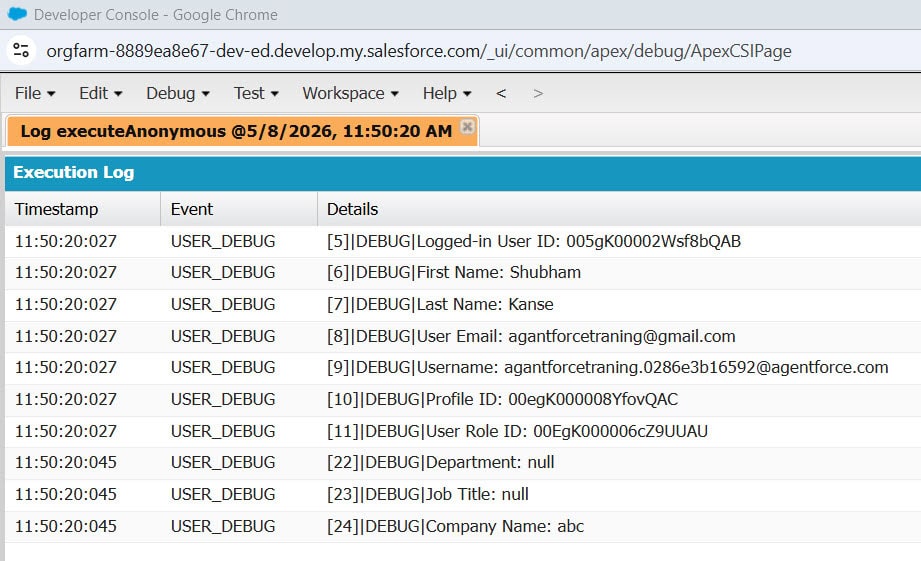
public class CurrentUserDetailsController {

    public static void getCurrentUserDetails() {

        System.debug('Logged-in User ID: ' + UserInfo.getUserId());
        System.debug('First Name: ' + UserInfo.getFirstName());
        System.debug('Last Name: ' + UserInfo.getLastName());
        System.debug('User Email: ' + UserInfo.getUserEmail());
        System.debug('Username: ' + UserInfo.getUserName());
        System.debug('Profile ID: ' + UserInfo.getProfileId());
        System.debug('User Role ID: ' + UserInfo.getUserRoleId());

        User currentUser = [
            SELECT Department,
                   Title,
                   CompanyName
            FROM User
            WHERE Id = :UserInfo.getUserId()
            LIMIT 1
        ];

        System.debug('Department: ' + currentUser.Department);
        System.debug('Job Title: ' + currentUser.Title);
        System.debug('Company Name: ' + currentUser.CompanyName);
    }
}
2. Get User Details in Salesforce Visualforce Pages
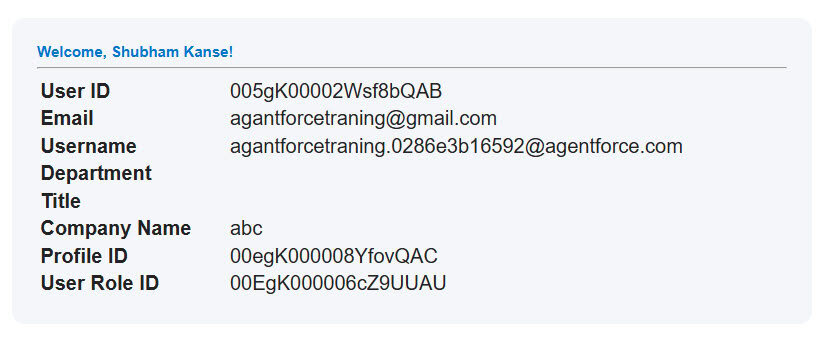
If you are using a Visualforce page and want to display the logged-in user’s information, Salesforce provides the built-in $User global variable for this as well.
You can directly access user details in the Visualforce page markup without writing any Apex controller code.
Here’s a simple example:
<apex:page showHeader="false" sidebar="false">

    <div style="width:600px;
                margin:30px auto;
                padding:20px;
                border-radius:10px;
                background:#f4f6f9;
                font-family:Arial;">

        <h1 style="color:#0176d3;">
            Welcome, {!$User.FirstName} {!$User.LastName}!
        </h1>

        <hr/>

        <table style="width:100%; font-size:16px;">

            <tr>
                <td><b>User ID</b></td>
                <td>{!$User.Id}</td>
            </tr>

            <tr>
                <td><b>Email</b></td>
                <td>{!$User.Email}</td>
            </tr>

            <tr>
                <td><b>Username</b></td>
                <td>{!$User.Username}</td>
            </tr>

            <tr>
                <td><b>Department</b></td>
                <td>{!$User.Department}</td>
            </tr>

            <tr>
                <td><b>Title</b></td>
                <td>{!$User.Title}</td>
            </tr>

            <tr>
                <td><b>Company Name</b></td>
                <td>{!$User.CompanyName}</td>
            </tr>

            <tr>
                <td><b>Profile ID</b></td>
                <td>{!$User.ProfileId}</td>
            </tr>

            <tr>
                <td><b>User Role ID</b></td>
                <td>{!$User.UserRoleId}</td>
            </tr>

        </table>

    </div>

</apex:page>
You can use any field from the User object this way — just use the {!$User.FieldAPIName} syntax. This is rendered server-side, so no extra Apex call is needed.
3: Display Logged-In User Details in LWC Without Salesforce Apex
This is one of the most recommended approaches for Lightning Web Components (LWC). Salesforce provides the @salesforce/user/Id scoped module, which allows you to access the logged-in user’s ID directly inside the component.
By combining it with the getRecord wire adapter from lightning/uiRecordApi, you can retrieve User object fields such as Name, Email, Department, and Title without creating an Apex class or writing a SOQL query.
- @salesforce/user/Id returns the ID of the logged-in Salesforce user.
- getRecord retrieves the current user record from Salesforce.
- The component dynamically displays the user’s:
- Name
- Department
- Job Title
This method does not require any Apex class or SOQL query, as Salesforce handles data retrieval automatically via the Lightning Data Service.
HTML File — currentUserHeader.html
<template>
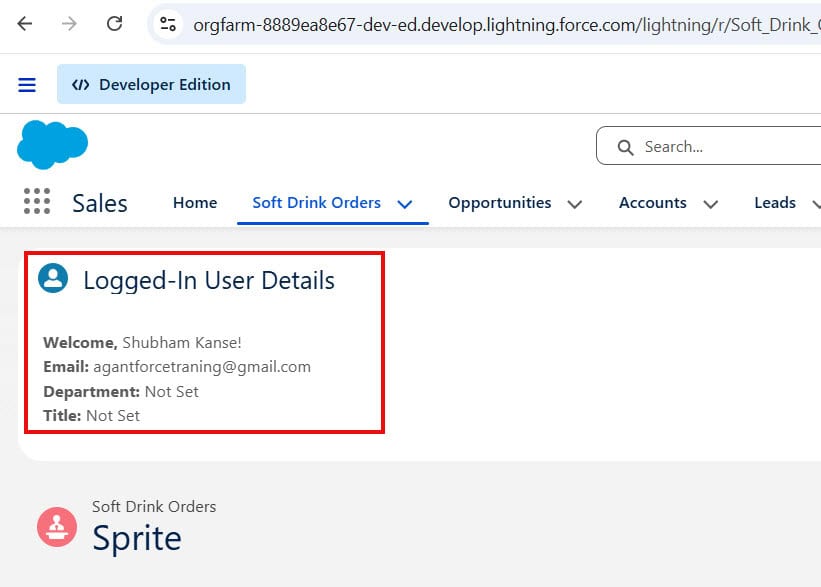
    <lightning-card title="Logged-In User Details" icon-name="standard:user">

        <div class="slds-p-around_medium">

            <p> <strong>Welcome,</strong> {userName}! </p>
            <p> <strong>Email:</strong> {userEmail} </p>
            <p> <strong>Department:</strong> {userDepartment}  </p>
            <p> <strong>Title:</strong> {userTitle} </p>

        </div>

    </lightning-card>
</template>
JavaScript File — currentUserHeader.js
import { LightningElement, wire } from 'lwc';

import { getRecord } from 'lightning/uiRecordApi';

import USER_ID from '@salesforce/user/Id';

import NAME_FIELD from '@salesforce/schema/User.Name';
import EMAIL_FIELD from '@salesforce/schema/User.Email';
import DEPARTMENT_FIELD from '@salesforce/schema/User.Department';
import TITLE_FIELD from '@salesforce/schema/User.Title';

export default class CurrentUserHeader extends LightningElement {

    userId = USER_ID;

    @wire(getRecord, {
        recordId: '$userId',
        fields: [
            NAME_FIELD,
            EMAIL_FIELD,
            DEPARTMENT_FIELD,
            TITLE_FIELD
        ]
    })
    userRecord;

    get userName() {
        return this.userRecord?.data?.fields?.Name?.value || '';
    }

    get userEmail() {
        return this.userRecord?.data?.fields?.Email?.value || '';
    }

    get userDepartment() {
        return this.userRecord?.data?.fields?.Department?.value || 'Not Set';
    }

    get userTitle() {
        return this.userRecord?.data?.fields?.Title?.value || 'Not Set';
    }
}
Meta XML File — currentUserHeader.js-meta.xml
<?xml version="1.0" encoding="UTF-8"?>

<LightningComponentBundle xmlns="http://soap.sforce.com/2006/04/metadata">

    <apiVersion>62.0</apiVersion>

    <isExposed>true</isExposed>

    <targets>
        <target>lightning__AppPage</target>
        <target>lightning__HomePage</target>
        <target>lightning__RecordPage</target>
    </targets>

</LightningComponentBundle>
Once you deploy this component, you can drag it onto any Lightning App Page, Home Page, or Record Page using Lightning App Builder — no Apex class, no SOQL query.
Important: When using the getRecord wire adapter in LWC, the returned record data is structured. Each field value is stored inside the fields object and accessed using the .value property.
For example, to access the user’s Name field, you should use:
data.fields.Name.valueInstead of:
data.NameThis is a common mistake for developers who are using Lightning/UIRecordApi for the first time. Always remember that field values from getRecord are accessed through the fields.<FieldName>.value structure.
Quick Reference: $User vs @salesforce/user vs UserInfo
Here’s a side-by-side comparison of the three main ways to access current user data:
| Feature | $User (Formula/VF) | @salesforce/user + getRecord (LWC) | UserInfo (Apex) |
|---|---|---|---|
| Works in | Formulas, Flows, Visualforce | LWC JavaScript | Apex classes |
| Requires Apex? | No | No | Yes (it is Apex) |
| Access custom fields? | Yes | Yes | Yes |
| Real-time data? | Yes | Yes (cached) | Yes |
| Related fields (Profile, Role)? | No (only direct User fields) | No (only direct User fields) | Yes (via SOQL joins) |
| Most common use | Formulas, defaults, VF pages | LWC header components | Complex logic, related data |
Key Takeaways
- Salesforce has multiple ways to access logged-in user details — the right one depends on where you need to display them
- For formulas, flows, and Visualforce, use the $User global variable — it’s zero code and works everywhere
- For LWC without Apex, use @salesforce/user/Id combined with the getRecord wire adapter — clean, fast, no server round trip for basic fields
- When using getRecord, always access field values with .value — e.g., data.fields.Name.value, not data.fields.Name
- For related data (like Profile.Name or UserRole.Name) or custom User fields, use Apex with UserInfo.getUserId() in a SOQL query
- Once your LWC is built, you can add it anywhere in the Salesforce UI using Lightning App Builder — no deployment complexity
- In Apex, UserInfo.getUserId() always returns the current running user’s ID — it’s the simplest and safest way to identify who is logged in
You may like to read:
- Get User Or Logged-In User Details Using SOQL
- Create a Free Customer Chatter User in Salesforce
- Salesforce Administrator Login as User: Add a Login Button
- Get Current User Info Using Apex in Salesforce
- Display Alerts and Notifications in Salesforce UI Header

I am Bijay Kumar, the founder of SalesforceFAQs.com. Having over 10 years of experience working in salesforce technologies for clients across the world (Canada, Australia, United States, United Kingdom, New Zealand, etc.). I am a certified salesforce administrator and expert with experience in developing salesforce applications and projects. My goal is to make it easy for people to learn and use salesforce technologies by providing simple and easy-to-understand solutions. Check out the complete profile on About us.
