
Salesforce Agentforce can answer questions using Salesforce records, Knowledge articles, and connected business data.
However, users often ask questions that require the latest information available online, such as industry news, competitor updates, product announcements, or market trends.
To handle these scenarios, Salesforce provides Web Search capabilities that allow Agentforce AI agents to retrieve information from public websites and generate real-time responses.
With Agentforce, we can create intelligent AI agents that can answer user queries, automate tasks, and interact with data.
But what if your agent does not know the answer? This is where web search capability becomes very important.
By giving your Agentforce agent the ability to search the web:
- It can fetch real-time information
- It can answer dynamic questions
- It becomes more intelligent and useful
- It improves customer experience
To solve this problem, Salesforce provides a built-in feature inside Agentforce Data Library that allows agents to search the web. This means you no longer need to build complex integrations using APIs or Apex.
In this article, we will learn step by step how to enable web search for Agentforce agents using the Salesforce data library, with real-time examples and detailed explanations.
What is Agentforce in Salesforce?
Agentforce is an AI-based framework in Salesforce that enables you to create smart agents capable of handling conversations and automating tasks.
Agentforce agents that allow you to:
- Create AI agents
- Automate conversations
- Perform actions using flows or Apex
- Integrate external systems
- Use AI reasoning to provide answers
These agents can be used in:
- Customer support
- Sales assistance
- Internal employee helpdesk
- Automation workflows
Agentforce agents work using three main components:
- Data Sources – These include Salesforce data or external data
- Instructions – These define how the agent should behave and respond
- Actions – These are tasks the agent can perform (like calling a flow or API)
For example, if a user asks about account details, the agent can fetch data from Salesforce records. Similarly, if properly configured, it can call external APIs to fetch information from outside Salesforce.
What is Web Search in Salesforce Agentforce?
Web Search enables Agentforce AI agents to retrieve publicly available information from the internet when the required information is not available in Salesforce.
Instead of relying only on Salesforce data and uploaded documents, Agentforce can search trusted public web sources and use that information to answer user questions.
Why is Web Search Capability Important for AI Agents in Agentforce?
By default, Agentforce agents work with:
- Salesforce data
- Knowledge articles
- Configured actions
But they cannot access real-time internet data unless you enable it.
Web search capability is important because not all information is available in Salesforce. Users often ask questions about current events, general knowledge, or frequently changing data.
Without web access, the agent becomes limited and may not satisfy user expectations.
Key Benefits of Web Search in Agentforce
- Access to Real-Time Data
The agent can fetch the latest information from the internet. This is useful for topics such as news, updates, trends, and weather. It ensures that the user always receives fresh and relevant answers. - Improved Accuracy
When the agent has access to external sources, it can provide more accurate answers. Instead of guessing or returning incomplete data, it fetches reliable information from APIs. - Better User Experience
Users feel more satisfied when they receive correct, up-to-date answers. This increases trust in your system and improves engagement. - Reduced Dependency on Internal Data
You do not need to store every possible piece of information inside Salesforce. The agent can dynamically fetch required data from the web.
How Web Search Works in Agentforce
The web search functionality works in a structured way. It follows a step-by-step process to understand the user query and fetch data from external sources.
- User asks a question
- The user enters a query in the chat interface. This query can be related to anything, including topics not available in Salesforce.
- Agent checks the Data Library
- The agent looks into its configured data sources to find the answer. It first tries to answer using internal data.
- Agent uses Web Search
- If the answer is not found internally, the agent uses the Web Search source. This allows it to fetch information from the internet.
- Results are processed
- The system retrieves relevant results and processes them. It extracts useful information and ignores unnecessary data.
How to Add a Web Data Source in Agentforce Data Library
Now, let us go through the detailed steps to enable web search for AI Agents in the Agentforce Data Library in Salesforce.
Prerequisites
Before enabling web search, make sure your setup is ready. These are basic requirements for using Agentforce Data Library.
- Agentforce should be enabled in your Salesforce org
- You should have access to Agentforce Studio
- Required permissions to manage the Data Library
- An existing Agentforce agent
Having these prerequisites ensures that you can follow the steps without any issues.
Without the Agentforce Data Library in Salesforce
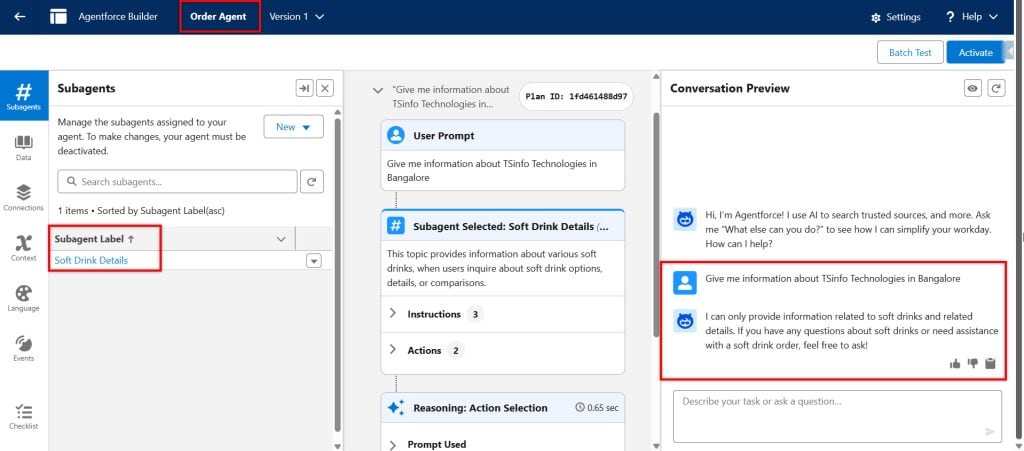
Below, you can see we haven’t assigned any Data Library to the Agentforce agent.
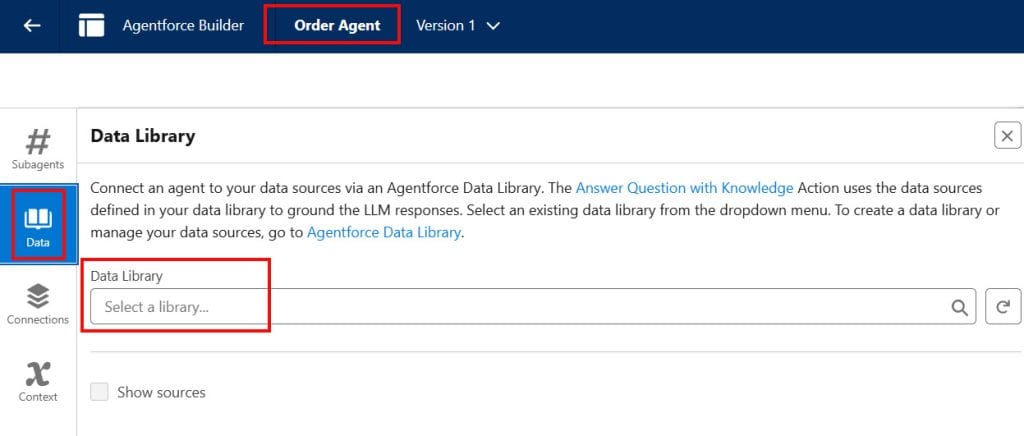
Because the agent does not have a web-based data library enabled, it cannot search the internet and therefore returns responses that differ from the given prompt.
With the Agentforce Data Library in Salesforce
The Agentforce Data Library in Salesforce is a feature that collects and organizes all the unstructured data the AI Agent needs.
To create the Agentforce data library and assign it to AI agents, first, we need to set up a data cloud in Salesforce.
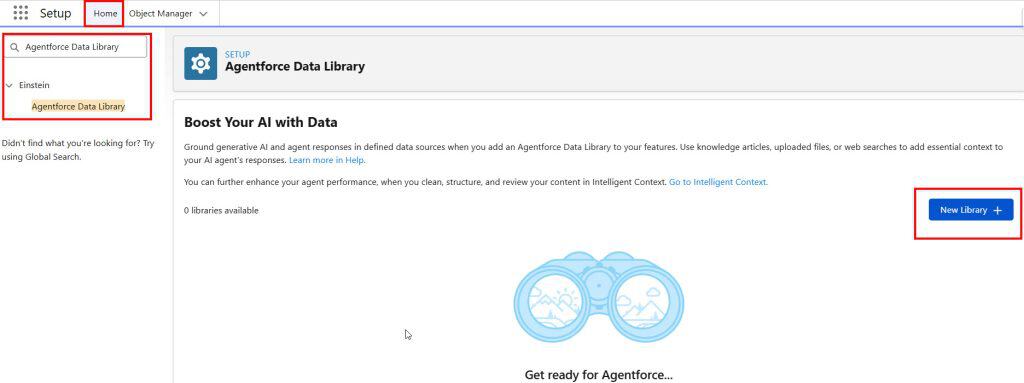
Step 1: Open Agentforce Data Library
After setting up the data cloud, navigate to Setup -> Quick Find, and search for Agentforce Data Library.
Click the New Library + button to create the data library.
Step 2: Create a New Data Library Source
After that, provide the Name for the data library, and the API Name will be automatically populated. Then click the Save button to create a library.
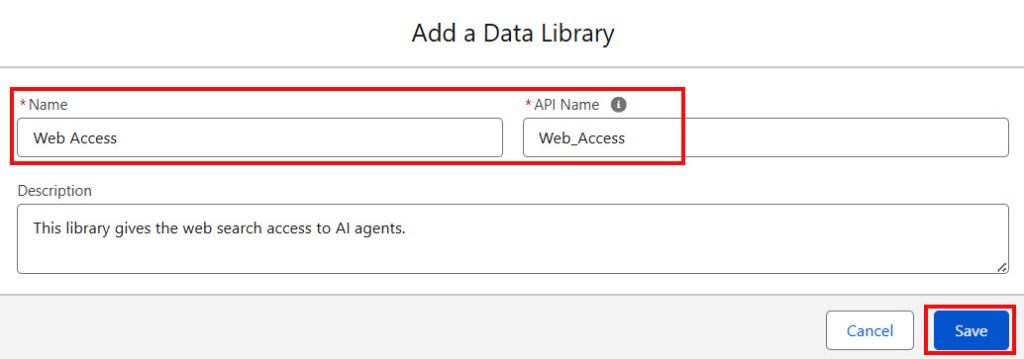
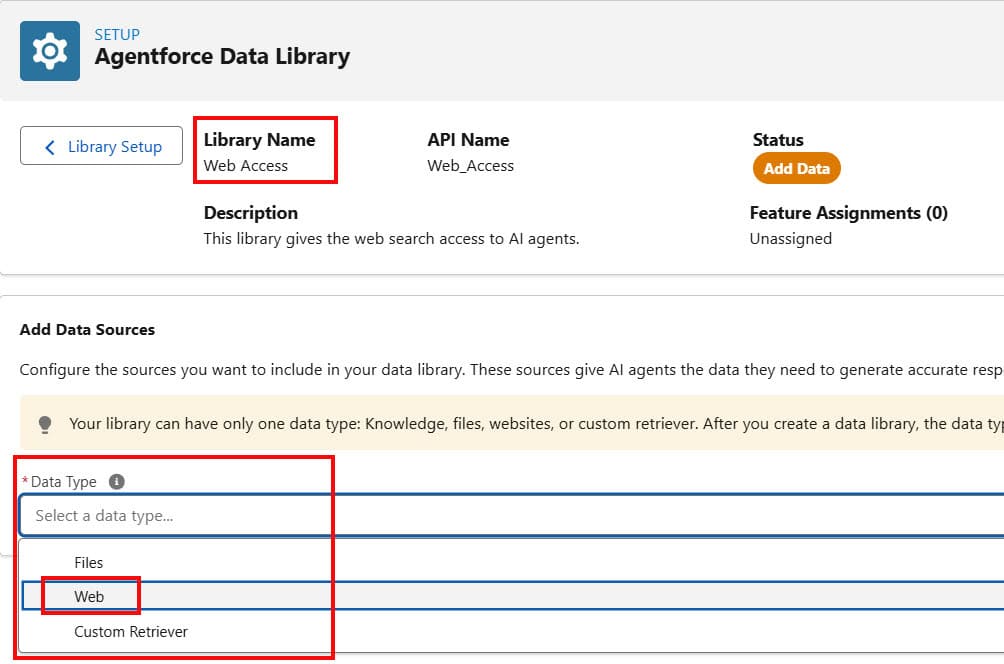
After creating the data library, we can add the Files, Web, and Customer Retriever to it. Below you can see these options:
- Files: You can upload your own files directly, including PDF, DOCX, TXT, and CSV. The AI agent will use this file to answer questions or give information related to its content.
- Web: Salesforce automatically enables internet-based search capability. The AI agent will read and use the content from that web as a knowledge source.
- Customer Retriever: This connects to your Salesforce data, including Accounts, Cases, and custom objects. The AI agent can then retrieve and use real-time customer data from Salesforce to answer user queries.
Here, we need to select Web as the data type.
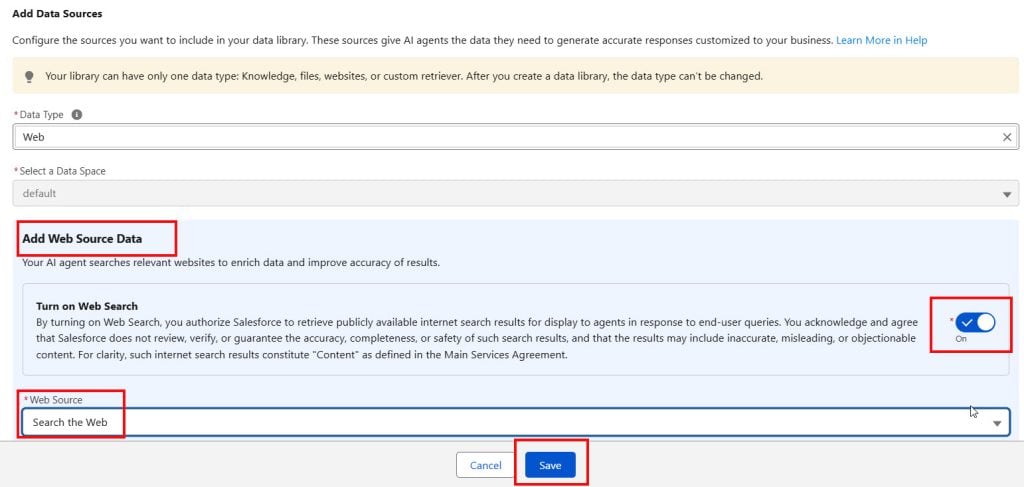
After that, in the Add We Source Data section, ‘Turn On Web Search‘, which allows agents to read information from the internet.
In the Web Source field, there is only one option: Search the Web, then click Save.
Step 3: Associate the Source with Your Agent
After that, open the AI agent in the builder to grant it access to web search. Then select the Data option.
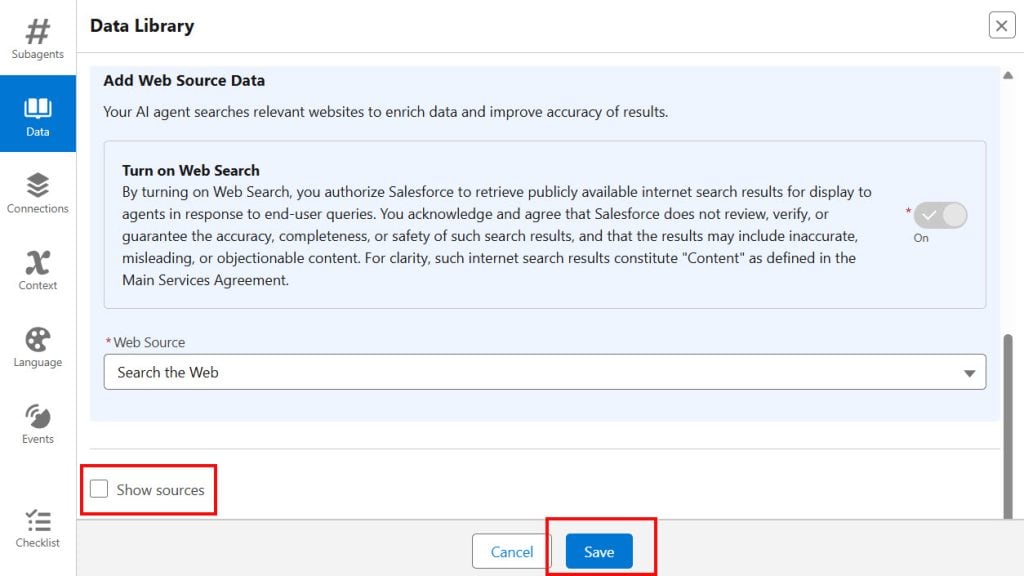
As you click the Data Library, you will see all the libraries you created. Select the one you want to assign, then scroll down.
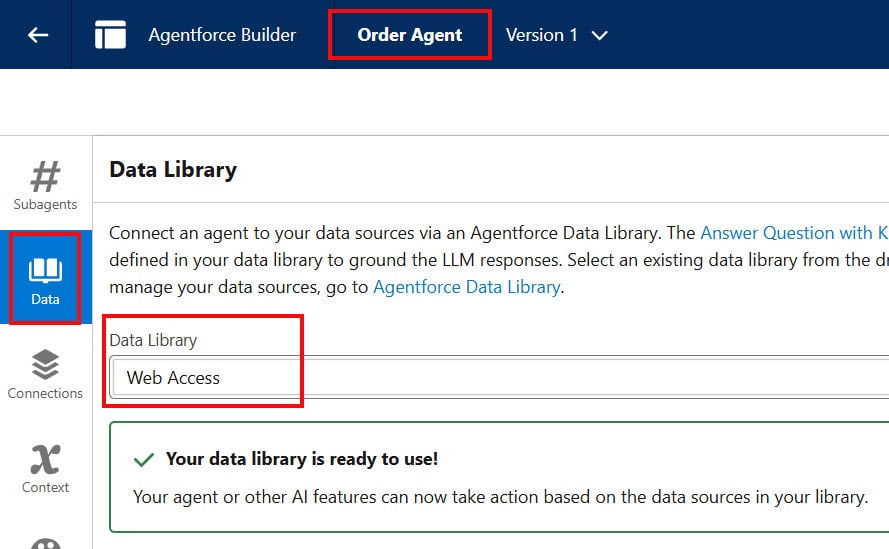
If you check the Show Sources checkbox, the agent will display the source of the information whenever it searches the web. You can keep unchecked, then click Save.
This way, we assign the Data Library to Agentforce agents in Salesforce.
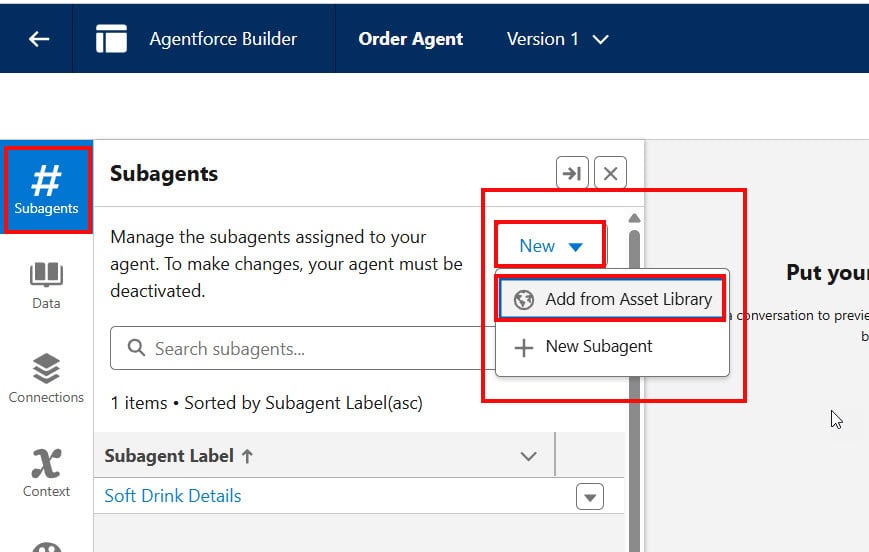
After that, to search for information on the web and display it to the user, Salesforce provided a standard topic and action for AI agents. We need to add the topic.
Click New -> Add from Asset Library.
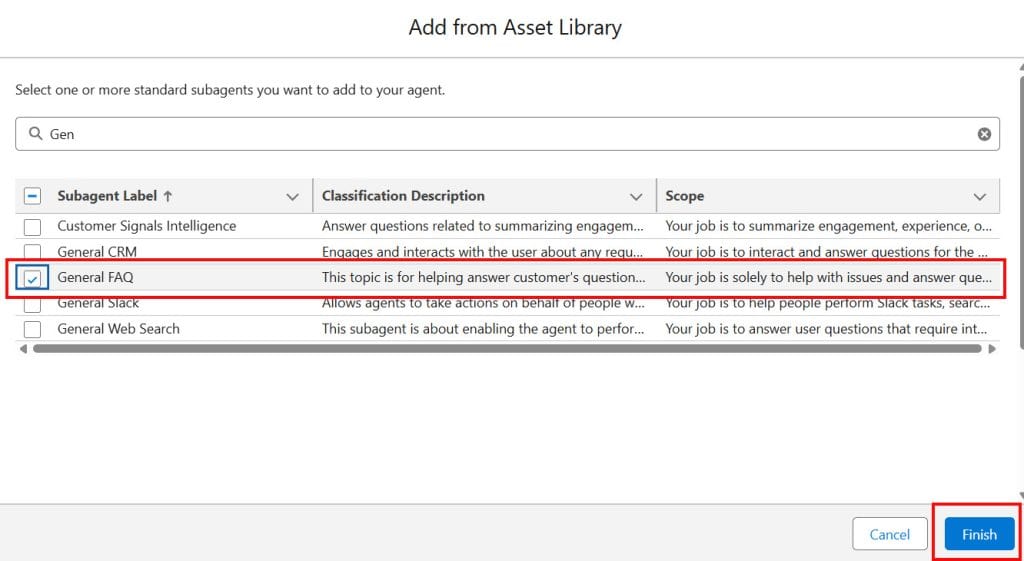
Select the General FAQ topic, and the Answer Questions with Knowledge action will get added under that topic. Click Finish.
Step 4: Test Agentforce Web Search
The topic will be added to the agent, then refresh the page once. As you ask the question, the agent will search for the information on the web and display it to the user.
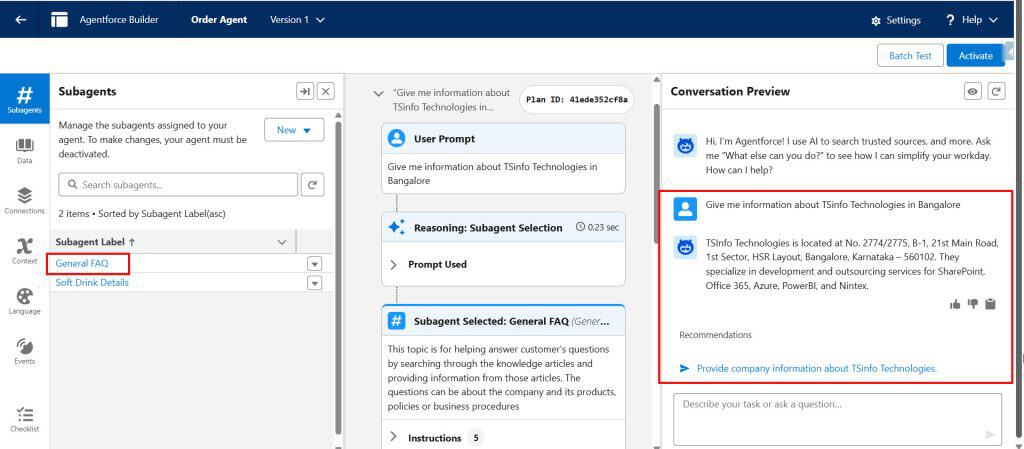
In this way, we can create an Agentforce data library with Web as the data type and assign it to agents so they can search for and display the information to users.
Real-World Use Cases for Agentforce Web Search
- Competitor Research
- Sales and marketing teams can ask questions about competitors and receive information gathered from publicly available sources.
- Industry News
- Users can access recent developments and announcements in their industry.
- Product Research
- Agents can provide information about products, services, and technology trends available on public websites.
- Customer Support
- Support agents can quickly gather external information that helps answer customer questions.
- Market Analysis
- Business users can access current market trends and insights without leaving Salesforce.
Agentforce Knowledge vs Web Search
| Feature | Knowledge Articles | Web Search |
|---|---|---|
| Uses Internal Company Data | Yes | No |
| Uses Public Websites | No | Yes |
| Real-Time Information | No | Yes |
| Best For | Internal Knowledge | External Information |
| Requires Uploaded Content | Yes | No |
| Supports Dynamic Information | Limited | Yes |
| Provides Latest News & Updates | No | Yes |
| Uses Salesforce Knowledge Base | Yes | No |
| Retrieves External Information | No | Yes |
| Ideal for FAQs & Company Policies | Yes | No |
| Ideal for Market Trends & Competitor Research | No | Yes |
| Information Source | Salesforce Knowledge Articles | Public Websites |
| Data Maintenance Required | Yes | No |
| Response Based on Live Internet Content | No | Yes |
Best Practices
- Use web search only when necessary to avoid overuse
- Combine it with internal data for better answers
- Regularly test agent performance
- Monitor responses for accuracy
- Keep instructions clear and simple
Each of these practices ensures that your agent performs efficiently and provides reliable responses.
Common Issues and Solutions Agentforce Data Library
- Web search is not working
- Check if it is added to the Data Library
- Ensure the agent is published
- Agent not using web search
- Update instructions
- Test with different queries
- Irrelevant results
- Refine agent instructions
- Use better query examples
These issues are common and can be resolved easily with proper configuration.
Frequently Asked Questions
1. Do I need API integration for web search?
No, Data Library provides a built-in web search. You do not need external APIs.
2. Can I control when web search is used?
Yes, you can configure instructions and settings to control usage.
3. Is web search secure?
Yes, Salesforce manages it internally, making it secure and reliable.
4. Can I use it with other data sources?
Yes, you can combine web search with Salesforce data and knowledge.
Conclusion
Enabling web search using Agentforce Data Library is the easiest and most efficient way to enhance your AI agent.
It removes the need for complex integrations and allows your agent to access real-time information. This makes your agent smarter, more accurate, and more useful in real-world scenarios.
By following the steps in this article, you can quickly enable web search and improve your agent’s performance.
With proper configuration and best practices, you can build a powerful AI assistant that delivers an excellent user experience.
You may like to read:
- Assign Data Library to Agentforce Agents in Salesforce
- Create and Assign Actions to Agentforce Agents in Salesforce
- How Agentforce Service Agent Greet by User Name in Salesforce
- Salesforce Agentforce Error Fix: Apex Custom Action Not Running
- Headless 360 in Salesforce [Complete Guide]

Shubham is a Certified Salesforce Developer with technical skills for Building applications using custom objects, approval processes, validation rules, Salesforce flows, and UI customization. He is proficient in writing Apex classes, triggers, controllers, Apex Batches, and bulk load APIs. I am also familiar with Visualforce Pages and Lightning Web Components. Read more about me.
