
As a Salesforce Developer, I received a requirement to create a custom action for an Agentforce Service Agent that we deployed on the community site to help resolve customer queries.
For example, when a customer buys any product and wants to track the status of their order, they can ask the query directly to the service agent on the community site.
I created this action using an Apex Class and assigned it to the Agentforce agent, so it will display the correct information whenever a customer asks a related query through the site.
When the customer asks this question, the Agentforce Service Agent should trigger the Apex custom action. This action retrieves the order status from Salesforce and then displays the correct status to the customer through the agent response.
After creating the Apex class, I assigned it as a Custom Action to the service agent in Salesforce. To test whether the action was working correctly, I tried to execute it by giving a prompt to the Agentforce agent.
I asked the agent to display the order status, expecting it to trigger the Apex custom action. However, when I provided the prompt, the agent did not execute the action or return the expected order status.
But the agent was unable to find the Apex class to execute the custom action that I created. Because of this issue, the Agentforce Service Agent could not run the action and was unable to display the order information as a response to the customer.
In this article, I will explain why the Agentforce Service Agent was unable to perform the custom action, even though it was assigned through the Apex class. I will also show how we can fix the issue where the Apex custom action is not running and ensure the agent executes it correctly.
Salesforce Agentforce Error Fix: Apex Custom Action Not Running
Below, I will show you the exact error that appears when a customer or user provides a prompt to the agent to get the information.
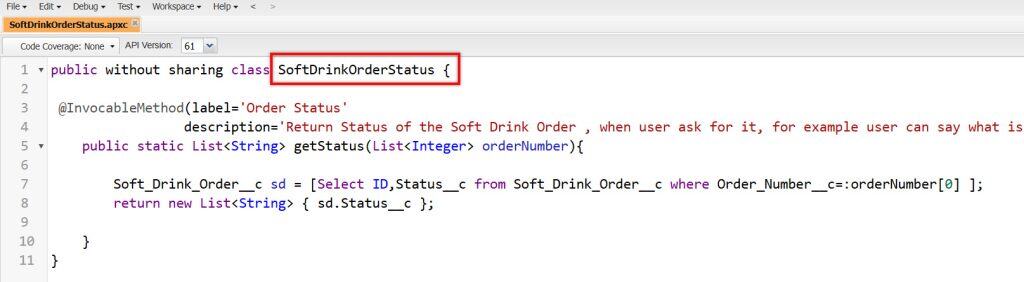
Here, we have created an Apex class as a custom action to retrieve the order status and respond to customers when requested.
public without sharing class SoftDrinkOrderStatus {

 @InvocableMethod (label='Order Status'
                 description='Return Status of the Soft Drink Order , when user ask for it, for example user can say what is the status of My Soft Drink order ABC')

    public static List<String> getStatus(List<Integer> orderNumber){

        Soft_Drink_Order__c sd = [Select ID,Status__c from Soft_Drink_Order__c where Order_Number__c=:orderNumber[0] ];

        return new List<String> { sd.Status__c };

    }
}
After that, we assigned the Apex class–based custom action to the Agentforce Service Agent in Salesforce so the agent can perform the task whenever a customer asks for that information.
This setup should allow the agent to run the action and return the correct response to the user.
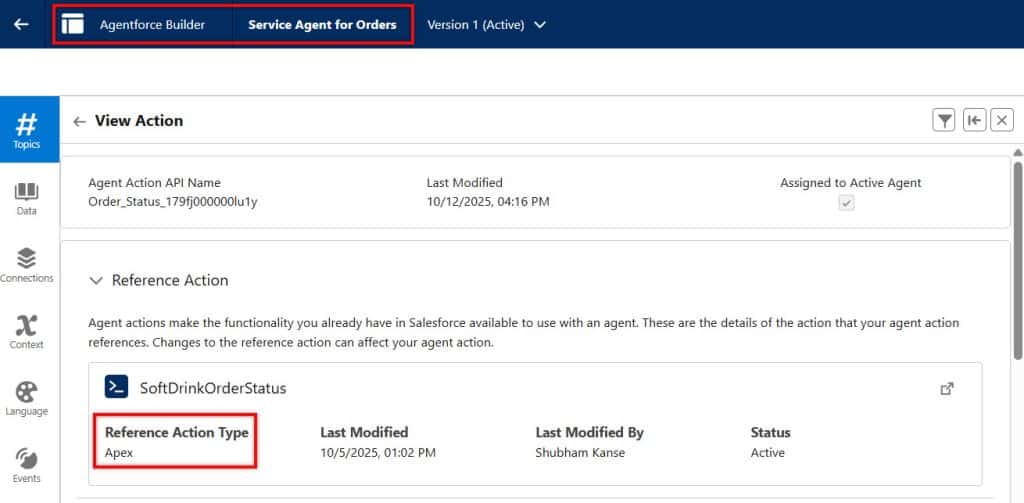
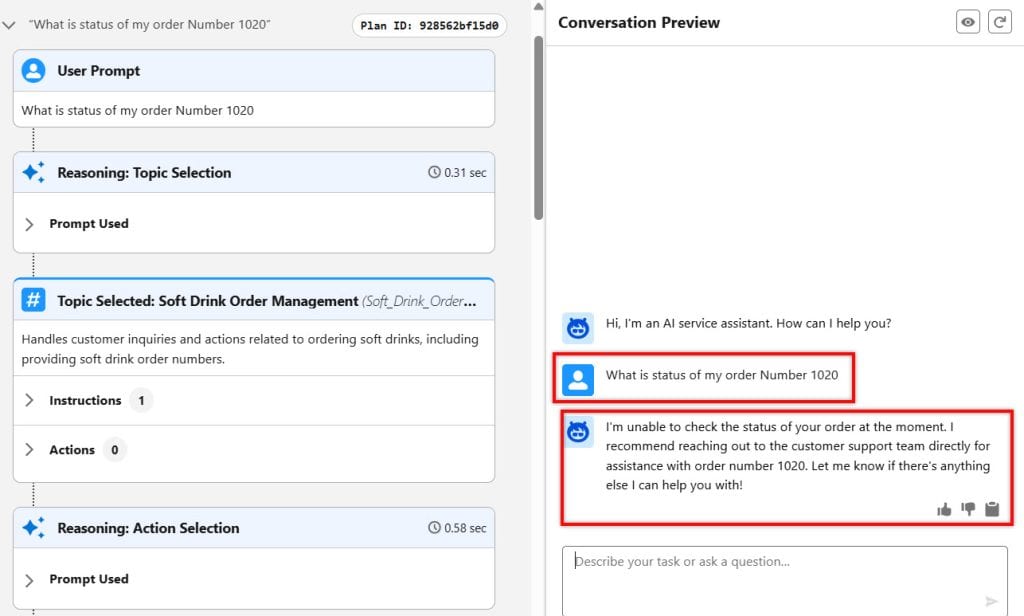
After assigning the custom action to the agent, let’s test the Agentforce service agent by providing a prompt to display the order status.
But here, you can see that the agent is unable to retrieve and display the order status details.
This happened because in Salesforce Agentforce, every service agent runs actions within a special Agent User Context.
If the Apex class or the data is not accessible to that agent user, the custom action cannot run. As a result, the agent fails to retrieve the order status and cannot display it to the customer.
First, we need to grant the Agent User access to the created Apex class. Once the agent user has permission to access the Apex class, the Agentforce service agent can run the custom action and retrieve the required information.
Solution: Apex Custom Action Not Running in Salesforce Agentforce
Now, let’s resolve the Apex Custom Action Not Running issue so the Service Agent can access the Apex class and successfully perform the action we developed.
Once the required permissions are granted, the Agentforce service agent will be able to retrieve the data and respond to customer queries without issue.
To navigate to the user, open the Service agent, which cannot perform the action created by the Apex class.
After that, open the builder and go to the Settings option. To open the settings, deactivate the agent, then open the agent settings.
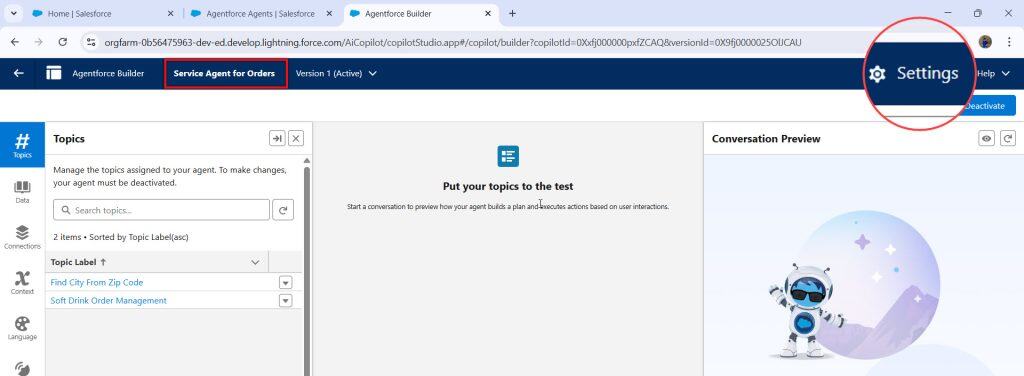
When we create an Agentforce Service Agent, Salesforce automatically assigns an Agent User to it. If the Einstein Service Agent User does not exist yet, Salesforce will prompt you to create a new Agent User, which will then act as the identity for the Service Agent.

After assigning the Einstein Service Agent User, you can find it in the User Setup. There, you will see that Salesforce has created a dedicated user profile with a special license for the Service Agent.
This license defines what features and permissions the agent can use inside Salesforce.

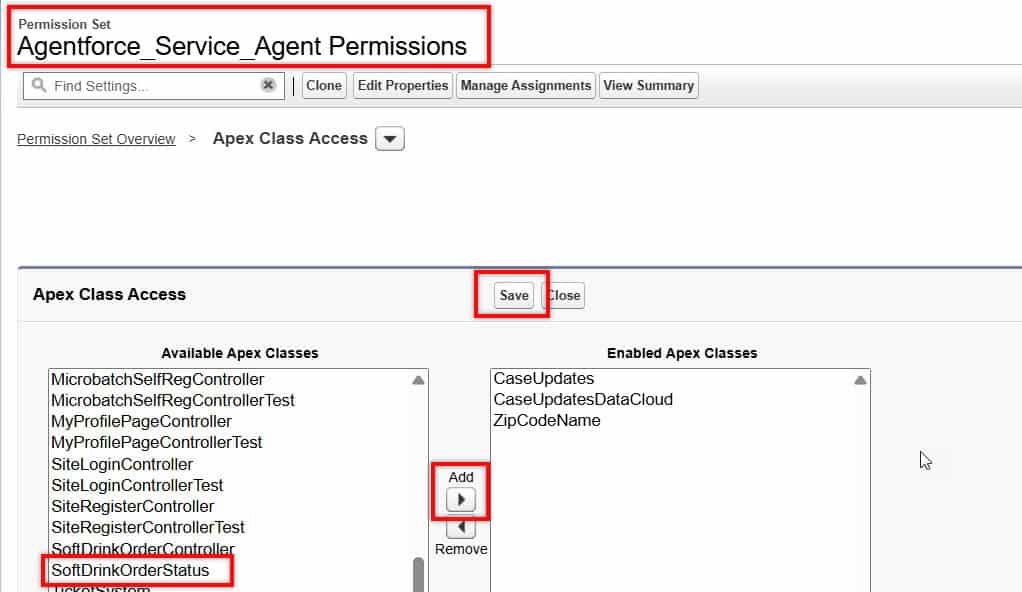
To grant access to the Apex class, open any Permission Set that is already assigned to the Agent User, or you can also create a new permission set for this purpose.
Next, open the Apex Class Access section inside the permission set and click the Edit button. After that, you will be able to grant access to the Apex class.
From the Available Apex Classes list, select the Apex class you created, and click the Add button. The selected class will move to the Enabled Apex Classes list. Finally, click Save to apply the changes.
Now you have granted access to the Apex class for the Einstein Service User. This user is responsible for executing the custom action. With this access, the agent can now retrieve the order status details and display them to the customer without any issue.
Now, let’s test the agent again by giving the prompt to get the order status and see whether it works correctly this time.
In the image below, you can see that I provided the prompt to the agent, and this time, the Service Agent successfully called the Apex class.
The Apex class retrieved the order information and returned it to the agent, and the agent responded back to the customer with the correct order status details.
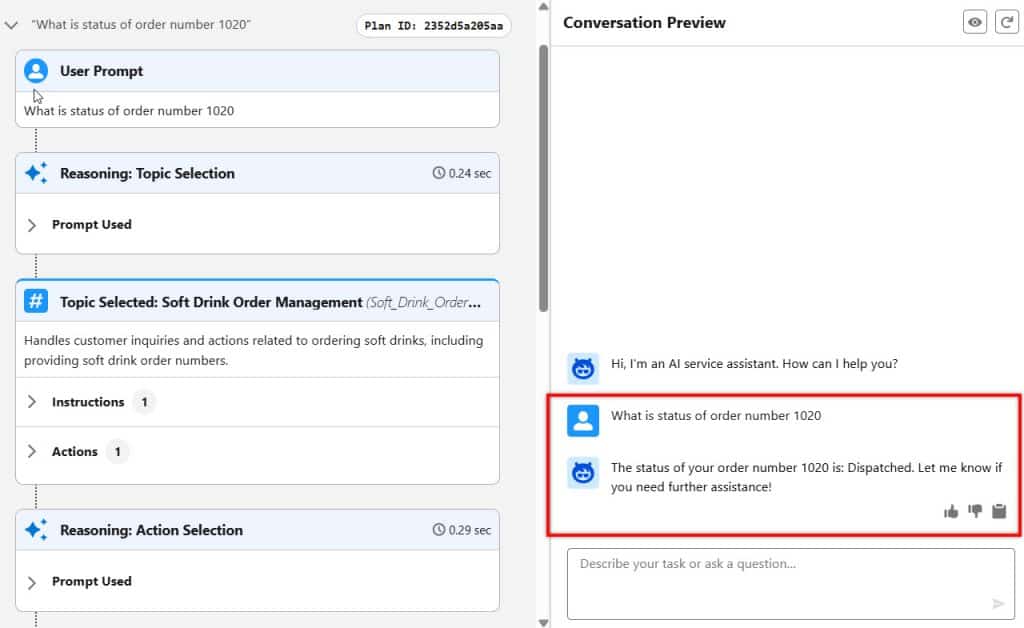
Also, after opening the community and granting the required permissions to the Einstein Service Agent User, when the customer requests the details again, the Service Agent can now provide the correct response.

This way, we need to grant the required permissions to the Service Agent user so the agent can successfully perform the custom action.
Conclusion
I hope you have an idea of why the Agentforce Service Agent was unable to perform the custom action, even though it was assigned via the Apex class.
In this article, I have explained how we can fix the issue where the Apex custom action is not running and ensure the agent executes it correctly.
You may like to read:
- Create & Assign Custom Actions to AI Agents in Salesforce Agentforce
- Deploy Agentforce Service Agent to Slack Workspace in Salesforce
- Prompt Builder and Prompt Template in Salesforce Agentforce
- Create Custom Action to Retrieve External Data Using APIs in Salesforce Agentforce
- Call Agentforce Agent via Record-Triggered Flow in Salesforce
- What is Agentforce Data Library in Salesforce?

I am Bijay Kumar, the founder of SalesforceFAQs.com. Having over 10 years of experience working in salesforce technologies for clients across the world (Canada, Australia, United States, United Kingdom, New Zealand, etc.). I am a certified salesforce administrator and expert with experience in developing salesforce applications and projects. My goal is to make it easy for people to learn and use salesforce technologies by providing simple and easy-to-understand solutions. Check out the complete profile on About us.