
In today’s digital world, customers interact with businesses through multiple channels such as websites, mobile apps, emails, and customer support. Managing all this data in one place is a big challenge.
This is where Salesforce Customer 360 comes into the picture.
Salesforce Customer 360 helps businesses connect all customer data from different systems and create a single, complete view of each customer.
This helps companies provide better service, personalized experiences, and faster decision-making.
In this article, we will learn about Salesforce Customer 360, with real-world examples, features, benefits, and use cases.
Salesforce Customer 360 gives companies a complete view of each customer across all departments.
Sales teams can see what a customer bought before, service reps can know about past issues, and marketing can send more targeted messages.
What is Salesforce Customer 360?
Salesforce Customer 360 is a platform that connects all Salesforce products and customer data into a single unified view. It allows businesses to:
- See complete customer information
- Track customer interactions
- Provide personalized experiences
Customer 360 = One single view of the customer across all departments
It brings together:
- Sales data
- Service data
- Marketing data
- Commerce data
So every team works with the same customer information. According to Salesforce, Customer 360 provides a complete view of customers across all touchpoints and interactions.
Let’s say a customer:
- Visits your website
- Contacts support
- Makes a purchase
Without Customer 360:
- The sales team sees only sales data
- The support team sees only complaints
With Customer 360: Every team sees the complete customer journey
Why Customer 360 is Important in Salesforce?
Today’s customers expect:
- Fast responses
- Personalized communication
- Consistent experience
Without Customer 360:
- Data is scattered
- Teams work in silos
- Customer experience is poor
With Customer 360:
- All data is connected
- Teams collaborate better
- Customers get a better experience
The Evolution of CRM Platforms
Customer Relationship Management (CRM) has come a long way. Early CRMs focused on basic contact info and sales tracking. Today’s CRMs, like Salesforce Customer 360, offer much more.
They combine data from sales, marketing, service, and other areas to create a full picture of each customer’s journey.
Salesforce Customer 360 takes this further. It uses AI to find insights in customer data, helping businesses make smarter choices and better serve customers.
Core Components of Customer 360
Customer 360 is not a single product. It is a combination of multiple Salesforce products.
Salesforce Customer 360 offers key advantages through its unified approach. The platform combines data and tools to give businesses a complete view of their customers.
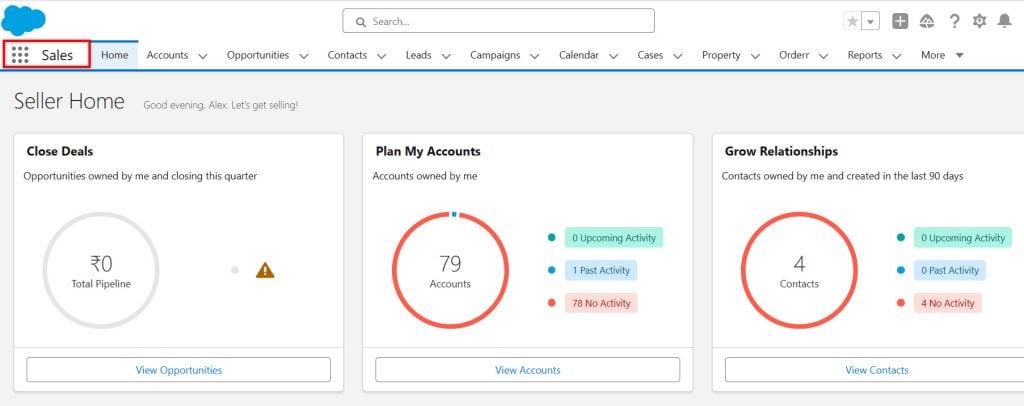
Salesforce Sales Cloud for Sales Management
Sales Cloud helps teams track leads and close deals faster by providing real-time data on sales activities and customer interactions.
Sales reps can manage contacts, accounts, and opportunities in one place. The tool offers sales forecasting and pipeline management.
Custom dashboards show key performance indicators. Mobile access lets sales teams work from anywhere.
Sales Cloud integrates with other Salesforce products to provide a complete view of each customer.
Helps manage:
- Leads
- Opportunities
- Deals
Salesforce Service Cloud for Enhanced Support
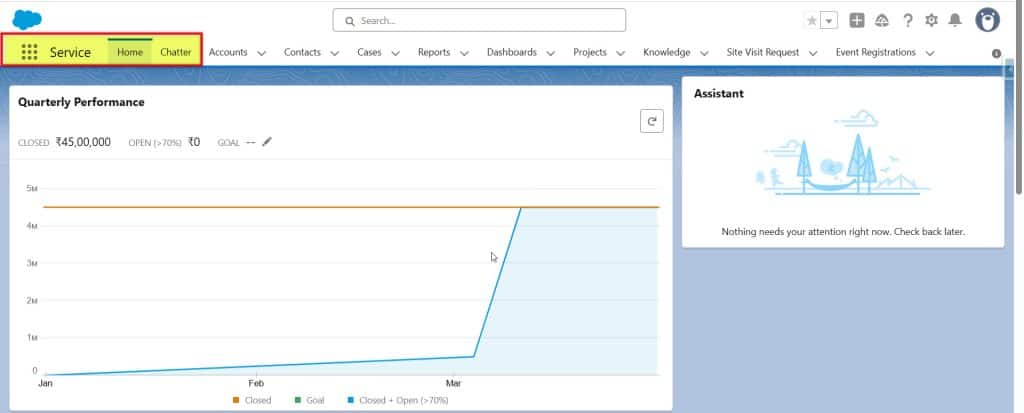
Service Cloud improves customer support across all channels. It helps agents solve problems quickly and boost customer satisfaction.
Used for:
- Customer support
- Case management
- Chat & call support
The platform offers case management, knowledge bases, and automated workflows. Agents can view customer history and preferences on one screen.
Service Cloud includes phone, email, chat, and social media support tools. It can route cases to the right agent based on skills and availability.
AI-powered chatbots can handle simple queries, freeing up agents for complex issues.
Salesforce Marketing Cloud for Marketing Campaigns
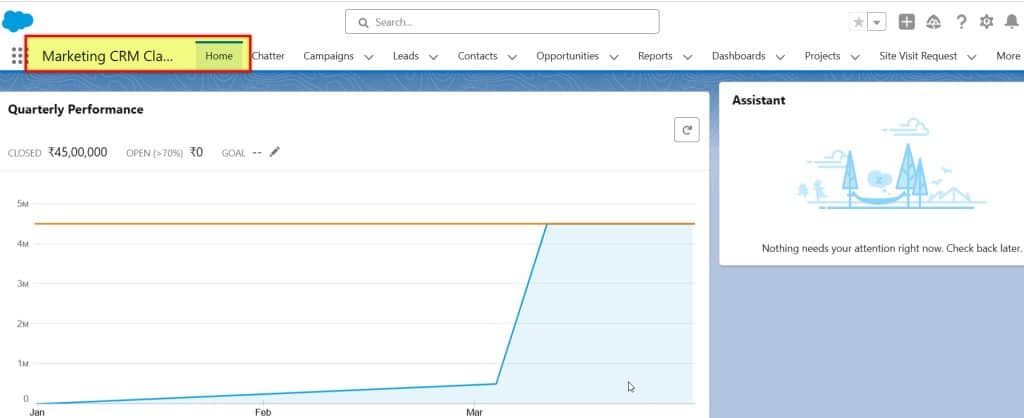
Marketing Cloud helps create personalized customer journeys across channels. It combines email, mobile, social media, and web advertising tools.
Marketers can segment audiences and tailor messages for each group. The platform tracks campaign performance and customer engagement.
Used for:
- Email campaigns
- Customer journeys
- Personalization
Automated workflows can trigger messages based on customer actions. AI helps predict the best times to send content for maximum impact.
Marketing Cloud integrates with sales and service data to provide a complete customer view.
Commerce Cloud for E-commerce Solutions
Commerce Cloud powers online stores for B2C and B2B companies. It offers tools for product catalogs, pricing, and order management.
The platform creates personalized shopping experiences based on customer data. It includes features for promotions, search, and product recommendations.
Commerce Cloud works on mobile devices and integrates with in-store systems. It handles multiple currencies and languages for global businesses.
AI-powered tools help predict demand and optimize inventory levels.
Salesforce Data Cloud for Comprehensive Customer Data
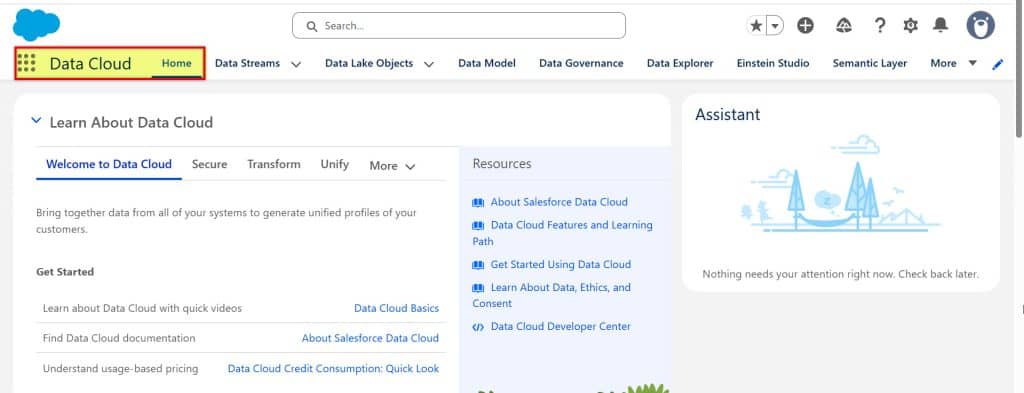
Data Cloud unifies customer information from all Salesforce products and external sources, creating a single, accurate view of each customer.
The platform automatically cleanses and enriches data. It uses AI to find patterns and predict customer behavior.
This is the most important part. It:
- Collects data from all sources
- Cleans and organizes it
- Creates a unified customer profile
Data Cloud powers personalized experiences across sales, service, and marketing. It helps teams make data-driven decisions quickly.
Privacy and security features ensure compliance with data protection laws.
Leveraging Artificial Intelligence in Salesforce
Salesforce Customer 360 uses AI to boost customer experiences and business outcomes. It offers predictive insights and personalized interactions through advanced AI technologies.
Salesforce Einstein AI for Predictive Insights
Einstein AI is the brain behind Salesforce Customer 360’s predictive capabilities. It analyzes data to forecast sales, spot trends, and suggest the best actions. Einstein AI helps businesses make more intelligent decisions faster.
The AI system learns from past interactions and outcomes and applies this knowledge to new situations. For example, Einstein can predict which leads are most likely to convert, helping sales teams focus on high-value prospects.
Einstein AI also aids in customer service. It can suggest solutions to common problems before they escalate, speeding up response times and improving customer satisfaction.
Customer 360 vs Traditional CRM
| Feature | Traditional CRM | Customer 360 |
|---|---|---|
| Data View | Limited | Complete |
| Integration | Low | High |
| Personalization | Basic | Advanced |
| AI Capability | Limited | High |
Extending Salesforce Capabilities
Salesforce Customer 360 can be enhanced with powerful tools to connect apps, analyze data, and boost teamwork. These additions make the platform even more useful for businesses.
MuleSoft for Connecting Applications
MuleSoft helps link Salesforce with other systems. It creates bridges between different apps and data sources, making it easier to share information across a company.
MuleSoft uses APIs to connect various programs. It can also join on-site systems with cloud services, allowing businesses to use all their data in one place.
Companies can build custom integrations with MuleSoft without writing complex code. Instead, they can use pre-built connectors and templates.
MuleSoft also helps manage data flows. It can transform data formats as needed, ensuring that all systems can understand and use the information.
Tableau for Advanced Analytics
Tableau turns raw data into clear visuals. It works with Salesforce data to create charts, graphs, and dashboards.
With Tableau, users can explore data independently. They don’t need to know complex coding, and the tool offers drag-and-drop features for easy analysis.
Tableau can handle large amounts of data quickly and combine information from many sources, giving a complete view of business operations.
The software offers real-time updates. As data changes in Salesforce, Tableau visuals adjust, helping teams make fast, informed choices.
Tableau also has AI features. These can spot trends and suggest insights, helping businesses find new opportunities in their data.
Slack Integration for Collaboration
Slack brings team chats into Salesforce Customer 360. This lets workers talk about customer data without switching apps.
Teams can share Salesforce records in Slack channels and update information directly from chat, keeping everyone on the same page.
Slack can send alerts about important Salesforce events. For example, it might notify a team when a big deal closes, helping staff react quickly to changes.
The integration allows for custom workflows. Teams can set up bots to automate tasks. This can save time on routine jobs.
Slack also offers video calls and screen sharing. These features help remote teams collaborate on Salesforce projects, making distance collaboration easier and more effective.

Optimizing Business Processes
Salesforce Customer 360 streamlines operations through automation and customization. It helps businesses work smarter and faster.
Automation of Routine Tasks
Customer 360 handles repetitive tasks. It frees up staff to focus on important work. The system can:
- Send follow-up emails
- Update customer records
- Create reports
These tasks happen without human input. This saves time and reduces errors.
Customer 360 also spots patterns in data. It can flag issues before they become problems, helping teams stay ahead of customer needs.
Customizable Agents for Business Needs
Every business is unique. Customer 360 adapts to fit specific needs. Companies can:
- Set up custom workflows
- Create special fields in customer profiles
- Design their own dashboards
These tools match how each team works best. Sales reps get the info they need fast. Service agents can solve problems more quickly.
The system grows with the business. New features can be added as needed. This keeps processes smooth as companies change and grow.
Measuring Success and ROI
Salesforce Customer 360 provides tools to track key performance indicators and investment returns. These metrics help businesses understand their sales and marketing efforts and customer interactions.
Analytics for Sales and Marketing Performance
Salesforce Customer 360 offers real-time analytics to measure sales and marketing success. The platform tracks sales pipeline progress, showing deal stages and conversion rates. This helps teams spot bottlenecks and improve their processes.
For marketing, Customer 360 measures campaign effectiveness. It tracks metrics such as email open rates, click-through rates, and social media engagement. The system links these to actual sales, showing which campaigns drive revenue.
ROI calculations are built in. The platform compares campaign costs to the revenue generated. This gives a clear picture of which marketing efforts are most profitable.
Best Practices for Deployment
Deploying Salesforce Customer 360 requires careful planning and execution. To maximize the value, companies should focus on data protection, cost management, and workflow optimization.
Data Privacy and Security Considerations
Protecting customer data is crucial when deploying Salesforce Customer 360. Use strong encryption for data at rest and in transit. Set up multi-factor authentication for all users. Create detailed access controls to limit data visibility by role.
Regularly audit system access and user permissions. Remove access for employees who leave the company. Train staff on data-handling best practices and privacy regulations, such as GDPR.
Back up data frequently and test disaster recovery plans. Use Salesforce Shield for additional security features, such as event monitoring and field audit trails.
Frequently Asked Questions
Salesforce Customer 360 offers a comprehensive approach to customer relationship management. It combines various tools and features to help businesses better understand and serve their customers.
How does Salesforce Customer 360 enhance customer relationship management?
Customer 360 creates a single view of each customer across departments. This allows teams to access the same customer data and provide consistent service.
It also uses AI to analyze customer interactions and predict future needs. This helps companies be more proactive in meeting customer expectations.
What are the components of the Salesforce Customer 360 Data Model?
The Customer 360 Data Model includes customer profiles, interaction history, product information, and data on sales, marketing campaigns, and service cases.
These components work together to create a complete picture of each customer’s journey with the company.
In what ways does Salesforce Customer 360 integrate with Tableau Software?
Salesforce Customer 360 integrates with Tableau to provide powerful data visualization. This allows users to create easy-to-understand charts and graphs from customer data.
Teams can use these visuals to spot trends and make informed decisions about customer strategies.
What does the architecture of Salesforce Customer 360 look like?
Customer 360’s architecture is cloud-based and modular. It includes different “clouds” for sales, service, marketing, and commerce.
These clouds connect through a central platform, allowing data to flow seamlessly between them.
How is Salesforce Customer 360 differentiated from traditional CRM solutions?
Customer 360 stands out by offering a unified platform for all customer interactions. Traditional CRMs often have separate systems for different departments.
It also provides AI-powered insights and automation, which many older CRM systems lack.
What training resources are available through Customer 360 Salesforce Trailhead?
Salesforce Trailhead offers free online courses for Customer 360. These include basic overviews and advanced topics for different roles.
Users can earn badges and certifications as they complete modules, helping teams stay current with the latest features and best practices.
Conclusion
Salesforce Customer 360 is a powerful solution that helps businesses unify customer data and deliver better experiences.
It connects sales, service, marketing, and commerce into a single platform, making it easier to understand customers and improve business performance.
If used correctly, Customer 360 can transform how businesses interact with their customers and drive long-term growth.
Customer 360 aims to boost efficiency by unifying data and processes. This can lead to happier customers and stronger business results.

I am Bijay Kumar, the founder of SalesforceFAQs.com. Having over 10 years of experience working in salesforce technologies for clients across the world (Canada, Australia, United States, United Kingdom, New Zealand, etc.). I am a certified salesforce administrator and expert with experience in developing salesforce applications and projects. My goal is to make it easy for people to learn and use salesforce technologies by providing simple and easy-to-understand solutions. Check out the complete profile on About us.
