How to Create a Lead Conversion Report in Salesforce

Lead conversion rate report in Salesforce classic

The Sales team in our Salesforce org has been actively converting leads generated through various marketing channels, including webinars, email campaigns, and online ads. The management team wants to assess the effectiveness of these efforts over the past quarter. As a system admin, I created a report on lead conversion so that the management could … Read more >>>

Create a Campaign Report in Salesforce

Salesforce Report on Campaign with Campaign Members

I worked in an organization that uses Salesforce CRM. Recently, we launched a new product and ran a campaign to promote it. Now, the team manager has asked me to create a report on the newly launched product campaign so that they can analyze the campaign’s impact. For that, I created a summary report on … Read more >>>

Create Bucket Fields in Salesforce Reports

bucket in salesforce report

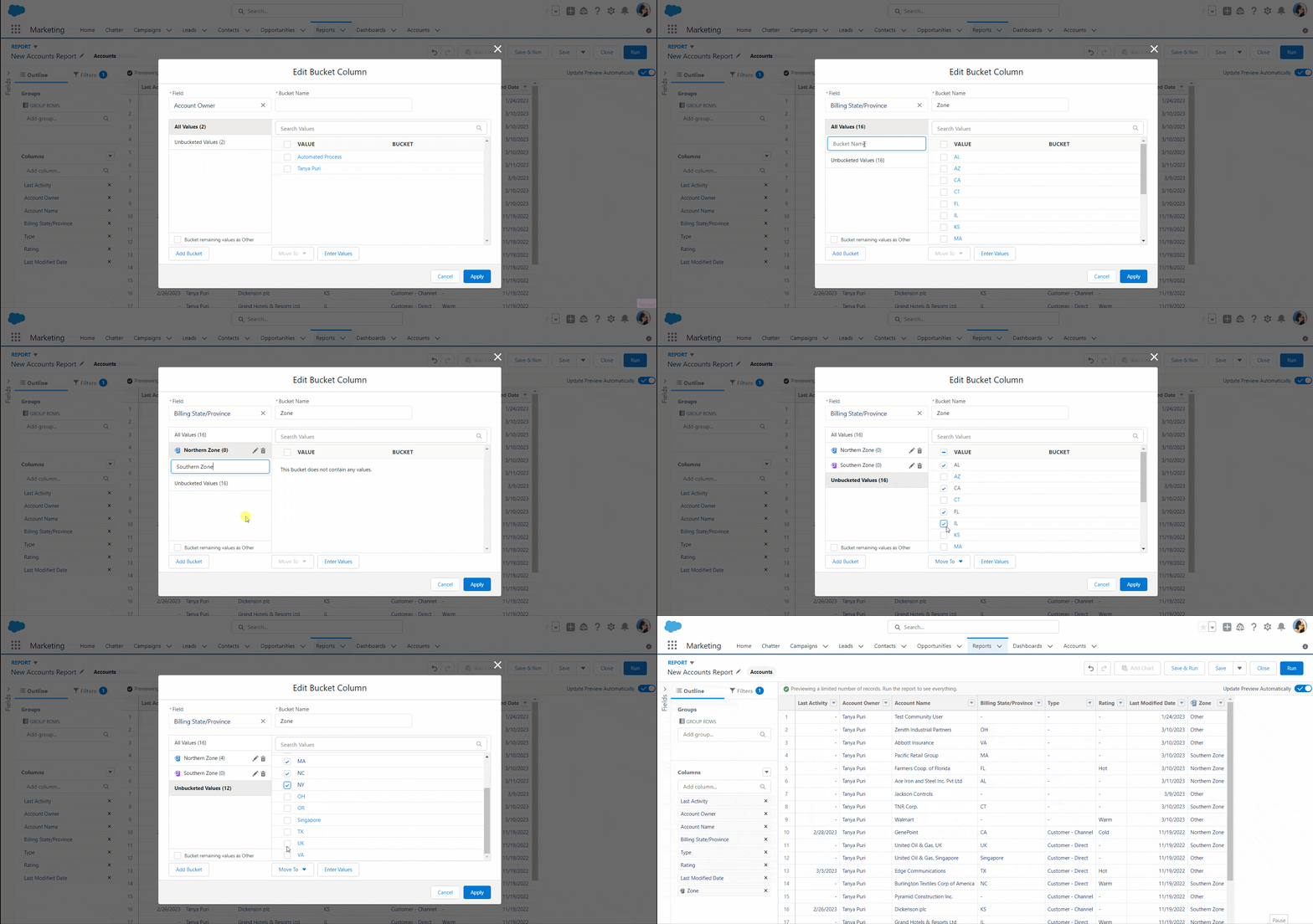
While working as a Salesforce developer for a retail company with stores across various states. The company’s management team wants to evaluate the distribution of accounts (stores) across different geographic zones: North Zone, South Zone, East Zone, and West Zone. However, no existing field categorizes the accounts into these zones based on location. To solve … Read more >>>

Sort Report by Record Count in Salesforce

Add Sort by Record Count in Salesforce Report

I was working as a Salesforce admin. Recently, the sales manager asked me to create a lead conversion report with the record count of each sales representative who converted leads to understand which sales representatives are converting the most leads. To achieve this requirement, I created a report that sorts the number of leads by … Read more >>>

How to Use Add Filter Logic in Salesforce Report?

How to Use Add Filter Logic in Salesforce Report

As a Salesforce admin, I need to generate an account report to display accounts with the type of ‘account=customer-direct.’ The account rating should be hot, or the account should be from the apparel industry. To create this type of report, first, we need to apply a filter to each field, and then we can use … Read more >>>

How to Use Date Formula in Salesforce Report

Use Date Formula in Salesforce Report

As a Salesforce admin, I worked on the case report. Recently, the manager wanted to calculate the open cases by the number of days since a customer’s case was created until today in a Salesforce report so that they could track the progress of customer support cases. I created a case report to achieve this … Read more >>>

How to Create Row Level Formula in Salesforce Report

how to add Row level formula filter in Salesforce

The Sales team in our Salesforce org was conducting a performance review, so I created a detailed report to calculate the “Year-to-Date Sales” for each opportunity directly in the report. In that report, using the row-level formula, I add a row-level formula field that calculates the “Year-to-Date Sales” by checking if the “Close Date” is … Read more >>>

How to Edit a Report in Salesforce

Relative date filters in Salesforce report

We created reports in the Salesforce CRM in the recent monthly sales review. In the analysis, we noticed that some important insights were missing from the reports. As a system admin, I reviewed and made the required changes in the reports. These changes include changing the grouping of columns and adding filters and descriptions of … Read more >>>

How to Apply Filter by Scope in Salesforce

salesforce report filter by scope

I was working as a system admin for an organization that uses Salesforce CRM. Recently, I was tasked with creating an account report that displays account records owned by specific users, along with their record criteria, in either report or list views within Salesforce. In Salesforce, we have the feature “Filter by Scope,” which allows … Read more >>>

How to Create Dynamic Reports and Dashboards in Salesforce

Create Salesforce Dynamic Dashboard

While working as a Salesforce admin for an organization, the sales manager asked me to create a report and dashboard to show important data like total sales, lead conversion rates, and sales pipeline status per user who is currently logged in. In Salesforce, we have dynamic reports and dashboard features, allowing us to create individual … Read more >>>

live webinar

Salesforce Data Cloud with Agentforce Data Library

In this live webinar, we will showcase how Salesforce AI Agents use business data and documents to provide intelligent responses using Agentforce Data Library and Salesforce Data Cloud.

Agentforce in Salesforce

DOWNLOAD FREE AGENTFORCE EBOOK

Start with AgentForce in Salesforce. Create your first agent and deploy to your Salesforce Org.