MID() Function in Salesforce: Get Substring in Formula Fields

Salesforce Classic Example MID Function

The MID() function in Salesforce returns a set number of characters from the middle of a text value, starting at a position you choose: MID(“Salesforce”, 6, 5) returns “force”. Combined with FIND(), it extracts text between two markers, such as the domain of an email address or the code after a “#”. Most MID tutorials … Read more >>>

How to Use Record Choice Set in Salesforce Screen Flow

Flow Resource Record Choice Set in Salesforce

A record choice set in a Salesforce screen flow turns records into the options of a Picklist, Radio Buttons or Checkbox Group component. The flow queries the records you filter for, such as active Accounts, shows a field like Name as the label, and stores the field you choose, usually the record ID, as the … Read more >>>

How to Query Multi-Currency Fields in Salesforce SOQL?

Query Multi-Currency Fields in Salesforce SOQL

To query multi-currency fields in Salesforce SOQL, wrap the currency field in convertCurrency() to get it in the user’s currency, use FORMAT() to show it with the right symbol, and filter with an ISO value such as Amount > USD5000. In Apex, give convertCurrency() an alias and read it with get(‘alias’). Most guides stop at … Read more >>>

Salesforce DATEVALUE Function: Syntax, Examples, and Uses

Create a Salesforce DATEVALUE Formula Field

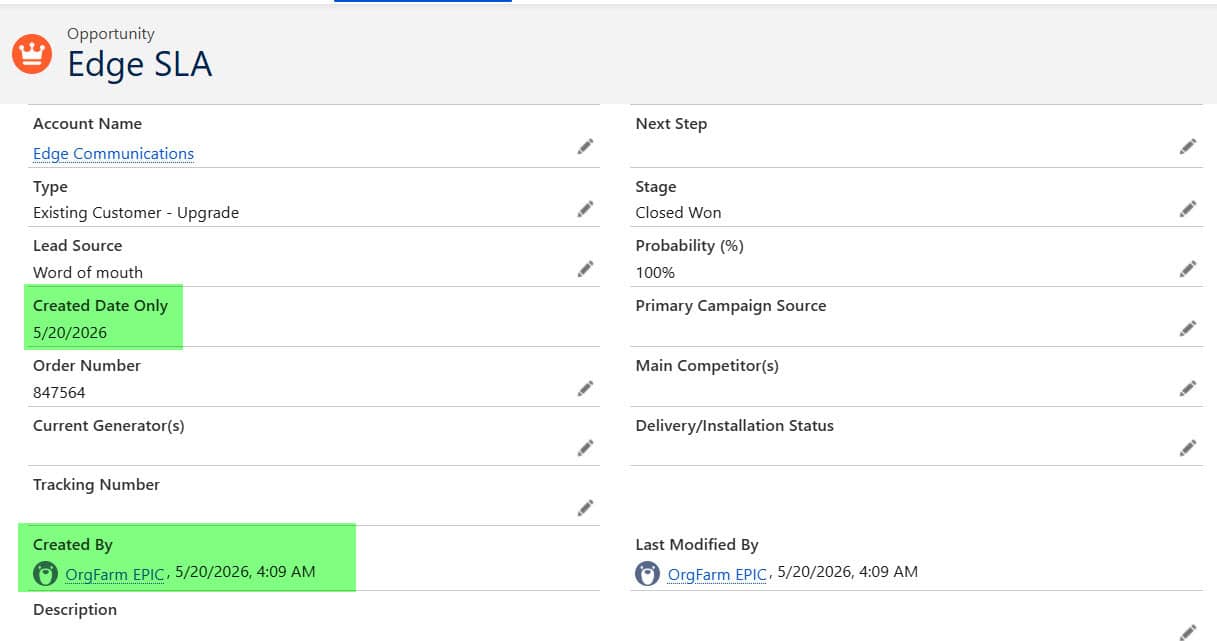
The DATEVALUE() function in Salesforce converts a Date/Time value, or text in YYYY-MM-DD format, into a Date. DATEVALUE(CreatedDate) returns just the day a record was created, in the viewing user’s time zone, so you can compare it with TODAY(), count days, or group records by day. The time-zone part is where most formulas go wrong, … Read more >>>

Salesforce REGEX Function

REGEX Function in Salesforce Classic Example

The REGEX function in Salesforce checks whether a text value matches a pattern and returns TRUE or FALSE. It is the standard way to enforce formats such as ZIP codes, phone numbers, product codes or IDs in validation rules, for example NOT(REGEX(BillingPostalCode, “\\d{5}”)) blocks any postal code that isn’t exactly five digits. Most REGEX tutorials … Read more >>>

SOQL Query on Group and GroupMember in Salesforce

Query inactive users from groups in Salesforce

To query groups in Salesforce, use two objects: Group, which holds every public group, queue and role group, and GroupMember, which holds one row for each member of a group. A SOQL query on Group and GroupMember lets you list public groups and queues, see who is in them, and find every group a user … Read more >>>

CASESAFEID() Function in Salesforce | Syntax, Examples, & Use Cases

Use CASESAFEID Function in Salesforce Classic

The CASESAFEID() function in Salesforce converts a 15-character record ID into its 18-character, case-insensitive version. You use it in formula fields when you need IDs that tools like Excel, VLOOKUP or an external database can match reliably, because those tools often treat “ABC” and “abc” as the same text. In this tutorial, I will explain … Read more >>>

We Can’t Display This Page Because Your Browser Blocks Cross-Domain Cookies in Salesforce

we can't display this page because your browser blocks cross-domain cookies, but you can view this page in salesforce classic. click here to open this page in salesforce classic.

The error “We can’t display this page because your browser blocks cross-domain cookies” appears in Salesforce Lightning Experience when your browser refuses the cookies Salesforce needs to load a page from another Salesforce domain. Some versions add “but you can view this page in Salesforce Classic” or “Try again with a different supported browser.” In … Read more >>>

Enhance Profile View in Salesforce

Salesforce enable enhanced profile view

The enhanced profile view in Salesforce (officially called the Enhanced Profile User Interface) changes how a profile’s settings are shown in Setup. Instead of one very long page with every permission listed, you get a short overview page, a search box to find any setting, and separate pages for each group of permissions. In this … Read more >>>