
Salesforce is growing very fast in Artificial Intelligence (AI). One of the newest and most powerful features is Agentforce. It helps companies create AI agents that can answer questions, assist customers, and automate tasks.
But many users have one common question: How does the AI agent know the correct answer?
The answer is: Agentforce Data Library. In this article, you will learn everything step-by-step:
- What is Agentforce?
- What is Agentforce Data Library
- Why is it important
- Core components of Agentforce Data Library
- How it works
- Real examples
What is Agentforce?
Agentforce is a Salesforce platform that allows you to create AI agents. These AI agents can understand user questions and give answers just like a human support agent.
It uses different components together, such as data, logic, and instructions. Based on these, it can take actions such as answering questions, retrieving records, or helping users complete tasks.
In simple words, Agentforce is like a smart assistant inside Salesforce. It works automatically and helps reduce manual effort by providing quick, accurate responses.
What is Agentforce Data Library?
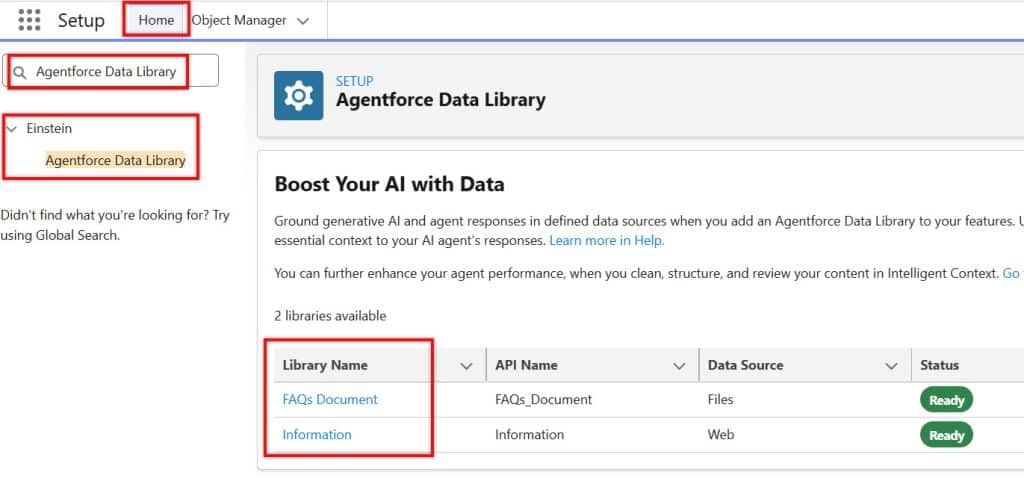
Agentforce Data Library is a special place where you store knowledge data for AI agents. This data can be documents, PDFs, FAQs, or any company-related information.
The main purpose of the Data Library is to help AI give correct answers. Without this data, the AI agent will not know what to answer or may give incorrect responses.
In simple words, Agentforce Data Library is like a brain for AI agents. The more good data you add, the smarter your AI agent becomes.
Why is Agentforce Data Library Needed in Salesforce?
AI agents depend completely on data. If there is no data, the AI cannot answer properly. It may guess answers, which can be wrong.
When you use a Data Library, the AI agent gets access to real company information. This helps it provide accurate, trusted answers to users.
So, the Data Library is important because it improves accuracy, builds trust, and makes AI useful in real business scenarios.
Core Components of Agentforce Data Library in Salesforce
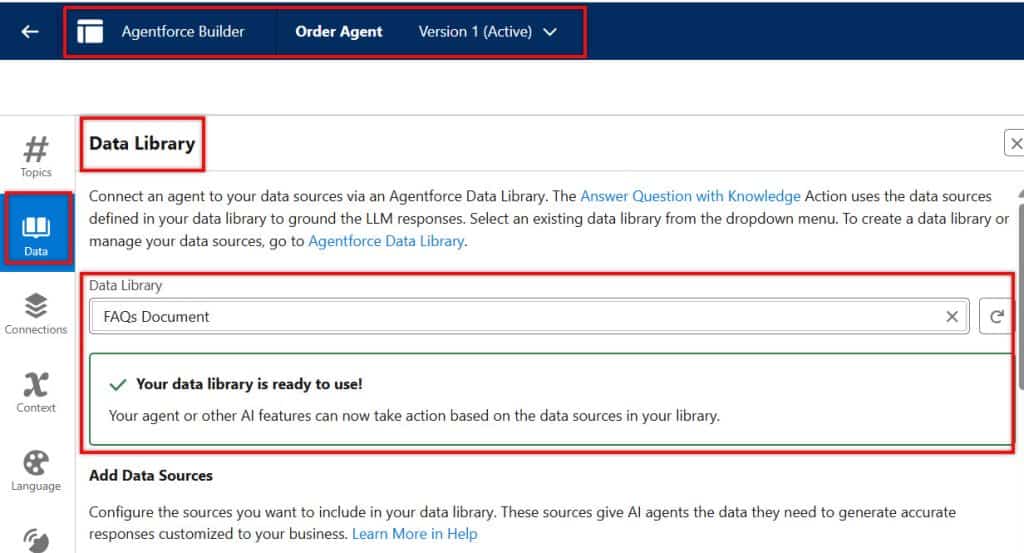
Below, I will explain the core components of the Agentforce Data Library, which enable AI agents to retrieve and display data to users.
1. Data Library
Data Library is a storage system where all your knowledge data is saved. This data is used by AI agents to understand business information and answer questions.
It can include various file types, such as documents, PDFs, and articles. All this information is stored in one place so AI can easily access it.
In simple terms, the Data Library is like a digital knowledge base. It stores all the important information that your AI agent needs to work properly.
2. Unstructured Data
Unstructured data is data that is not organized in a proper table format. It does not have rows and columns like database records.
Examples of unstructured data include PDFs, emails, Word documents, and text files. This type of data is very common in real-world business.
AI is designed to understand this type of data. Agentforce Data Library uses this data to answer real-world questions in a natural way.
3. Structured Data
Structured data is data stored in a well-defined format within Salesforce. It is organized into objects like Account, Contact, and Opportunity.
This type of data is easy to query and retrieve because it follows a defined structure. Each field has a specific value.
In simple terms, structured data is clean, organized data. It is mostly used for reporting, automation, and record-based operations.
4. Retrieval-Augmented Generation (RAG)
RAG is a method AI uses to improve its answers. In this process, AI first searches for relevant data and then generates an answer.
Instead of guessing, AI uses real data from the Data Library. This makes the answer more accurate and reliable.
In simple words, RAG means:
- First, find data → Then give an answer
- This helps reduce wrong answers and improves trust.
5. Indexing
Indexing is the process of preparing data so that AI can search it quickly. When you upload documents, the system creates an index.
This index helps AI find information faster without having to read the entire document repeatedly.
In simple words, indexing is like creating a shortcut for searching data. It improves the speed and performance of AI.
6. Chunking
Chunking means breaking large documents into smaller pieces. Instead of processing a full document, AI reads small chunks.
This helps AI understand the content better and find the exact answer quickly.
In simple terms, chunking is like dividing a big book into smaller pages so it’s easier to read and search.
7. Retriever
Retriever is a component that searches the Data Library for data. It works like a search engine.
When a user asks a question, the retriever finds the most relevant information from stored data.
In simple words, a retriever is the part of the system that finds the correct data for the AI to use.
8. Metadata
Metadata is information about your data. It describes the structure and meaning of your data.
Examples include field names, object names, and labels. This helps AI understand what the data represents.
In simple terms, metadata is like a label or description that helps AI better understand the data.
9. Prompt Builder
Prompt Builder is a tool for providing instructions to AI agents. It tells the AI how to respond to user queries.
You can define what data to use and how the response should look. This helps control AI behavior.
In simple words, Prompt Builder is like giving instructions to AI so it works correctly.
10. Data Cloud
Data Cloud is a Salesforce platform for storing large amounts of data from various sources. It is used for analytics and customer insights.
It handles structured and unstructured data at a very large scale. It connects multiple systems and creates a unified view.
In simple terms, Data Cloud is for storing all business data, while Data Library is used only for AI knowledge.
How Agentforce Data Library Works in Salesforce
Below, I will explain how the Agentforce Data Library in Salesforce stores data and how AI agents retrieve it.
1. Add Data to Agentforce Data Library
The first step is to add data to the Agentforce Data Library. This data can come from various sources, such as PDFs, knowledge articles, help documents, or internal company files.
You can upload these files directly from your Salesforce org. While uploading, ensure the data is clean and useful.
If you upload outdated or incorrect documents, the AI agent may give wrong answers. So always review your content before adding it to the Data Library.
2. Chunking & Indexing in Salesforce Data Cloud
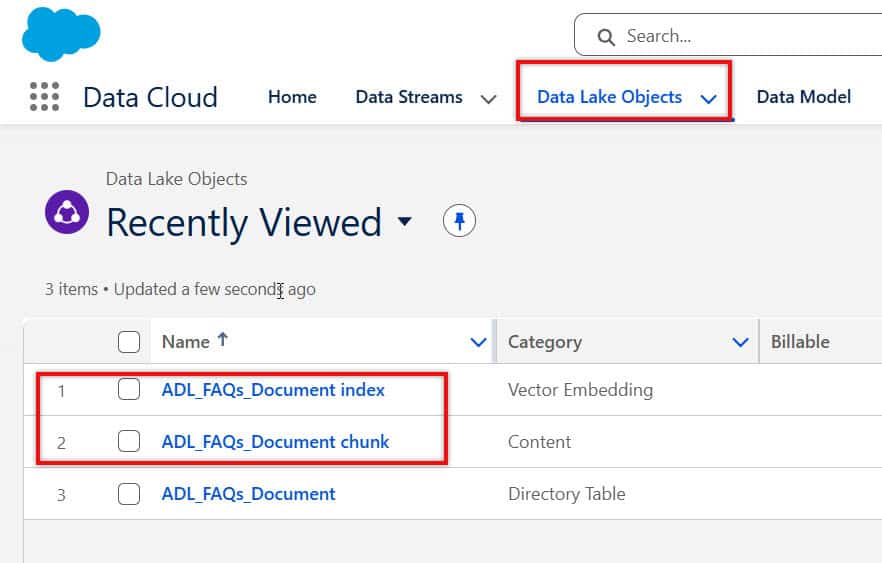
Once the data is uploaded, Salesforce automatically processes it using chunking and indexing. Chunking breaks large documents into smaller pieces so the AI can read and understand them easily.
After chunking, indexing is performed. Indexing creates a searchable structure of the data. This helps the system quickly find relevant information, rather than scanning the entire document every time a question is asked.
This step is very important because it directly affects performance and accuracy. Better chunking and indexing lead to faster, more accurate responses.
3. Retriever in Salesforce Data Cloud
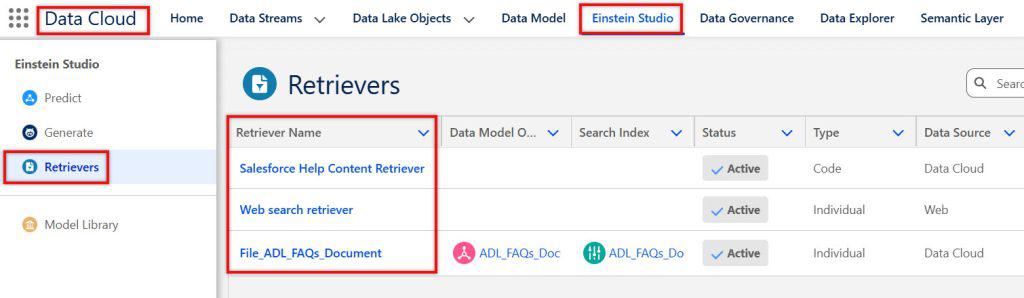
The retriever is the component that connects your AI agent with the Data Library. It works like a search engine inside Salesforce.
When you configure a retriever, you define how the AI should search the data. You can control which data sources to use and how relevant results are selected. This ensures that the AI fetches the most accurate information.
A well-configured retriever improves answer quality. If not configured properly, the AI may miss important data or return irrelevant results.
4. AI Processing and Response Generation
When a user asks a question, the AI agent starts processing it. First, it understands the intent of the question using natural language processing.
Then, the retriever searches the Data Library and finds the most relevant chunks of data. After that, the AI uses this data to generate a final answer using RAG (Retrieval-Augmented Generation).
The final response is not random. It is based on real data from your Data Library, which makes it accurate and reliable. This is what makes Agentforce more powerful than typical chatbots.
Agentforce Data Library vs Data Cloud in Salesforce
| Feature | Data Library | Data Cloud |
|---|---|---|
| Purpose | AI knowledge base | Centralized data platform |
| Data Type | Mostly unstructured | Structured + unstructured |
| Usage | AI responses | Analytics & insights |
| Data Volume | Limited | Very large scale |
| Users | AI agents | Data teams, analysts |
| Real-time Usage | Used during AI response | Used for reporting and segmentation |
| Data Processing | Chunking & indexing | Data ingestion & transformation |
| Integration | Directly with Agentforce | Integrates multiple systems |
| Performance Focus | Fast AI retrieval | Large-scale data processing |
| Maintenance | Requires content updates | Requires pipeline management |
| Complexity | Medium | High |
| Business Use | Customer support, FAQs | Customer 360 view, analytics |
| Cost | Lower compared to Data Cloud | Higher due to large infrastructure |
| Flexibility | Focused use-case | Multi-purpose platform |
Data Library: It is mainly used for AI agents to answer questions. It stores selected knowledge that is useful for answering user queries.
Data Cloud: a large data platform. It collects data from multiple systems and provides a complete view of customers.
Benefits of Agentforce Data Library in Salesforce
Below are the benefits of using Agentforce Data Library in Salesforce
1. Highly Accurate Responses
Agentforce Data Library improves accuracy by using real company data rather than guesswork. This reduces incorrect answers and improves trust.
When users get correct answers, they feel confident in using the system. This is very important for customer support and business operations.
2. Improved Customer Experience
Customers expect quick and correct answers. With Data Library, AI agents can respond instantly without waiting for human support.
This reduces waiting time and improves customer satisfaction. It also provides consistent answers, which is not always possible with human agents.
3. Time and Cost Saving
Businesses can automate many support tasks using AI agents. This reduces the workload on human teams.
Less manual work means lower operational costs. Employees can focus on more important tasks instead of answering repeated questions.
4. Scalability
The Agentforce Data Library enables AI agents to handle thousands of queries simultaneously. It does not tire as humans do.
As your business grows, the AI can handle more users without extra cost. This makes it a scalable solution for large organizations.
5. Secure and Controlled Data Usage
Salesforce ensures that all data follows security rules. AI agents only access the data they are allowed to use.
This means sensitive information is protected. Businesses can confidently use AI without worrying about data leaks.
Conclusion
Agentforce Data Library is very important for AI in Salesforce. Without it, AI cannot work properly. With it, AI becomes smart and accurate. If you want to build powerful AI agents, you must understand the Data Library and related concepts.
You may like to read:
- Transfer Chat from Agentforce AI to Human Agent in Salesforce
- Auto-Email Replies Using Agentforce Agents in Salesforce
- Create and Assign Actions to Agentforce Agents in Salesforce
- Salesforce Agentforce Error Fix: Apex Custom Action Not Running
- Create a Custom Retriever in Salesforce Agentforce

Shubham is a Certified Salesforce Developer with technical skills for Building applications using custom objects, approval processes, validation rules, Salesforce flows, and UI customization. He is proficient in writing Apex classes, triggers, controllers, Apex Batches, and bulk load APIs. I am also familiar with Visualforce Pages and Lightning Web Components. Read more about me.