
Claudeforce is the expanded partnership between Salesforce and Anthropic that combines Claude’s AI reasoning with Salesforce data, workflows, business logic, and governance.
It is not a standalone Salesforce product; rather, it is a name for a set of integrations across Claude, Salesforce, Agentforce, and Slack.
The first product released under this partnership is Salesforce in Claude, a plugin designed initially for sales and revenue teams.
It lets users ask Claude questions about live Salesforce data and take approved Salesforce actions without working directly in the traditional Salesforce interface.
In this article, you will learn what is ClaudeForce and what changes for Salesforce users.
Claude for Salesforce in Simple Terms
Traditionally, a Salesforce user opens Salesforce Lightning, navigates through objects such as Accounts, Opportunities, Leads, Contacts, Activities, and Reports, and then manually performs tasks.
They may review pipeline records, prepare for a meeting, identify at-risk deals, update opportunity fields, or follow up with customers.
Claudeforce aims to change the interface layer of that experience.
Instead of requiring a seller to navigate through many screens, they can work with Claude in natural language.
Claude can use Salesforce as the governed system of record: it can retrieve permitted data, reason over the current context, and route actions back through Salesforce so existing business rules continue to apply.
Salesforce describes this model as exposing trusted platform capabilities through Headless 360, MCP servers, APIs, and command-line tools.
For example, a seller could ask Claude:
“Prepare me for my meeting with Acme Corp. Show the open opportunities, recent activities, key risks, next steps, and any Slack discussion related to the account.”
Rather than manually opening multiple Salesforce records and searching Slack, the goal is for Claude to assemble a grounded view from the data and tools the user is authorized to access.
Salesforce in Claude: The First Release
Salesforce in Claude is the first product released through Claudeforce. It is a Claude plugin focused on sales and revenue workflows, launching with 37 prebuilt sales skills.
Salesforce specifically names meeting preparation, deal-health review, and pipeline review among the initial capabilities.
These skills are intended to help sellers and sales agents work with live revenue context, automate pipeline-related updates, and take governed actions without leaving Claude.
Salesforce says the experience can also create a tailored dashboard based on enterprise context from Salesforce, Slack, and other available Claude connectors.
Examples of Work Salesforce in Claude Can Support
| Business task | Traditional Salesforce experience | ClaudeForce-style experience |
|---|---|---|
| Meeting preparation | Open Account, Contacts, Opportunities, Activities, Cases, and related Slack messages | Ask Claude for a meeting brief grounded in permitted account and revenue data |
| Deal health review | Inspect opportunity fields, activities, stage history, forecast data, and risks | Ask Claude to identify deal risks, missing information, stalled activity, and recommended next steps |
| Pipeline review | Use reports, list views, dashboards, and manual filtering | Ask Claude to summarize pipeline changes, identify high-risk deals, or surface deals requiring attention |
| Pipeline updates | Navigate to an Opportunity record and edit fields manually | Instruct Claude to make an update, with Salesforce rules and permissions governing the action |
| Account planning | Collect information across multiple records and collaboration tools | Ask Claude to prepare an account plan using Salesforce and Slack context where available |
Salesforce positions the experience as more than a generic chatbot connected to a CRM API. Its stated goal is to pair Claude’s multistep reasoning and tool use with Salesforce data, workflow execution, business logic, and controls.
What Is ClaudeForce and What Changes for Salesforce Users?
The central change is not that Salesforce data moves outside Salesforce governance. The main change is that users can potentially interact with Salesforce capabilities through Claude using natural language, instead of only through Salesforce Lightning pages, reports, dashboards, and forms.
1. Salesforce Becomes Available in Another Interface
Salesforce users may increasingly complete CRM tasks from Claude rather than switching between Salesforce tabs and record pages.
This can be particularly useful for sales users who spend much of their time preparing for customer conversations, reviewing account changes, updating pipeline information, and coordinating in Slack.
Salesforce describes this as a move from static application interfaces to a model where trusted enterprise systems can power different interfaces, including Claude and Slack.
This does not mean Salesforce Lightning disappears. Salesforce remains the platform that stores customer data, evaluates permissions, applies business rules, runs workflows, and records activity. Claude becomes an additional conversational layer for accessing and acting on that platform.
2. Sales Work Becomes More Conversational
For users, the interaction may look less like form completion and more like delegation.
Instead of asking, “Which report should I run?” a sales manager may ask:
- “Which enterprise opportunities are at risk this quarter?”
- “Show deals with no activity in the last 14 days.”
- “Create a summary of changes in my pipeline since last week.”
- “Prepare account plans for my top five opportunities.”
- “Update the next step for the Acme opportunity based on today’s meeting notes.”
The important distinction is that Claude can help reason over information and propose or perform actions, while Salesforce continues to control what data and actions are allowed.
3. Existing Salesforce Permissions Remain Critical
One of the most important implications for administrators is that Claudeforce does not create a replacement permissions model.
Salesforce says that answers and actions run through existing Salesforce permissions and business rules. In practical terms, a user should only be able to see records, fields, and perform actions that they are already permitted to access in Salesforce.
Salesforce’s documentation for hosted MCP servers provides more technical detail:
- Each user authenticates with their own Salesforce account through an External Client App.
- MCP tools run using the permissions of the authenticated user.
- Standard Salesforce controls continue to apply, including object-level CRUD permissions, field-level security, and record-sharing rules.
- Salesforce logs MCP server activity through Event Monitoring, creating an audit trail of the user, activity, and affected objects.
This is important because AI access does not fix an over-permissioned org. If a seller already has broad access to sensitive records or fields, Claude may be able to access those same permitted resources.
Before enabling AI-connected workflows, organizations should review profiles, permission sets, sharing rules, field-level security, and access to sensitive operations.
4. Admins Control the Connection and Rollout
Salesforce says an administrator connects Salesforce in Claude once, with authentication and permissions centrally managed instead of requiring every seller to build an individual integration.
However, “connect once” should not be interpreted as “deploy without governance.” Salesforce’s MCP security guidance recommends a controlled setup:
- Use a dedicated External Client App for each MCP client, such as Claude.
- Prefer the least-privilege approach: expose only the tools and operations users need.
- Restrict access to pre-authorized users through profiles or permission sets.
- Apply IP restrictions when appropriate.
- Review refresh-token policies.
- Activate only the MCP servers intended for use.
- Monitor audit logs and investigate unexpected access patterns.
For an initial pilot, a Salesforce administrator should start with a small group of sales users, a limited number of safe actions, tested permission sets, and clear governance for data updates.
5. More Salesforce Products are Expected to Connect
The initial release is focused on Sales. Salesforce says other prebuilt skills are expected to begin launching later in 2026.
The Claudeforce site also identifies future areas such as Service, Marketing, Commerce, Revenue, Field Service, Tableau, MuleSoft, Informatica, Data 360, Headless 360, and Industries as coming soon.
These should be treated as roadmap direction, not as capabilities that every customer can deploy today.
How Claude, Agentforce, and Slack Fit Together
Claudeforce is broader than the Salesforce in Claude plugin. The partnership also extends Anthropic’s Claude model further into the Salesforce ecosystem.
Claude Inside Salesforce
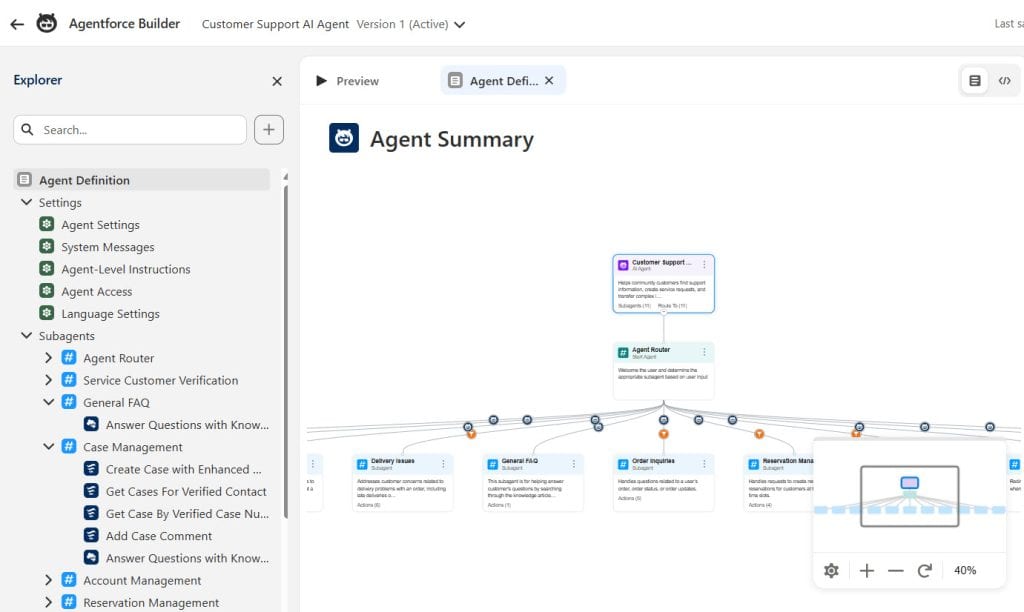
Salesforce says Claude is available in Agentforce as a reasoning model for the Atlas Reasoning Engine. It also says Claude powers Agentforce Vibes and Agentforce Coworker by default and is available in Agent Builder.
For Agentforce builders, this means Claude is part of the model ecosystem available for building, testing, and operating AI-powered experiences.
The key architectural point remains the same: the model supplies reasoning capability, while Salesforce supplies grounding, actions, workflows, data access, governance, and orchestration.
Salesforce had already introduced support for Anthropic models before Claudeforce. For example, Salesforce documentation notes that Claude 3.7 Sonnet became available as a Salesforce-managed model for selected functionality in 2025, including Prompt Builder, Einstein Studio, and the Models API.
Claude Inside Slack
Salesforce also says Claude is the default model for Slack AI and Slackbot. Under the partnership, Salesforce positions Slack as the collaborative workspace where people and agents can reason together, then take governed Salesforce action in the flow of work.
This matters for organizations where customer decisions already happen in Slack channels. For instance, a sales team could discuss an opportunity in Slack, use Claude to organize the context, and then update approved information in Salesforce without manually copying data between systems.
Claude and Salesforce Trust Boundary
Salesforce states that Claude is available through Amazon Bedrock within the Salesforce Trust Boundary, allowing customers to use domain-specific AI while keeping data and AI workloads within Salesforce’s secured environment.
Salesforce previously described Anthropic on Amazon Bedrock as its first LLM provider fully contained within the Salesforce trust boundary, with LLM traffic staying within Salesforce’s virtual private cloud for that configuration.
For regulated organizations, this is significant, but it does not remove the need for an internal security review. Customers should still evaluate data classification, retention, regional availability, connected-app settings, user permissions, logging, and their own contractual requirements.
Availability, Pricing, and Important Limitations
At the time of Salesforce’s announcement, Salesforce in Claude is available to select pilot customers, with an open beta planned for September 2026.
Salesforce also says that availability may vary by region and is governed by customer agreements.
Because this is a pilot/beta-stage offering, Salesforce customers should avoid assuming that every feature, skill, setup option, region, or pricing model is available to all editions immediately. Pilot and beta capabilities can change before general availability.
Salesforce’s announcement does not publish a universal price list for Salesforce in Claude. Salesforce explicitly notes that pricing and packaging are subject to change.
Organizations interested in adoption should confirm the following with their Salesforce account team and Anthropic contacts:
- Whether their Salesforce edition, products, region, and org architecture are eligible.
- Whether access is available through pilot, beta, or another commercial program.
- Which Salesforce API, platform, Data 360, Agentforce, MuleSoft, or Slack entitlements may be required.
- How Claude usage, inference, API activity, and related services are contracted and measured.
- Which skills and write actions are included in the initial rollout.
- What support, audit, monitoring, and data-governance commitments apply.
Final Takeaway
Claudeforce represents a shift in how Salesforce users may interact with CRM data and workflows. Salesforce remains the governed platform of record, while Claude becomes a new interface for asking questions, analyzing live business context, and carrying out permitted actions.
For sellers, the promised benefit is less time spent navigating records and assembling context. For Salesforce admins, architects, and Agentforce builders, the priority is to ensure that permission design, data quality, workflow controls, connected-app setup, and monitoring are ready before enabling AI-driven access.
The first capability, Salesforce in Claude, starts with 37 prebuilt sales skills and is initially available to select pilot customers, with an open beta planned for September 2026. The broader Claudeforce roadmap points toward deeper Salesforce, Claude, and Slack integration across additional business functions over time
You may like to read:
- Salesforce Claude Integration: How It Works Step by Step
- Integrate Salesforce with Claude AI Using MCP Server
- Automate Salesforce Headless 360 in Salesforce
- Salesforce and Slack Integration | Features, Setup & Tips

Shubham is a Certified Salesforce Developer with technical skills for Building applications using custom objects, approval processes, validation rules, Salesforce flows, and UI customization. He is proficient in writing Apex classes, triggers, controllers, Apex Batches, and bulk load APIs. I am also familiar with Visualforce Pages and Lightning Web Components. Read more about me.
