
If you are learning Salesforce or working as an Admin, Consultant, or Developer, you will hear the term “Sales Cloud” again and again.
But what exactly is Sales Cloud?
- Is it a different software?
- Is it just leads and opportunities?
- Why do companies pay so much for it?
Don’t worry
In this article, I will explain everything about Sales Cloud in Salesforce. It’s key features, benefits, and how it helps businesses grow faster with practical examples.
What is Sales Cloud in Salesforce?
Sales Cloud is a Salesforce product that helps companies manage their entire sales process in one single system.
It is specifically designed for sales teams to track potential customers, manage deals, and close sales in a structured, organized way.
In simple words, Sales Cloud helps businesses:
- Capture new leads
- Convert leads into customers
- Manage sales opportunities
- Track revenue
- Monitor team performance
Before using Sales Cloud, many companies used Excel sheets, emails, and manual records to manage sales.
Sometimes follow-ups were missed. Managers did not have a clear idea of how much revenue was coming in.
Sales Cloud solves all these problems by consolidating everything into a single, centralized system.
All customer information, sales activities, and deal stages are stored in one place, which makes it easier to manage and track.
Why Do Companies Use Sales Cloud?
Let us understand this with a simple real-life example.
Imagine a company that sells software services. Every day, they receive inquiries from various sources, such as website forms, phone calls, emails, and referrals.
Now, if they manage all these inquiries in Excel sheets, it becomes difficult to track who contacted whom, what was discussed, and what the next step is.
Over time, confusion increases. Some customers do not receive follow-ups. Some deals are forgotten. Managers cannot clearly see the actual pipeline.
Now imagine the same company using Sales Cloud.
Every inquiry automatically becomes a Lead in Salesforce. Leads are assigned to sales representatives. Each sales rep updates the status after speaking to the customer.
When the customer shows serious interest, the lead is converted into an Opportunity. Managers can see all deals in the pipeline and forecast expected revenue.
Core Components of Sales Cloud in Salesforce
Now, let us understand the most important part the core components of Sales Cloud. These are the main building blocks that help companies easily manage their entire sales process.
1. Lead Management in Salesforce
A Lead represents a person or company that has shown some interest in your product or service, but you have not yet qualified them as a confirmed customer.
For example:
- Someone fills out a contact form on your website.
- Someone downloads your ebook.
- Someone calls your company to ask for pricing.
Sales Cloud allows you to:
- Capture leads automatically from your website using Web-to-Lead.
- Import leads from Excel files.
- Create leads manually if someone calls you.
- Assign leads to specific sales representatives.
- Track the status of each lead.
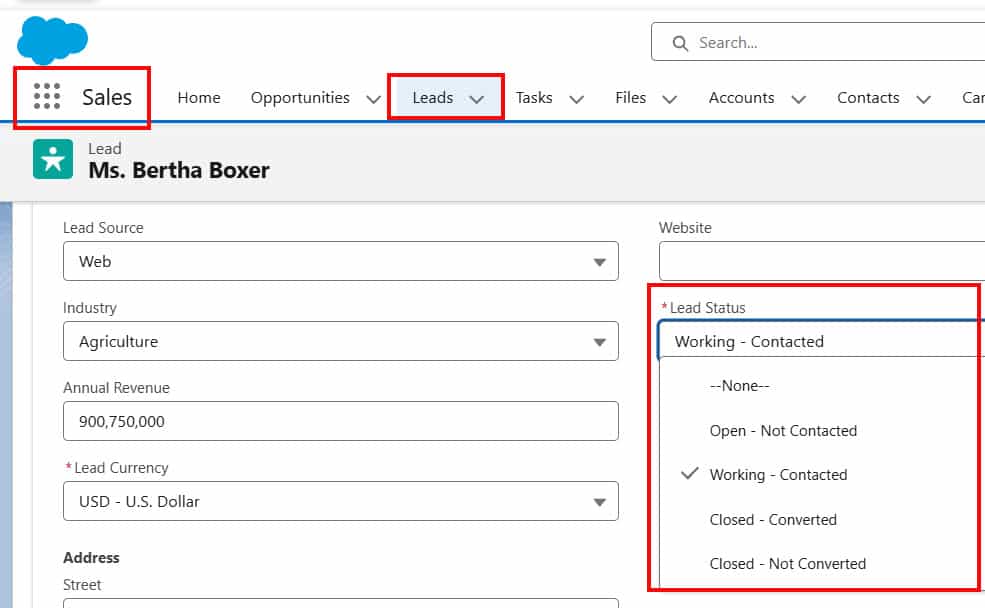
Lead Status is very important. It tells you where the lead stands. For example:
- New (just received)
- Working (sales rep is contacting them)
- Qualified (interested in buying)
- Unqualified (not interested)
This structured tracking ensures that no inquiry is forgotten. Every potential customer is properly followed up with.
You can assign leads to specific sales representatives and track their progress using lead status, such as New, Working, Qualified, or Closed.
2. Lead Conversion in Salesforce
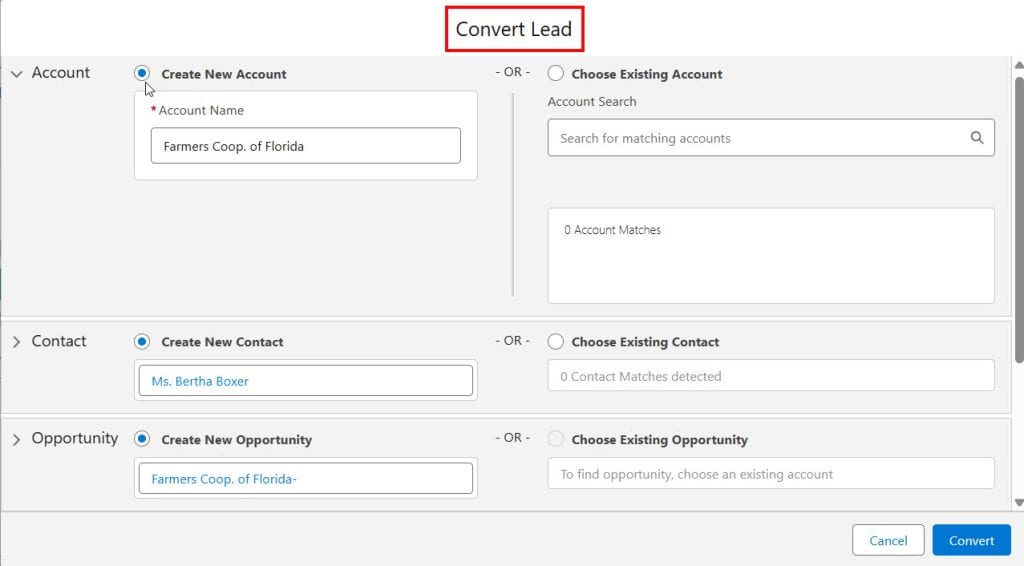
Lead conversion is the process of turning a potential customer into a real business opportunity.
When a sales representative talks to a lead and confirms that the lead is genuinely interested in purchasing, the lead is converted.
During conversion, Salesforce automatically creates three important records:
- Account – The company name
- Contact – The person you are dealing with
- Opportunity – The potential deal
This automation saves time and prevents duplicate data entry. You do not have to manually create Accounts, Contacts, and Opportunities one by one.
For example, if Alex from ABC Technologies is interested in buying software worth ₹5 lakhs, when you convert the lead:
- ABC Technologies becomes the Account
- Alex becomes the Contact
- The ₹5 lakh deal becomes the Opportunity
This entire process takes just a few clicks and saves a lot of manual work. You do not have to re-enter the same data.
3. Account Management in Salesforce
This is the standard object for storing the company or organization information with which you are doing business.
For example:
- ABC Pvt Ltd
- XYZ Solutions
- Global Tech Services
The Account record stores all important company-level information, such as:
- Company name
- Industry
- Phone number
- Billing and shipping address
- Website
But that is not all.
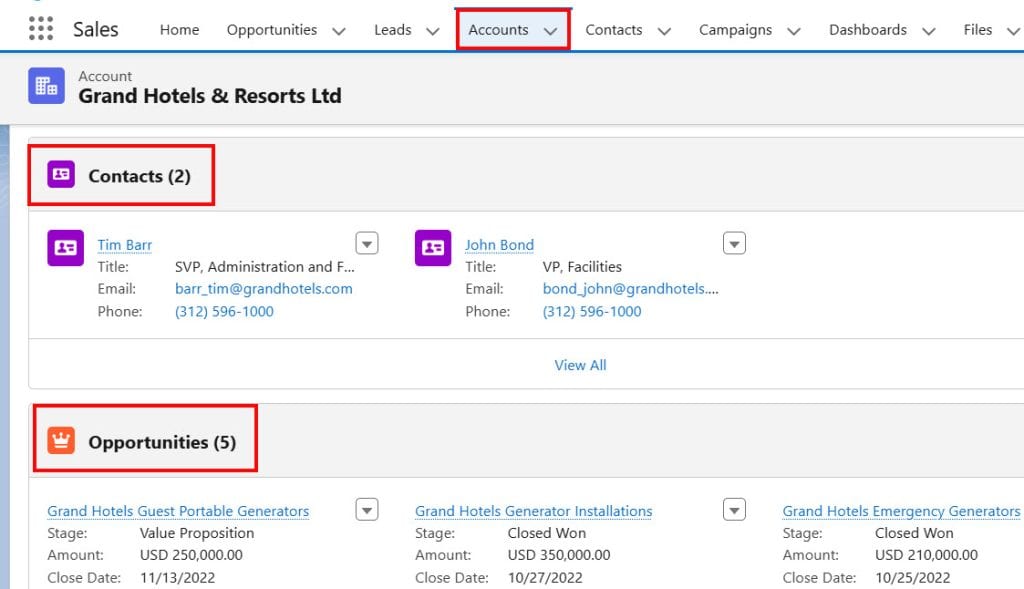
The real power of account management is that it connects everything related to that company in one place. Inside an Account record, you can see:
- All contacts working in that company
- All opportunities linked to that company
- All activities (calls, meetings, emails)
- Cases (if Service Cloud is used)
The Account record stores important information like company name, address, industry, phone number, and related contacts. It also shows all related opportunities and activities linked to that company.
4. Contact Management in Salesforce
A Contact represents an individual person associated with an Account. In this object, we can store information about the persons associated with the accounts (companies).
For example:
- Alice Black, Sales Manager at ABC Technologies
- Basil Wenceslas, Director at XYZ Software
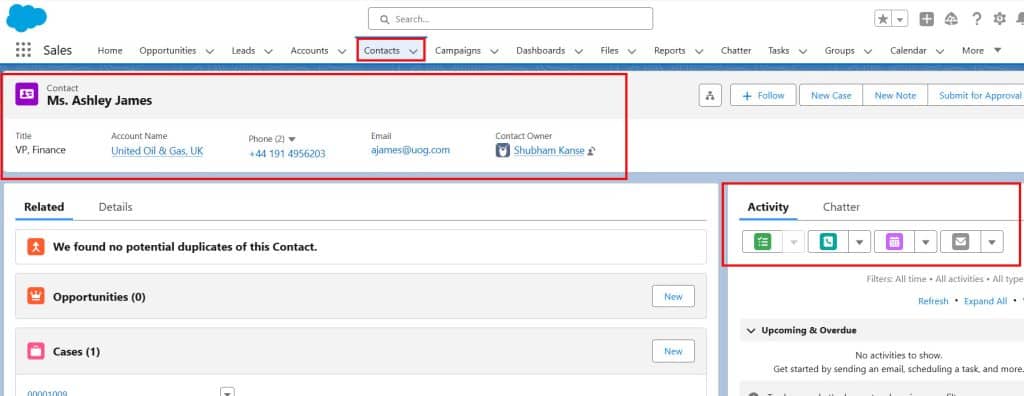
Each contact record stores:
- Email address
- Phone number
- Job title
- Department
- Communication history
The most useful part is the Activity Timeline. It shows:
- Calls made
- Meetings scheduled
- Emails sent
- Notes added
The Contact record stores email addresses, phone numbers, designations, and activity history, such as calls and meetings.
5. Opportunity Management in Salesforce
Opportunity is where the actual deal is tracked. They help sales teams monitor progress and increase chances of closing sales.
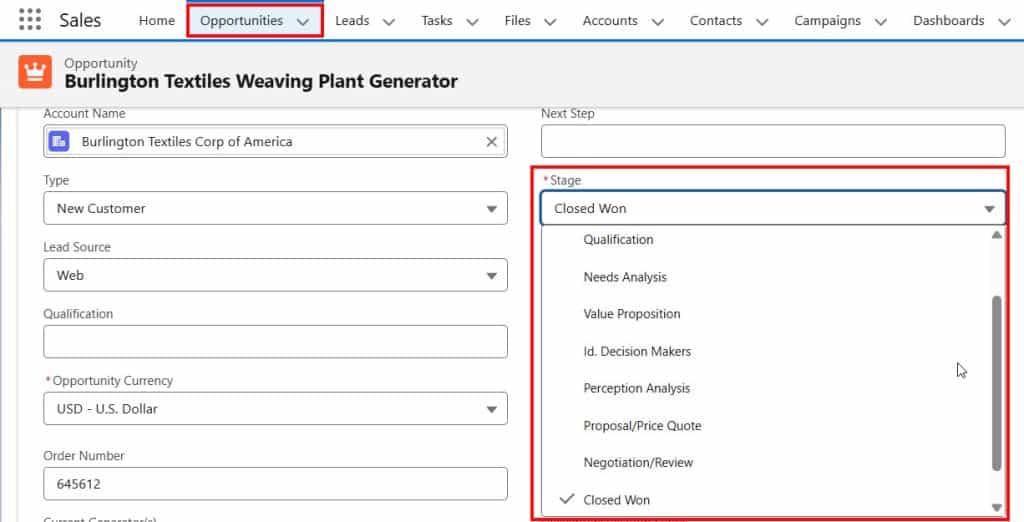
Opportunities in Salesforce are deals in progress. They represent potential sales and track key details for each deal, including the account involved, key players, and potential sale amounts.
When a lead is converted, and the customer is interested in buying, an Opportunity is created. This represents potential revenue.
Each opportunity includes:
- Opportunity Name
- Amount
- Close Date
- Stage (Prospecting, Proposal, Negotiation, Closed Won, Closed Lost)
- Probability
6. Sales Pipeline and Kanban View in Salesforce
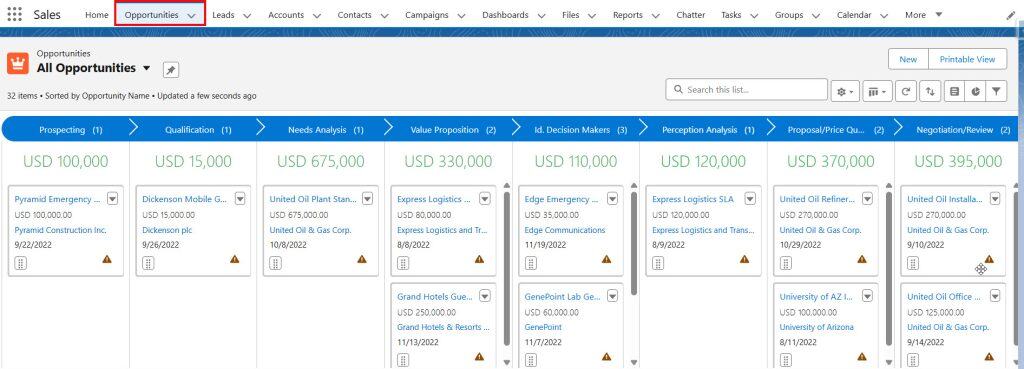
The sales pipeline shows all open opportunities grouped by stage. This helps sales managers understand the revenue expected in the coming weeks or months.
The Kanban view makes this even more visual. You can drag and drop opportunities from one stage to another.
7. Reports and Dashboards in Salesforce
Salesforce reports are customizable lists or summaries of data that can be presented in various formats.
These reports allow you to analyze your data, track performance metrics, and make informed decisions.
As a Salesforce developer or administrator, you should know how to work with reports and dashboards in Salesforce.
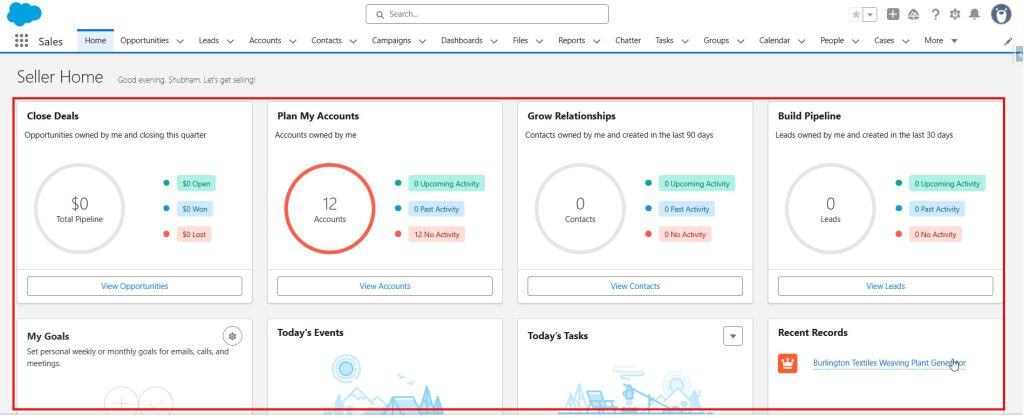
Salesforce dashboards visually represent your reports, providing a snapshot of your key metrics and performance indicators.
Dashboards consist of multiple components, such as charts, tables, and gauges, that display data from your reports in an easy-to-understand format.
Salesforce allows you to create reports to analyze data. For example, you can create reports to see:
- Total pipeline value
- Opportunities closing this month
- Revenue by sales rep
- Closed won deals
Dashboards convert reports into visual charts and graphs.
Conclusion
I hope you have a good idea of Sales Cloud in Salesforce. Sales Cloud is not just a CRM tool. It is a complete sales management system that helps companies increase productivity, improve visibility, and grow revenue in a structured way.
You may like to read:
- Create Custom Objects in Salesforce
- Set Up Data Cloud in Salesforce Agentforce
- Comparison Between Oracle Sales vs Salesforce Sales Cloud
- Salesforce Service Cloud vs Zendesk

Shubham is a Certified Salesforce Developer with technical skills for Building applications using custom objects, approval processes, validation rules, Salesforce flows, and UI customization. He is proficient in writing Apex classes, triggers, controllers, Apex Batches, and bulk load APIs. I am also familiar with Visualforce Pages and Lightning Web Components. Read more about me.