
If you’ve been working with Salesforce recently, you’ve probably heard about Agentforce. It’s one of the most talked-about Salesforce innovations because it helps businesses automate tasks and provide faster support using AI-powered agents.
Many Salesforce teams face common challenges every day:
- Support agents spend a lot of time answering repetitive customer questions.
- Sales reps spend valuable time updating records, creating follow-up tasks, and searching for information instead of selling.
- Employees often struggle to find company information and end up sending emails or messages to multiple people for help.
Agentforce is not a one-click solution that fixes everything instantly. However, when implemented correctly, it can automate routine work, provide quick answers, and help teams become more productive.
In this article, we’ll look at practical Agentforce use cases across three key business areas: Sales, Service, and Employee Support. For each use case, we’ll cover:
- The business challenge organizations commonly face.
- How Agentforce helps solve the problem.
- What the solution looks like inside Salesforce.
Let’s get started.
What is Agentforce and Why Does it Matter?
Before jumping into use cases, let me quickly explain what Agentforce actually is — in plain terms. What is Agentforce?
Agentforce is Salesforce’s AI agent platform that helps users complete tasks using natural language. It works with your Salesforce data, business processes, and automation tools to answer questions and perform actions.
Instead of manually opening records, searching for information, and completing tasks, users can simply ask an Agentforce agent what they need. The agent understands the request, gathers the required information, and performs the appropriate actions.
What makes Agentforce different from a traditional chatbot is that it can take action, not just provide answers.
For example, a basic chatbot might tell a customer that their order has been delayed. An Agentforce agent can go further by checking the order details, identifying the reason for the delay, creating a support case if needed, sending a notification, and updating Salesforce records—all within the same conversation.
Agentforce works using several key components:
Topics – Define the business tasks or areas that the agent can handle, such as checking order status, qualifying leads, or submitting leave requests.
Actions – The operations that the agent can perform, such as creating records, updating records, retrieving data, sending emails, or launching Salesforce Flows.
Instructions – Rules and guidelines that tell the agent how to respond, what information to provide, and when to transfer the conversation to a human user.
Prompt Templates – Reusable prompts that help generate consistent and relevant responses using Salesforce data and context.
Now that you understand the basics of Agentforce, let’s explore some real-world use cases for Sales, Service, and Employee Support.
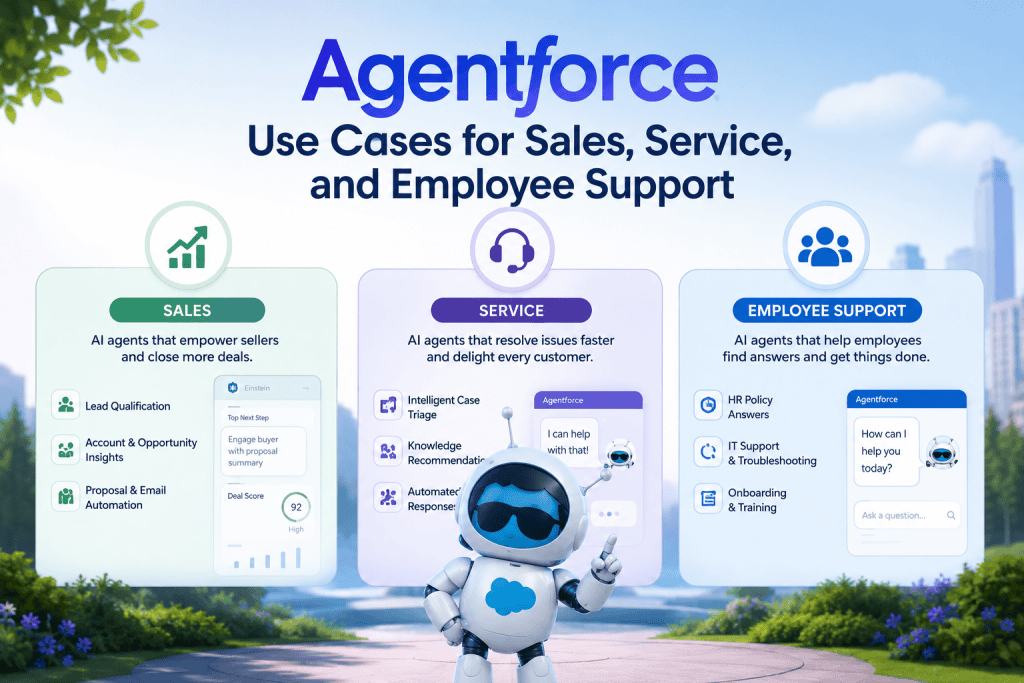
Agentforce Use Cases for Sales
Sales is one of the areas where Agentforce can deliver quick and noticeable benefits. Many sales reps spend a significant portion of their day on administrative tasks rather than selling.
Updating Salesforce records, writing follow-up emails, reviewing leads, and deciding the next best action can take up valuable time.
Agentforce helps reduce this manual work by automating routine tasks and providing intelligent assistance directly within Salesforce. This allows sales reps to spend more time building customer relationships, following up on opportunities, and closing deals.
Let’s look at some common sales use cases where Agentforce can help improve productivity and efficiency.
Use Case 1: Lead Qualification and Assignment
The Problem
Sales teams often receive leads from web forms, marketing campaigns, events, and third-party integrations. As the number of leads grows, it becomes difficult for sales reps to determine which leads to contact first.
Without a structured qualification process, reps may spend time on low-quality leads while missing high-potential opportunities.
How Agentforce Helps
Agentforce can help automate the lead qualification process by evaluating new leads against your organization’s business rules.
For example, when a new lead is created, Agentforce can review information such as:
- Industry
- Company size
- Job title
- Lead source
- Website activity and engagement
- Marketing campaign interactions
Based on the qualification criteria, Agentforce can determine the appropriate next steps.
If the lead meets the qualification requirements, Agentforce can:
- Update the Lead Status to Qualified
- Assign the lead to the appropriate sales rep or queue
- Create a follow-up task for the sales rep
- Generate a summary of the lead and notify the assigned rep
If the lead does not meet the qualification criteria, Agentforce can:
- Update the Lead Status to Nurture
- Add the lead to a marketing nurture campaign
- Record the qualification results for future reference
What This Looks Like in Your Salesforce Org
A typical implementation might include:
- An Agentforce topic called Lead Qualification
- Agent actions that retrieve and evaluate lead information
- Salesforce Flows that update records, assign ownership, and create tasks
- Prompt Templates that generate lead summaries and recommendations for sales reps
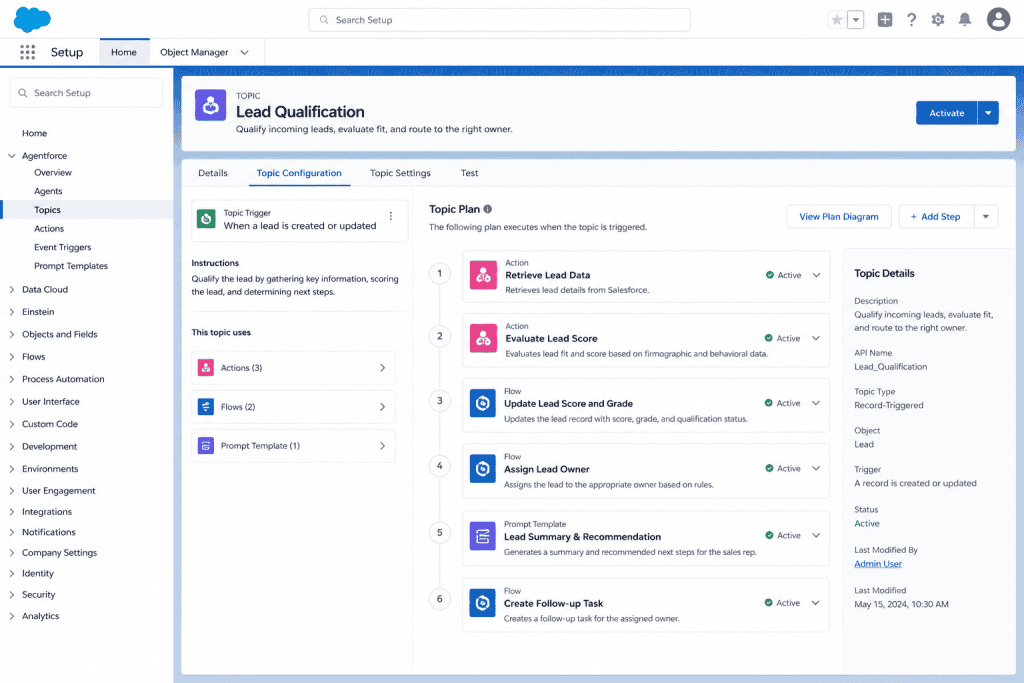
By automating lead qualification and assignment, sales teams can focus on high-value opportunities while ensuring every lead follows the correct process.
Use Case 2: Opportunity Follow-Up and Pipeline Management
The Problem
One of the biggest challenges for sales teams is managing open opportunities effectively. As the number of opportunities grows, it becomes difficult for sales reps to track which deals need attention and which ones are at risk of stalling.
For example, an opportunity may remain in the same stage for several days without any follow-up activity, increasing the chances of losing the deal. Reps with a large pipeline often spend time reviewing records manually to identify their next priorities.
How Agentforce Helps
Agentforce can continuously monitor open opportunities and identify deals that may require immediate attention.
For example, Agentforce can review opportunities where:
- The Opportunity Stage has not changed in the last 7 days
- No activities have been logged in the last 5 days
- The Close Date is approaching within the next 30 days
When an opportunity meets these conditions, Agentforce can:
- Create a follow-up task for the opportunity owner
- Generate a personalized follow-up email draft based on opportunity details and previous interactions
- Update a custom field, such as Needs Attention, to help reps prioritize their work
- Provide recommendations on the next best action
When the sales rep logs in to Salesforce, they can quickly see which opportunities require attention, rather than manually reviewing their entire pipeline.
Organizations can extend this process further by adding additional automation. For example:
- Notify the sales manager when an opportunity remains inactive for an extended period
- Flag opportunities where the Close Date has passed
- Trigger a Flow to update fields, create tasks, or start approval processes based on business requirements
What This Looks Like in Your Salesforce Org
A typical implementation might include:
- An Agentforce topic called Opportunity Management
- Agent actions that retrieve opportunity and activity data
- Salesforce Flows that create tasks, send notifications, and update opportunity records
- Prompt Templates that generate personalized follow-up emails and next-step recommendations
Example Follow-Up Email Generated by Agentforce
Hi Sarah,
I wanted to follow up regarding our recent discussion about your CRM implementation project. I wanted to check whether you have any questions about the proposal or any additional information that would help your team move forward.
If helpful, we can schedule a quick call this week to discuss the next steps.
Thank you,
Sales Team
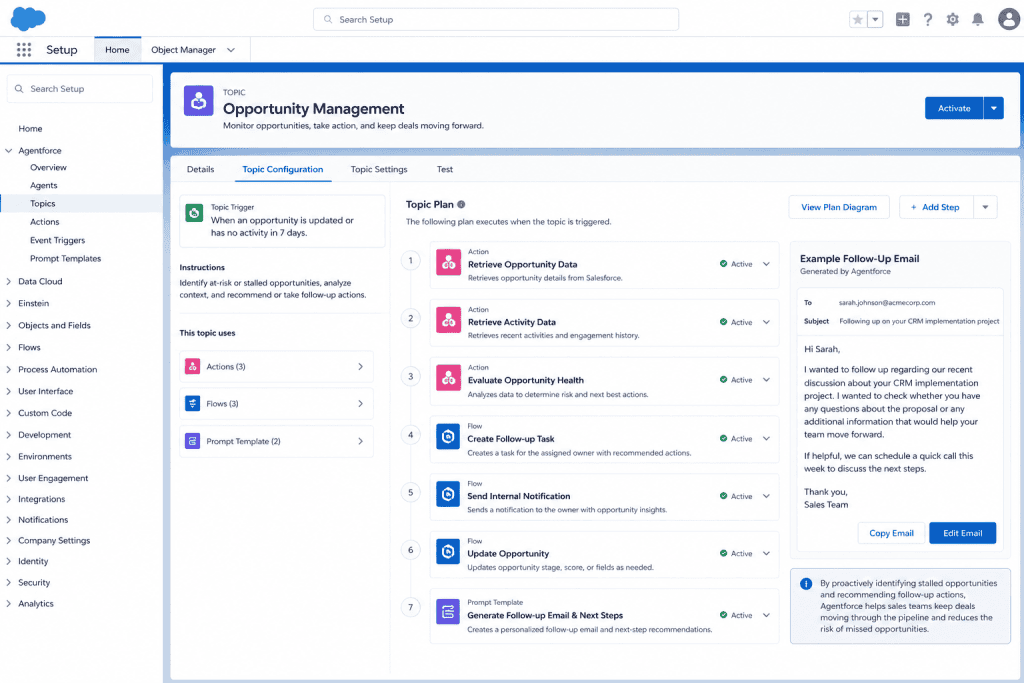
By proactively identifying stalled opportunities and recommending follow-up actions, Agentforce helps sales teams keep deals moving through the pipeline and reduces the risk of missed opportunities.
Use Case 3: Quote Generation and Proposal Assistance
The Problem
Creating quotes can be a time-consuming process for sales reps. They often need to review products, check pricing, apply discounts, prepare a proposal, and ensure all information is accurate before sending it to the customer.
When reps perform these tasks manually for every opportunity, valuable selling time is lost.
How Agentforce Helps
Agentforce can assist sales reps by automating many aspects of the quote-creation process.
For example, a sales rep can ask:
“Generate a quote for Acme Corp for 50 Sales Cloud Professional licenses with a 12-month subscription.”
Agentforce can then:
- Retrieve product and pricing information from Salesforce CPQ or Revenue Cloud
- Apply predefined pricing rules and discounts
- Create a Quote record in Salesforce
- Generate a personalized proposal summary or cover message
- Present the quote for review before it is shared with the customer
The entire process can be completed in a few minutes instead of requiring multiple manual steps.
Agentforce can also provide additional recommendations, such as:
- Identifying discounts that require approval
- Suggesting complementary products based on existing product selections
- Highlighting pricing or configuration issues before the quote is sent
What This Looks Like in Your Salesforce Org
A typical implementation might include:
- An Agentforce topic called Quote Generation
- Agent actions that retrieve product, pricing, and quote information
- Salesforce CPQ or Revenue Cloud integration
- Salesforce Flows for approvals and quote-related automation
- Prompt Templates that generate proposal summaries and customer-facing messages
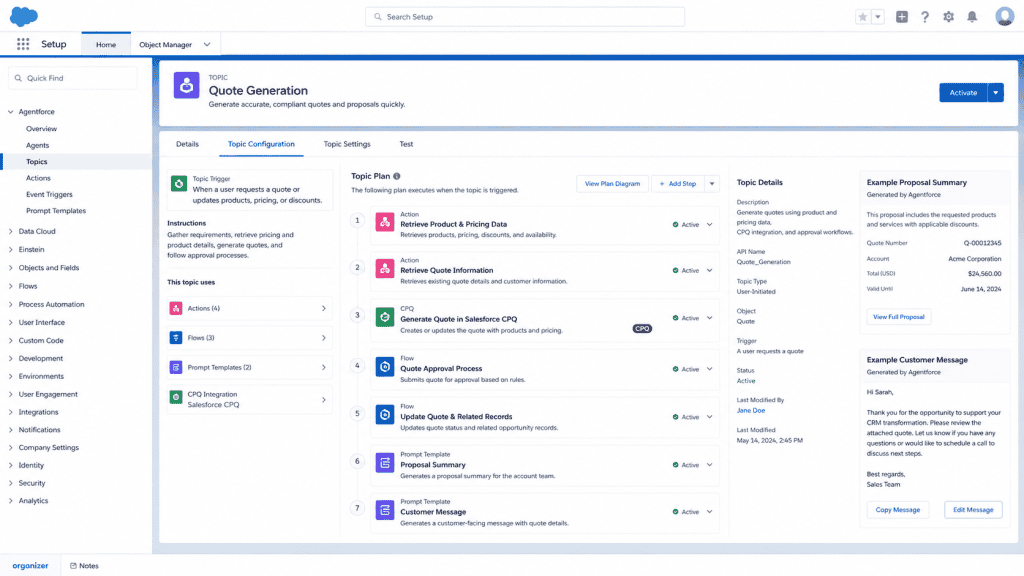
By automating quote preparation, sales reps can respond to customers faster and spend more time focusing on sales conversations.
Agentforce Use Cases for Service
Customer Service is one of the areas where Agentforce can deliver significant value. Support teams often handle numerous repetitive requests each day, such as checking order status, resetting passwords, updating account information, or answering common questions.
These requests are usually straightforward, but they consume a considerable amount of an agent’s time. As support volumes increase, response times may lengthen, and service teams may struggle to focus on more complex customer issues.
Agentforce helps by handling routine customer requests, providing quick answers, retrieving information from Salesforce, and performing actions when needed. This allows service agents to spend more time resolving complex cases that require human expertise.
Let’s look at some common service use cases where Agentforce can improve customer experience and increase support team efficiency.
Use Case 1: 24/7 Customer Self-Service Support
The Problem
Many support teams receive more customer requests than they can handle during business hours. Customers, however, expect quick answers regardless of the time of day.
As a result, support teams often face challenges such as:
- Long case queues
- Increased response times
- Repetitive customer inquiries
- Reduced agent productivity
This can lead to a poor customer experience and put additional pressure on support agents.
How Agentforce Helps
Agentforce Service Agent can provide customer support around the clock by handling common requests without requiring a human agent.
The agent can be deployed through:
- Experience Cloud sites or customer portals
- Website chat
- Messaging channels
- Mobile applications
When a customer asks a question, Agentforce can understand the request, retrieve information from Salesforce, and provide an appropriate response.
For example:
Customer: Where is my order? I placed it three days ago.
Agentforce: I can help with that. Please provide your order number or the email address associated with the order.
Customer: Order 98765.
Agentforce: Your order is currently in transit and is expected to be delivered on Thursday. You can track your shipment using the tracking information provided in your order confirmation.
In this scenario, Agentforce can:
- Understand the customer’s intent
- Retrieve order information from Salesforce or connected systems
- Provide delivery details
- Answer follow-up questions
- Continue the conversation naturally
Agentforce can also perform actions when appropriate.
For example, if a customer wants to cancel an order, Agentforce can:
- Verify whether the order is eligible for cancellation
- Initiate the cancellation process through a Flow or connected system
- Update Salesforce records
- Create a Case and transfer the conversation to a service agent when human assistance is required
What This Looks Like in Your Salesforce Org
A typical implementation might include:
- An Agentforce topic called Order Support
- Agent actions that retrieve order and shipment information
- Salesforce Flows that process cancellations and service requests
- Integrations with order management and shipping systems
- Prompt Templates that generate customer-friendly responses

By automating common customer requests, Agentforce helps reduce case volume, improve response times, and allows support agents to focus on more complex customer issues.
Use Case 2: Intelligent Case Classification and Routing
The Problem
As support requests increase, service teams often spend a significant amount of time reviewing and routing incoming cases.
For every new case, someone needs to determine:
- What issue is the customer reporting
- How urgent the issue is
- Which support team should handle it
When this process is performed manually, cases can be assigned to the wrong queue, response times can increase, and customers may be transferred between multiple teams before reaching the right person.
How Agentforce Helps
Agentforce can automatically review incoming cases and help classify and route them to the appropriate team.
When a case is created, Agentforce can analyze the case subject, description, and other available information to understand the customer’s issue.
Based on predefined business rules, Agentforce can:
- Categorize the case
- Set fields such as Priority, Type, and Category
- Assign the case to the appropriate queue or owner
- Generate customer acknowledgment messages
- Recommend next steps for support agents
For example:
Case Subject: Can’t log in after password reset
Case Description: I reset my password yesterday, but I still can’t access my account. I’ve tried several times without success.
Agentforce can:
- Identify the issue as an Authentication or Login Problem
- Set the case priority based on business rules
- Assign the case to the appropriate support queue
- Create follow-up tasks for the support team
- Send an acknowledgment email confirming that the request has been received
The customer receives a quick response, while the support team receives a properly classified case with relevant information already populated.
What This Looks Like in Your Salesforce Org
A typical implementation might include:
- An Agentforce topic called Case Classification
- Agent actions that review case details
- Salesforce Flows that assign queues, update fields, and create follow-up tasks
- Assignment Rules and Omni-Channel routing configurations
- Prompt Templates that generate customer acknowledgment messages
For example, Agentforce might:
- Route billing questions to the Finance Support Queue
- Route product issues to the Technical Support Queue
- Escalate critical incidents to a high-priority support team
- Create tasks for troubleshooting steps based on the issue type
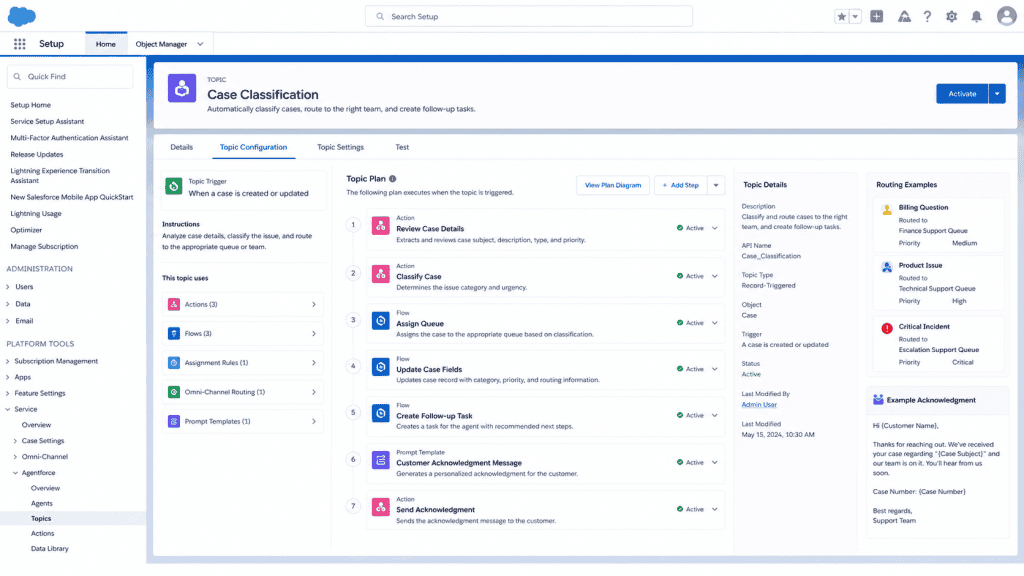
By automating case classification and routing, organizations can reduce manual effort, improve response times, and ensure cases reach the right team faster.
Use Case 3: Knowledge-Based Customer Support
The Problem
Support teams spend a large amount of time answering the same questions repeatedly. Common inquiries about products, policies, account management, and troubleshooting steps often require agents to search Knowledge articles and manually provide answers to customers.
This reduces efficiency and limits the time agents can spend on more complex issues.
How Agentforce Helps
Agentforce can use Salesforce Knowledge as a trusted source of information when responding to customer questions.
When a customer asks a question, Agentforce can:
- Search relevant Knowledge articles
- Retrieve the most appropriate information
- Generate a clear and easy-to-understand response
- Provide links to related resources when needed
For example:
Customer: Does your software support macOS?
Agentforce: Yes, our software supports macOS versions. You can find installation instructions and download information in our setup guide.
Instead of sending customers a list of articles, Agentforce can provide a direct answer while still using approved Knowledge content.
Agentforce can also:
- Recommend related Knowledge articles
- Escalate conversations when no suitable answer is available
- Track which articles are most frequently used
- Help identify gaps in the Knowledge base
What This Looks Like in Your Salesforce Org
A typical implementation might include:
- An Agentforce topic called Knowledge Support
- Salesforce Knowledge articles are the grounding source
- Agent actions that retrieve Knowledge content
- Prompt Templates that generate customer-friendly responses
- Escalation paths for unanswered questions
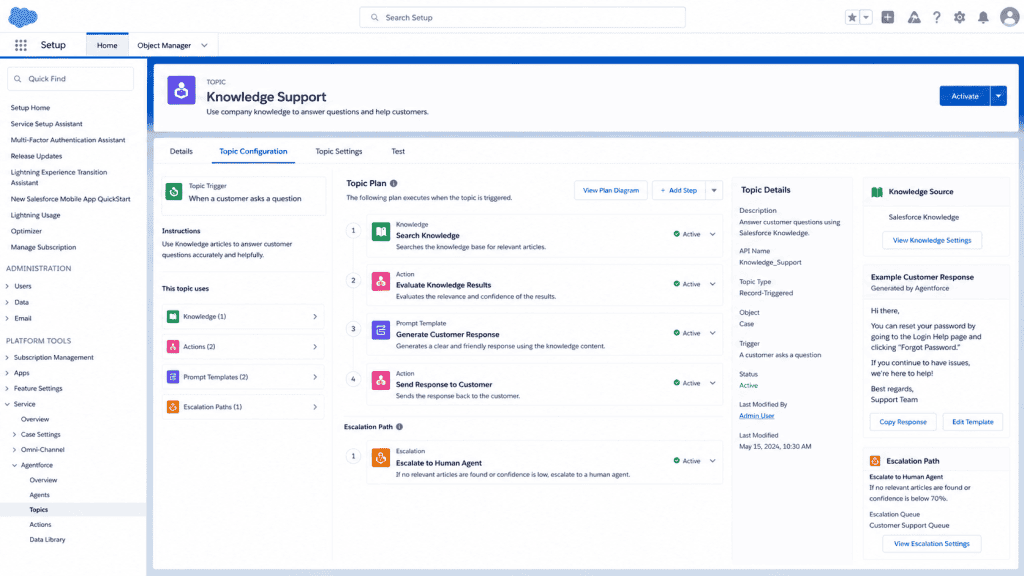
By using Salesforce Knowledge with Agentforce, organizations can deliver faster and more consistent support while reducing repetitive work for service agents.
Want to build Agentforce agents yourself? Learn how to create topics, actions, prompt templates, and real-world Agentforce solutions with my live, hands-on training course. Enroll now: https://salesforcefaqs.com/agentforce-live-training/
Agentforce Use Cases for Employee Support
Agentforce is not only useful for customer-facing experiences. Many organizations also use Agentforce internally to help employees complete tasks, find information, and get answers faster.
Employees often spend a significant amount of time searching for documents, submitting requests, or contacting internal teams for routine questions. Agentforce can help automate these processes and provide instant assistance directly within Salesforce or other connected systems.
In many cases, internal Agentforce implementations can deliver a strong return on investment by reducing manual work, improving employee productivity, and enabling support teams to focus on more complex requests.
The following use cases illustrate how Agentforce can support employees across departments within an organization.
Use Case 1: IT Help Desk and Employee Self-Service
The Problem
IT teams receive a large number of routine support requests every day. Common tasks such as password resets, software access requests, account unlocks, and device setup often require manual effort, even though the process is usually straightforward.
As the number of employees grows, IT teams can spend a significant amount of time handling repetitive requests instead of focusing on higher-priority projects and technical issues.
How Agentforce Helps
Agentforce can act as an internal IT support assistant, helping employees resolve common issues without requiring direct involvement from the IT team.
For example, an employee might ask:
“I need to reset my Salesforce password.”
Agentforce can:
- Identify the request type
- Provide self-service instructions
- Trigger approved automation when available
- Confirm that the request has been completed
Similarly, if an employee requests access to a business application, Agentforce can:
- Collect the required information
- Create or update a support request
- Route the request to the appropriate approval process
- Notify the employee about the request status
Agentforce can also provide step-by-step guidance for common IT procedures, helping employees solve problems faster without opening a support ticket.
Common IT support processes that can be automated include:
- Password reset assistance
- Software and application access requests
- Account unlock requests
- Hardware and equipment requests
- VPN setup guidance
- Device configuration instructions
- Security incident reporting
- New employee IT onboarding requests
What This Looks Like in Your Salesforce Org
A typical implementation might include:
- An Agentforce topic called IT Support
- Agent actions for handling common IT requests
- Salesforce Flows that automate request creation and approvals
- Integrations with identity management or IT service systems
- Prompt Templates that generate employee-friendly responses
- Service Cloud or custom objects for tracking IT requests
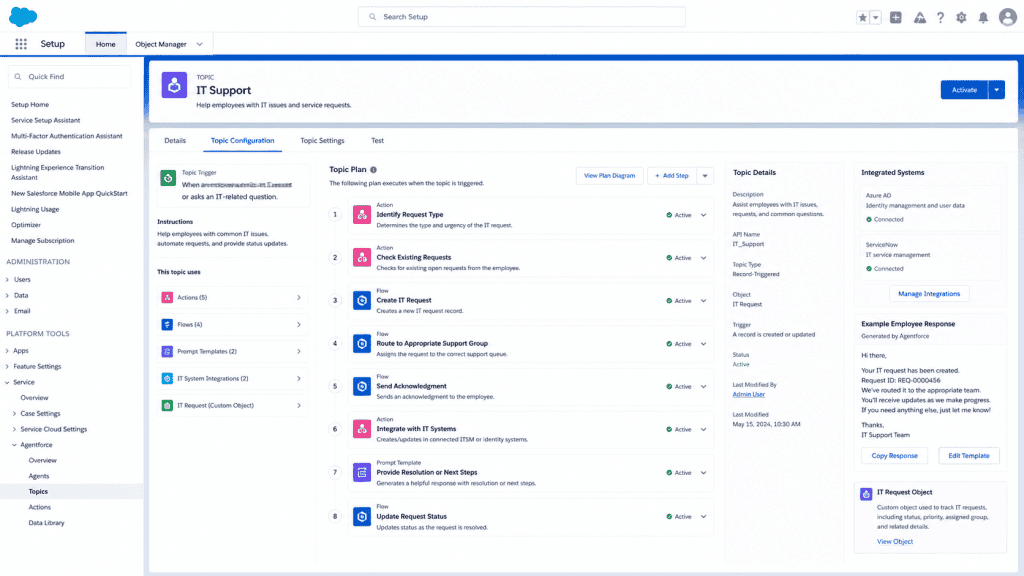
By automating routine IT support tasks, Agentforce can reduce ticket volume, improve response times, and allow IT teams to focus on more complex and strategic work.
Use Case 2: HR Support and Employee Assistance
The Problem
HR teams spend a significant amount of time answering repetitive employee questions. Common requests such as leave balances, company policies, expense claims, benefits information, and onboarding guidance are asked repeatedly by employees across the organization.
Although these questions are usually straightforward, they can create a large administrative workload for HR teams and may lead to inconsistent responses when employees receive information from different sources.
How Agentforce Helps
Agentforce can serve as an internal HR assistant by providing employees with quick access to information and helping them complete common HR-related tasks.
When connected to approved HR systems, knowledge articles, and business processes, Agentforce can:
- Answer questions about company policies
- Retrieve employee-specific information when appropriate
- Guide employees through HR processes
- Create and track HR-related requests
- Route requests for approval when needed
For example, an employee might ask:
“How many leave days do I have remaining?”
Agentforce can retrieve the employee’s leave balance from the connected HR system and provide the information directly.
The employee can then request leave, and Agentforce can:
- Capture the leave dates
- Create a leave request
- Submit it for manager approval
- Notify the employee about the request status
Similarly, employees can ask questions such as:
- What is the work-from-home policy?
- How do I submit an expense claim?
- What benefits am I eligible for?
- What is the parental leave process?
Instead of searching through documents or contacting HR, employees can receive accurate and consistent answers through a conversational experience.
Additional HR processes that can be supported include:
- Leave request management
- Expense claim submissions
- Policy and compliance questions
- Employee onboarding activities
- Benefits enrollment guidance
- Training and learning recommendations
- Employee document requests
What This Looks Like in Your Salesforce Org
A typical implementation might include:
- An Agentforce topic called HR Support
- Internal knowledge articles as a trusted information source
- Agent actions that retrieve employee information from connected systems
- Salesforce Flows for approvals and request management
- Prompt Templates that generate clear employee responses
- Integrations with HR, payroll, and employee management systems
By automating routine HR interactions, Agentforce can improve employee self-service, reduce administrative work for HR teams, and provide a more consistent employee experience.
Use Case 3: New Employee Onboarding Support
The Problem
Starting a new job can be challenging for new employees. During their first few days and weeks, they need to complete multiple tasks such as setting up accounts, accessing business applications, completing mandatory training, and learning company processes.
Without a structured onboarding experience, new hires often need to contact HR, IT, and managers repeatedly for assistance. This can create additional work for internal teams and lead to an inconsistent onboarding experience.
How Agentforce Helps
Agentforce can serve as a virtual onboarding assistant, guiding employees through their onboarding journey step by step.
The agent can:
- Provide personalized onboarding checklists
- Remind employees about required tasks and training
- Answer questions about company processes
- Help employees locate the right systems and resources
- Create support requests when access or equipment is missing
For example, Agentforce can welcome a new employee and provide a list of first-day tasks. As onboarding progresses, the agent can check task completion, share relevant resources, and help employees resolve common issues.
Employees can also ask questions such as:
- How do I submit an expense report?
- Where can I access company training materials?
- How do I request access to a business application?
- Who should I contact for a specific issue?
Instead of searching through documentation or contacting multiple teams, employees can receive guidance through a single conversational experience.
What This Looks Like in Your Salesforce Org
A typical implementation might include:
- An Agentforce topic called Employee Onboarding
- Salesforce Flows that track onboarding tasks and milestones
- Agent actions that create support requests or approvals
- Knowledge articles containing onboarding information
- Integrations with HR, learning management, and IT systems
- Prompt Templates that generate personalized onboarding guidance
By providing a guided onboarding experience, Agentforce can help new employees become productive faster while reducing the workload on HR and IT teams.
How to Decide Where to Start with Agentforce
After reviewing these use cases, the next question is often: Where should you start?
A practical approach is to begin with a simple, high-impact use case and expand from there.
Step 1: Identify Repetitive Business Processes
Look at the requests your teams handle most frequently.
Examples include:
- Customer support inquiries
- IT support requests
- HR questions
- Access requests
- Case status inquiries
Processes that occur frequently are often the best candidates for Agentforce.
Step 2: Choose Structured Processes
The best automation opportunities usually follow clear business rules.
For example:
- If a case is open, provide its status.
- If an employee requests access, route it for approval.
- If a customer asks a common question, retrieve the answer from Knowledge.
Processes that require complex judgment may still need human involvement.
Step 3: Review Your Salesforce Data
Most Agentforce implementations rely on Salesforce data and business processes.
Common Salesforce objects include:
- Lead
- Account
- Contact
- Opportunity
- Case
- Knowledge
- Custom Objects
If the required data already exists in Salesforce, implementation becomes much easier.
Step 4: Start Small
Instead of building a large agent with many responsibilities, begin with a single topic and a single business process.
For example:
- Check case status
- Submit an IT request
- Answer Knowledge-based questions
Once the initial use case is successful, additional topics and actions can be added gradually.
Step 5: Define Clear Instructions
Agent performance depends heavily on clear instructions and well-designed prompts.
Define:
- What the agent should do
- What information can it access
- When it should escalate to a human user
- How responses should be presented
Well-defined instructions help create a more reliable and consistent user experience.
Quick Summary of Agentforce Use Cases
Sales
- Lead qualification and assignment
- Opportunity follow-up and pipeline management
- Quote generation and proposal assistance
- AI-powered sales coaching
Service
- 24/7 customer self-service support
- Intelligent case classification and routing
- Proactive case updates and follow-up communication
- Knowledge-based customer support
- Consistent support across multiple channels
Employee Support
- IT help desk and employee self-service
- HR support and employee assistance
- New employee onboarding support
- Internal knowledge and compliance support
Conclusion
Agentforce enables organizations to automate repetitive tasks, provide faster support, and improve productivity across sales, service, and employee support teams.
Whether you are helping sales representatives manage opportunities, enabling customers to resolve issues faster, or supporting employees with internal requests, Agentforce can work alongside your existing Salesforce data, automation, and business processes.
Many of these use cases can be implemented using standard Salesforce capabilities such as Agent Builder, Flow, Prompt Builder, Salesforce Knowledge, and integrations with external systems.
The best approach is to start with a focused use case, deliver value quickly, and then expand your Agentforce implementation as your business needs grow.
You may like to read:
- Headless 360 in Salesforce [Complete Guide]
- Assign Data Library to Agentforce Agents in Salesforce
- How Agentforce Service Agent Greet by User Name in Salesforce
- 5 Real Business Problems You Can Solve with Agentforce

I am Bijay Kumar, the founder of SalesforceFAQs.com. Having over 10 years of experience working in salesforce technologies for clients across the world (Canada, Australia, United States, United Kingdom, New Zealand, etc.). I am a certified salesforce administrator and expert with experience in developing salesforce applications and projects. My goal is to make it easy for people to learn and use salesforce technologies by providing simple and easy-to-understand solutions. Check out the complete profile on About us.