
How to Get Record ID in LWC in Salesforce (Detailed Guide)
How to Get Record ID in LWC in Salesforce

When we build Lightning Web Components, getting the recordId is very important. We need it to fetch data, call Apex, show forms, or know which record the user is viewing. For example, imagine you add a Lightning Web Component to the Account record page. When a user opens any Account, the LWC should automatically show … Read more >>>

REVERSE() Function in Salesforce [Syntax & Real Examples]

REVERSE Function in Salesforce

In a company, order numbers are stored in a format like ORD-458921. The manager wants to create a short tracking code using only the last three digits of the order number. However, Salesforce formulas cannot directly read text from right to left. To solve this, you can use the REVERSE() function. First, reverse the order … Read more >>>

Get Record ID In Salesforce Lightning Web Component

Fetch record ID of current record in lightning web component

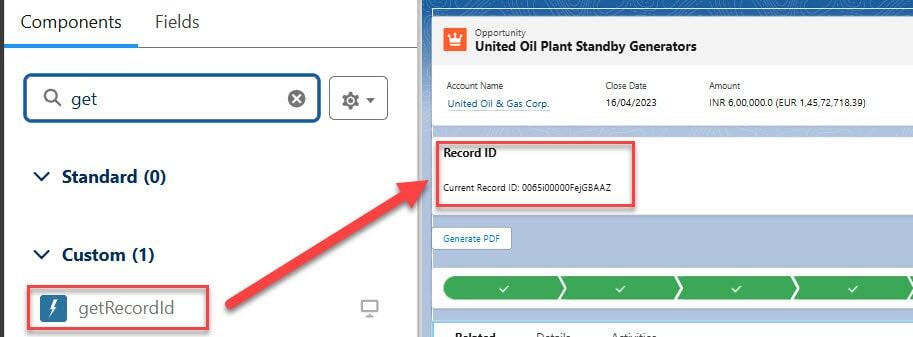
In Salesforce, record ID is a unique identifier for a Salesforce object record. To get or fetch the record ID in a Lightning Web Component, we need to add the component to the Lightning record page of that specific object. In this Salesforce tutorial, we will learn how to get record Id in Salesforce lightning web … Read more >>>

Salesforce Formula to Calculate Days Between Dates

Get Days between two Dates in Salesforce Classic

I was assigned a task at work that required me to calculate the number of days between two dates in Salesforce. To fulfill this requirement, I created a formula field and used an advanced formula to display the number of days. In this Salesforce Tutorial, we will learn the formula to calculate the number of … Read more >>>

Salesforce Last Activity Date Formula Explained

Salesforce Last Activity Date Formula

A sales manager wants to know when their team last contacted each customer. They need a field that displays the most recent activity, such as a call, meeting, or email, on the account. This helps them quickly find which customers have not been contacted recently and take follow-up action. I was assigned the task of … Read more >>>

How to Create a Free Customer Chatter User in Salesforce

Salesforce lightning setup free chatter user

I worked at a company that used Salesforce CRM to provide support their customers. Whenever customers faced any issue, they raised support cases in Salesforce. The client wanted customers to be able to check case updates, reply to the support team, and share screenshots or files related to their issues. At the same time, the … Read more >>>

TRIM() Function in Salesforce [Formula Syntax & Examples]

TRIM() Function in Salesforce

I saw that most of the time all the Salesforce developers face an error where the client enters inaccurate data that has lots of unnecessary spaces. Due to this, the user faces problems in searching, decision-making, inconsistent data entry, missed opportunities, etc. So, I decided to overcome this problem, I started searching and found that … Read more >>>

RIGHT() Function in Salesforce [Formula Syntax & Examples]

RIGHT() Function in Salesforce

While working as a Salesforce Administrator, I created a custom field to store the Account Number in the format ACC-IND-000123. Now, the sales team has requested a new field that displays only the last 6 digits (000123) of the account number for reporting and reference purposes. To meet this requirement, I created a formula field and … Read more >>>

Salesforce Merge Contacts | Merge Duplicate Contacts

how to merge contacts in salesforce

Dealing with huge amounts of data is a big problem, and this problem gets more serious when the same data is repeated multiple times, and we get clueless now with which data we work. This similar problem we commly face in Salesforce for the contact data. As a Salesforce consultant, I mostly get questions regarding … Read more >>>