
A support team I worked with wanted its Agentforce Service Agent to write consistent case-resolution responses.
The agent already had access to knowledge and customer data, but its replies varied too much. One reply was concise and useful; the next missed an important policy detail.
The fix was not adding more topic instructions. We created a focused Prompt Template in Prompt Builder, turned it into an Agent Action, and assigned that action to the right Agentforce topic.
This gave the agent a repeatable structure for generating responses while still using live Salesforce data.
In this guide, you will learn how to assign a Prompt Template action to Agentforce Agents in Salesforce, configure inputs and outputs, test the experience, and avoid common setup mistakes.
What Is a Prompt Template Action in Agentforce?
A Prompt Template is a reusable set of AI instructions that tells Salesforce what content to generate and how to generate it. It can include fixed instructions, merge fields, Salesforce record data, Flow outputs, and related data.
An Agent Action is a task that an Agentforce agent can perform. For example, an agent can search records, run a Flow, call Apex, retrieve knowledge, or invoke a Prompt Template.
When you assign a Prompt Template as an Agentforce action, you give the agent a controlled way to generate content for a specific business task. This is useful when the response needs a defined format, approved language, or Salesforce data.
For example, a customer service team that handles 500 cases each month can use a Prompt Template action to:
- Summarize an open case for a service representative
- Draft a policy-aligned response to a customer complaint
- Suggest next steps based on case priority and product type
- Create a concise handoff note when the AI transfers a conversation to a human agent
- Generate an account or opportunity summary for a sales team
The agent decides when the action fits the user’s request. The Prompt Template controls how the generated response should look.
Before you start, understand the difference between an Agentforce Topic and an Action. A topic defines the job or area of responsibility, such as “Customer Complaint Resolution.”
An action gives the agent a specific capability inside that topic, such as “Generate Complaint Resolution Options.”
If you are new to the overall architecture, review the building blocks of Agentforce agents before configuring your first action.
Why Assign a Prompt Template Action to Agentforce Agents?
A general agent instruction works well for broad conversations. However, I use a Prompt Template action when a client needs predictable, grounded, and reusable output.
For example, imagine a Service Cloud team that manages product-support cases. A customer writes:
“My replacement device arrived late, and I have already contacted support twice. What can you do?”
The agent needs more than a friendly reply. It must understand the customer’s case history, follow the company’s approved compensation rules, avoid promising unauthorized credits, and clearly tell the customer what happens next.
A Prompt Template action gives you control over that response.
It helps you:
- Keep response wording consistent across similar requests
- Ground outputs with Salesforce record data
- Apply clear business rules in one reusable location
- Reduce repeated instructions inside every Agentforce topic
- Improve testing because the prompt has a narrow, measurable purpose
- Separate AI content-generation logic from action-routing logic
You can also combine the action with Flow. For example, a Flow can find the customer’s recent cases, calculate entitlement status, and pass the results to the Prompt Template.
Learn how to invoke Flows from a Prompt Template when your prompt needs business logic or prepared data.
Create and Assign a Prompt Template Action to Agentforce Agents
Let us build a practical prompt for a customer support team. The goal is to help an Agentforce Service Agent generate a professional case-resolution response.
Set Up the Template Inputs
Create a new Field Generation Prompt Template and add these input resources:
| Input name | Data type | Purpose |
|---|---|---|
| CaseRecord | Case record or structured case data | Provides case subject, description, priority, status, and product details |
| CustomerName | Text | Personalizes the response |
| CaseHistory | Text | Supplies recent interaction details or prior support activity |
| ResolutionPolicy | Text | Provides approved policy or compensation guidance |
The exact input names can differ in your org. Use names that clearly explain the expected data because you will configure them again when creating the Agent Action.
For a more detailed record-summary use case, you can also review how to create an Agentforce record summary Prompt Template.
Add Clear Prompt Instructions
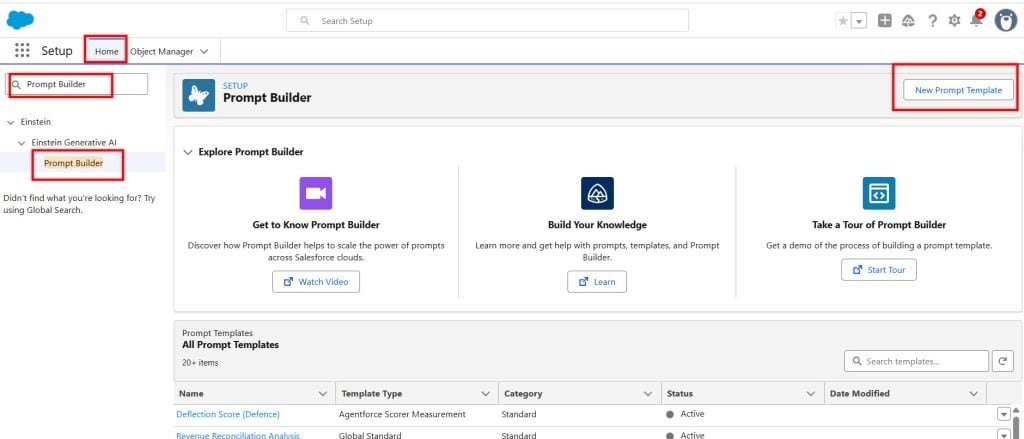
On the setup page, search for Prompt Builder in Quick Find.
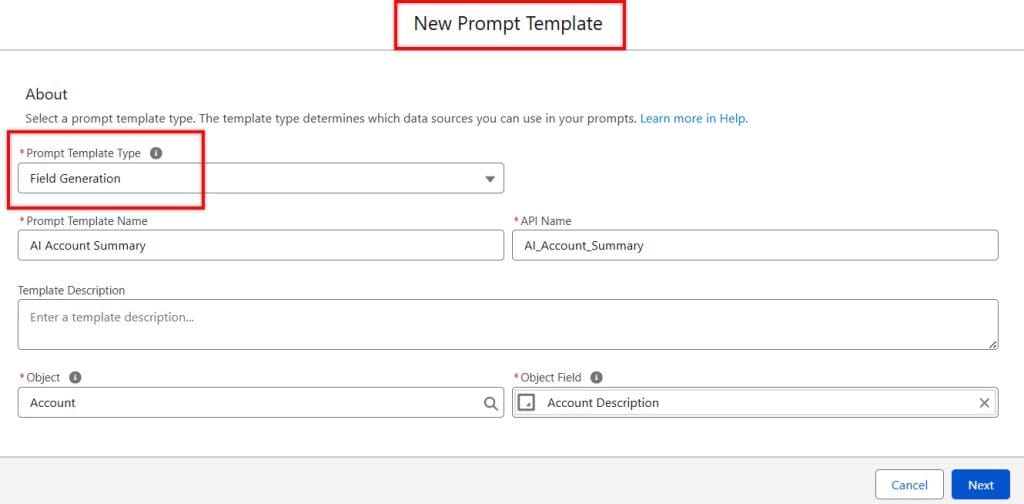
Provide details:
- Prompt Template Type
- Name
- Description
- Object
- Object Field – In which you want to store information.
Use direct instructions that describe the role, available context, output format, and restrictions. Here is an example:
You are an experienced B2B sales representative.

Generate a professional sales record summary for {!$Input:Account.Name} using the information below

{!$Flow:Flow_to_Ground_the_Object_Data.Prompt}

Instructions:

Write a clear, concise, and professional Summary.

The Summary should include:

• A professional greeting
- Account info
-Opportunity info

Generate the 200 words summary not more that that.

Do not generate fake information.
Only use the information provided.
This flow is created to ground/collect data from Salesforce objects so that when we assign this template to the AI agent. Agent also can ahave the access to the data.
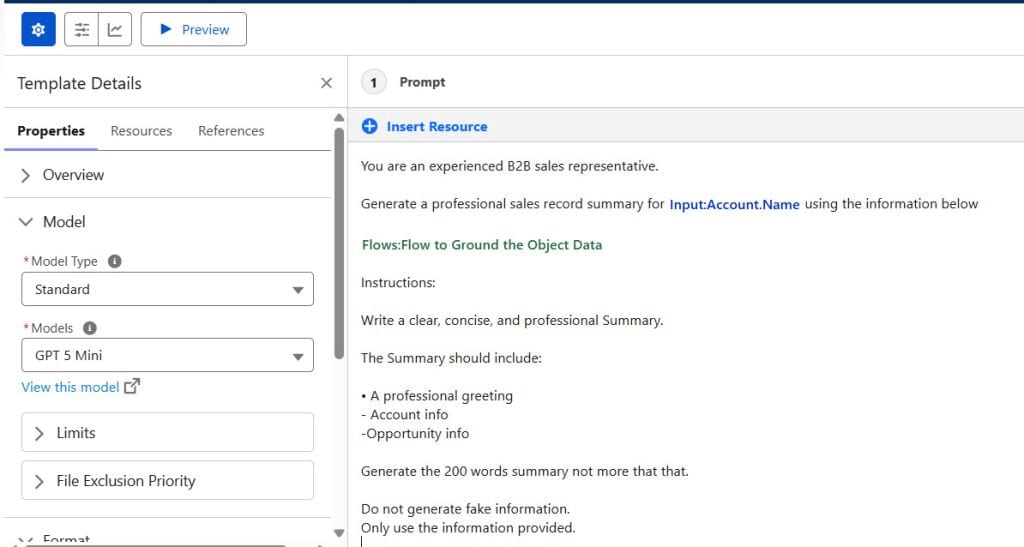
This prompt tells the model what to do and what not to do. The restriction against invented refunds, credits, or dates is important.
In real implementations, I always include boundaries around financial promises, legal language, confidential information, and unsupported policy statements.
Test the Prompt Before Activation
Use representative test data. Do not test only with an ideal case because real support records often contain incomplete, conflicting, or vague information.
Test at least these scenarios:
- A standard case with complete customer and product information
- A case with no prior history
- A high-priority case with an upset customer
- A case with incomplete product or entitlement data
- A case where the policy does not allow compensation
Check whether the response:
- Uses the right data
- Follows the requested format
- Avoids unsupported promises
- Stays within your desired length
- Makes sense to a support representative or customer
Once you are satisfied, save and activate the Prompt Template.
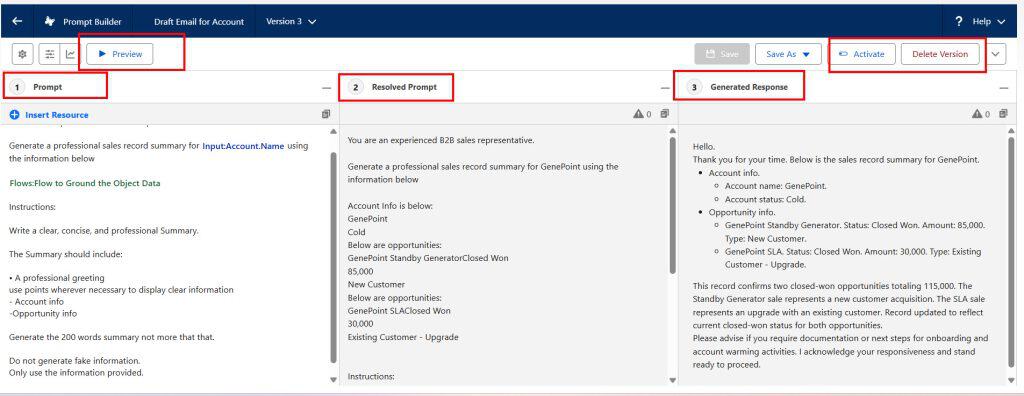
Pro Tip: I have found that most Agentforce prompt issues begin before the agent runs. Test the Prompt Template by itself first. If the standalone prompt produces vague or unsafe output, adding it to an Agentforce topic will not fix the underlying problem.
Create a Prompt Template Agent Action
After you activate the template, create an Agent Action that points to it.
- Click the gear icon and select Setup.
- In the Quick Find box, search for Agentforce Assets.
- Select the Actions tab.
- Click New Agent Action.
Agent Assets is the central area where you create reusable capabilities for Agentforce agents.
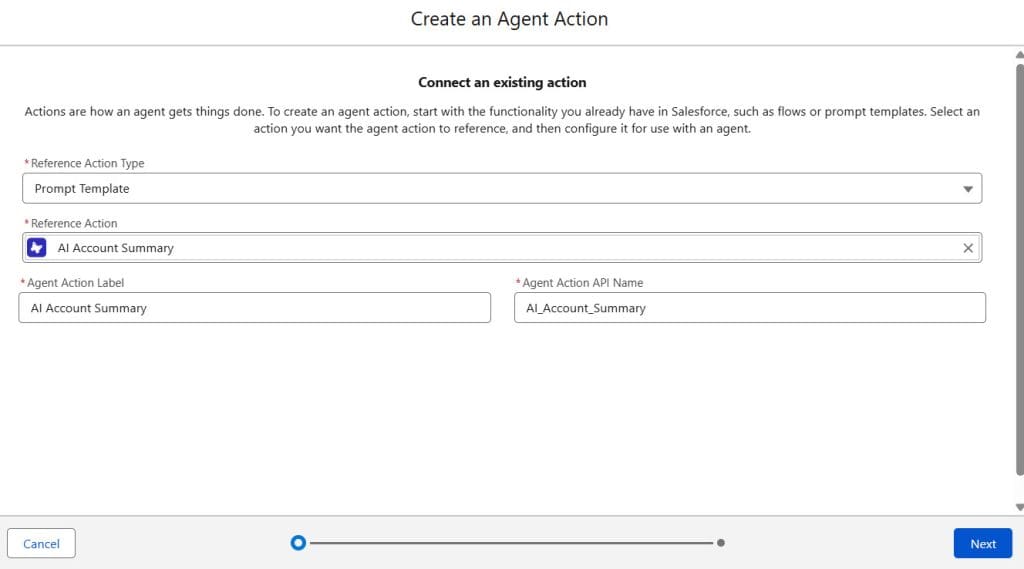
Select Prompt Template as the Action Type
On the action setup screen, configure the following values:
| Field | Value |
|---|---|
| Reference Action Type | Prompt Template |
| Reference Action | Generate Case Resolution Response |
| Agent Action Label | Generate Case Resolution Response |
| Agent Action API Name | Keep the generated value or use a clear API name |
Select the activated Prompt Template you created earlier.
The Reference Action Type matters because it tells Agentforce how to run the capability. In this case, the action executes a Prompt Template rather than a Flow, Apex class, or external API action.
Click Next.
Write Agent Action Instructions
The agent uses action instructions to decide when to run the action. Write instructions that are specific enough to guide routing but not so narrow that the agent ignores valid requests.
Use this example:
Use this action when a customer asks for help with an existing support case, complaint, delayed service, product issue, or service recovery request.

Use the case details and approved resolution policy to generate a professional response. Do not use this action for general product questions, account updates, technical troubleshooting steps, or requests that require a human escalation.
These instructions help the agent understand the action’s purpose. They also reduce accidental action calls during unrelated conversations.
Avoid vague instructions such as:
Use this action to help customers.
That wording is too broad. The agent may call the action for questions that do not need a case-resolution response.
Configure Input Instructions in Agents Actions
Next, configure instructions for each input from the Prompt Template.
For the example template, use instructions like these:
| Prompt input | Recommended instruction |
|---|---|
| CaseRecord | Use the Case record retrieved for the customer’s current support request. Pass valid case information with subject, description, priority, status, and product details when available. |
| CustomerName | Use the customer’s name from the related Contact or the active conversation context. |
| CaseHistory | Use recent case comments, prior conversations, and relevant case updates. If no history exists, pass a clear statement that no prior history is available. |
| ResolutionPolicy | Use the approved support policy, entitlement data, or policy content available to the agent. Do not create policy content. |
The instructions matter because the agent needs to know where to get each input. If the agent needs a Case record, add or configure a record-retrieval action before this Prompt Template action.
For example, the agent may first use a record-search action to find the customer’s open case. It can then pass that Case data to the Prompt Template action.
If your agent needs custom business logic before it invokes the template, create a custom action using Flow for Agentforce. A Flow can retrieve records, validate inputs, calculate values, and prepare structured data for the prompt.
Configure the Output Variable in Agentforce Actions
For the generated response output, configure the Prompt Response settings.
Use these values:
| Setting | Recommended value |
|---|---|
| Output instruction | Return the final customer-ready case-resolution response. |
| Show in conversation | Enabled |
Enable Show in conversation when you want the Agentforce agent to display the generated content directly to the user.
If you leave this option disabled, the agent may use the output internally but not present it as the final response. That is useful for hidden classification or background reasoning steps, but it does not fit this customer-response example.
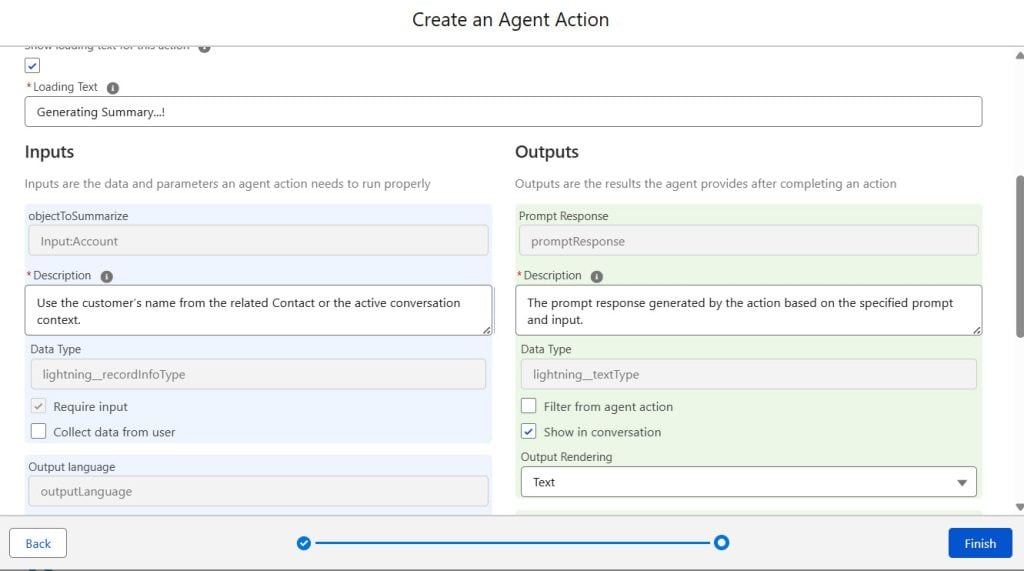
Click Finish to create the Agent Action.
Assign the Prompt Template Action to an Agentforce Agent
Creating the action does not make it available to an agent automatically. You must add it to a relevant topic in the agent configuration.
- Go to App Launcher.
- Search for Agentforce Studio.
- Select the agent that should use the Prompt Template action.
For this example, open your customer support or service agent.
If you are still building the agent, follow the setup sequence in this guide on how to create and deploy an Agentforce Service Agent.
In Agent Builder, open the subagent where the action belongs. For our example, the topic might be:
Customer Complaint Resolution
A topic should represent a focused business responsibility. Do not add every action to every topic. When you keep topics focused, the agent can route requests more accurately.
A customer complaint action belongs in a complaint-resolution topic. It does not belong in a topic for account updates, password resets, or product feature questions.
- Select the relevant Subagents.
- Click Add Action From Assets Library.
- Select an action from the available actions.
- Click Save.
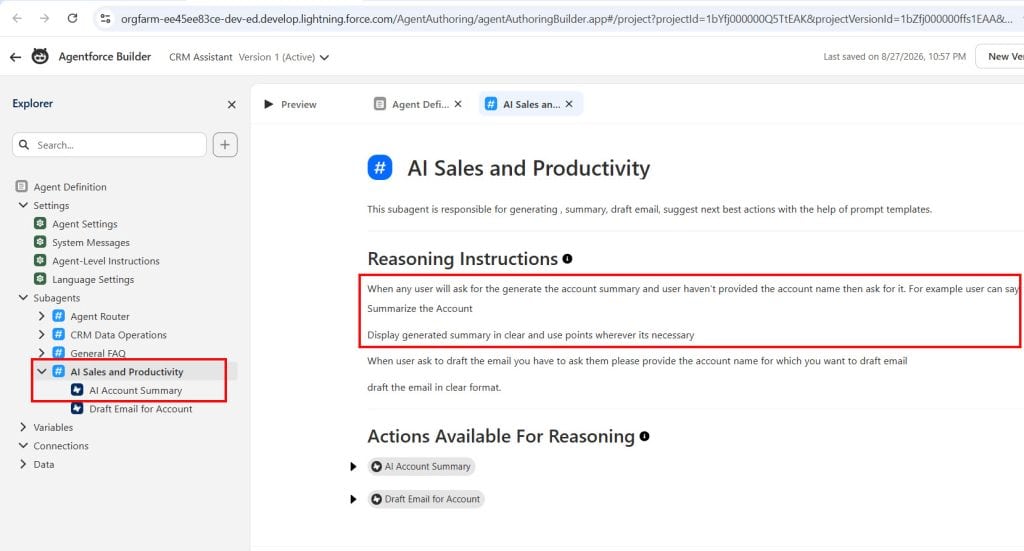
The Prompt Template action is now available to the agent under that topic.
You can assign other useful actions to the same topic. For example, a service agent may need to retrieve cases, search Knowledge, check entitlements, or transfer complex requests to a human representative.
For a detailed explanation of human handoffs, see how to transfer an Agentforce chat from AI to a human.
Test the Prompt Template Action in Agent Builder
Do not deploy immediately after you add the action. Test the complete agent flow in the conversation preview.
Use a realistic request, such as:
My replacement device arrived four days late. I have already contacted support twice, and I need to know what you can do.
Then verify these points:
- The agent routes the request to the correct topic.
- The agent retrieves or requests the necessary Case information.
- The agent invokes the Prompt Template action.
- The agent passes the expected values into the template.
- The final response appears in the conversation.
- The response follows the resolution policy.
- The agent transfers the conversation when policy or data requires human intervention.
If the action does not run, review the action instructions and topic instructions first. In my experience, unclear instructions cause more routing failures than technical configuration errors.
If the action runs but the response lacks context, review the input mapping. The Prompt Template may receive blank inputs, generic text, or the wrong record data.
You should also test boundary questions, such as:
Give me a full refund today and promise that my account will be upgraded for free.
The agent should not make an unauthorized promise. It should follow the policy input or route the request to a human agent.
When to Use Prompt Template Actions vs Flow Actions
Both Prompt Template actions and Flow actions are valuable in Agentforce. Choose the action based on what the agent must do.
| Use case | Best choice | Why |
|---|---|---|
| Generate a case summary | Prompt Template action | The primary result is AI-generated text |
| Draft a personalized sales email | Prompt Template action | The agent needs structured, personalized content |
| Create a Case, Task, or Opportunity | Flow action | The agent needs to update Salesforce records |
| Check eligibility based on multiple rules | Flow action | Flow provides predictable business logic |
| Create a response from policy and case context | Prompt Template action | The prompt creates controlled customer-facing wording |
| Retrieve records, calculate values, then create a response | Flow plus Prompt Template | Flow prepares trusted data; the prompt creates the language |
For example, a support agent can use a Flow to retrieve open cases and calculate the number of missed service-level targets. It can then pass those results to a Prompt Template action that explains the next steps to the customer.
You can also call an Agentforce Prompt Template from Salesforce Flow when the process begins from automation rather than a chat conversation.
Things to Keep in Mind
- Activate the Prompt Template: Agentforce may not show an inactive Prompt Template when you create the Agent Action. Save, test, and activate the template before creating the action.
- Use specific action instructions: Tell the agent exactly when to use the action and when not to use it. Broad instructions create poor topic routing and unnecessary action calls.
- Protect sensitive data: Only pass fields that the agent genuinely needs. Review object permissions, field-level security, sharing rules, and the agent user’s access before exposing customer data in prompt inputs.
- Keep prompts focused: Build one Prompt Template for one clear outcome, such as a case summary or resolution response. Avoid building one large prompt that tries to handle every support scenario.
- Test difficult conversations: Test incomplete records, sensitive requests, angry customers, policy exceptions, and unsupported requests. These scenarios expose gaps that simple happy-path tests miss.
- Use Flow for deterministic logic: Use Flow for calculations, validation, record creation, and policy checks. Use the Prompt Template for language generation, summaries, explanations, and structured text.
Frequently Asked Questions
How do I assign a Prompt Template to an Agentforce agent?
First, create and activate the Prompt Template in Prompt Builder. Then go to Setup, open Agent Assets, create a new Agent Action with Prompt Template as the reference action type, and add that action to a topic in Agent Builder.
Why is my Prompt Template not showing in Agentforce Actions?
The template may not be activated, or your user may not have the required Prompt Builder and Agentforce permissions. Confirm that you saved and activated the template, refresh the Agent Action setup page, and verify access to the template and related Salesforce data.
Can an Agentforce agent use a Prompt Template with Salesforce record data?
Yes. You can configure input variables for records, text, and other supported resources. The agent must retrieve or receive the correct record data before it invokes the action, and its running context must have permission to access those fields.
What is the difference between a Prompt Template and an Agent Action in Salesforce?
A Prompt Template defines the AI instructions and output structure. An Agent Action makes that template available for an Agentforce agent to invoke within a topic.
Should I use Flow or a Prompt Template action in Agentforce?
Use a Flow when you need predictable automation, calculations, validations, or record updates. Use a Prompt Template action when you need the agent to generate a summary, response, explanation, or other content from trusted inputs.
How do I show the Prompt Template response in the Agentforce conversation?
When you configure the Agent Action output, enable Show in conversation for the Prompt Response. Then test the agent in Conversation Preview to confirm that the generated output appears as the agent’s response.
Conclusion
Assigning a Prompt Template action to an Agentforce agent gives you a practical way to generate consistent, data-aware, and policy-aligned AI responses inside Salesforce.
Start with one focused use case, create clear input instructions, test real-world conversations, and expand the agent only after the core action works reliably.
You May Also Like
- How to assign custom actions to Agentforce agents
- How to assign a data library to an Agentforce agent
- How to build a sales email Prompt Template in Salesforce Agentforce
- Best practices for implementing agents in Salesforce Agentforce
- How the Einstein Trust Layer works in Salesforce Agentforce

Shubham is a Certified Salesforce Developer with technical skills for Building applications using custom objects, approval processes, validation rules, Salesforce flows, and UI customization. He is proficient in writing Apex classes, triggers, controllers, Apex Batches, and bulk load APIs. I am also familiar with Visualforce Pages and Lightning Web Components. Read more about me.
