
If you’ve been following Salesforce updates recently, you’ve probably heard a lot about Agentforce.
Salesforce describes it as an AI agent platform, but the real value lies in how it helps businesses with day-to-day work. It can reduce manual tasks, improve response times, and help teams work more consistently.
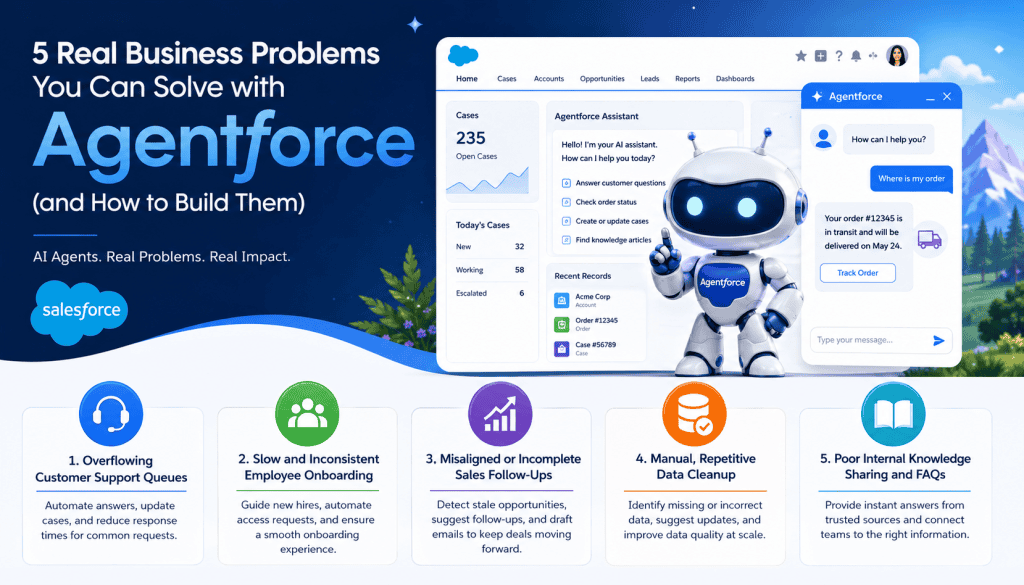
In this guide, I’m not going to focus on complex AI buzzwords. Instead, I’ll explain five real business problems that you can solve using Agentforce in Salesforce.
For each use case, I’ll cover:
- What the problem looks like in a real Salesforce org
- How an Agentforce agent can help solve it
- How you can build a similar solution inside Salesforce
By the end of this guide, you’ll have a clear understanding of how Agentforce works and how you can design your own AI agents for real business use cases in Salesforce.
1. Overflowing Customer Support Queues
When customer support teams handle a large volume of repetitive cases each day, agents spend more time answering common questions rather than resolving critical customer issues. This increases response times and reduces overall support efficiency.
What This Problem Looks Like in Real Businesses
Many customer support teams face the same challenge every day. When support agents start their workday, the case queue in Salesforce is already full.
Most of these support cases are repetitive questions, such as:
- “Where is my order?”
- “Can you reset my password?”
- “What is the status of my case?”
Support agents often spend hours replying with the same answers by using email templates, macros, or Salesforce Knowledge articles.
Because of these repeated requests, important and complex customer issues can get delayed or buried in the queue.
Instead of focusing on solving high-priority problems, agents spend most of their time on simple, repetitive tasks.
How Agentforce Helps
Here’s where Agentforce can make a direct impact: you can build a self‑service agent. The Agentforce service agent can answer common customer questions and automatically update Salesforce records in the background.
In a real Salesforce implementation, you can create a Service Agent inside Service Cloud or expose it through a customer portal or Experience Cloud site.

This AI agent can:
- Fetch recent cases, orders, and customer details from Salesforce in real time
- Reply to customers in natural language using your company’s tone and style
- Create or update cases when the issue needs to be handled by a human support agent
This is more than a basic chatbot. Since the Agentforce agent operates directly within Salesforce, it can securely read and update standard and custom Salesforce objects in response to the customer’s request.
A Real Example of How This Works
Let’s take a common customer request:
“My order hasn’t arrived yet. Order number 12345.”
Without Agentforce, the process is usually manual:
- A support case is created in Salesforce
- A support agent opens the related Order record
- The agent checks the delivery or shipment status
- Then they manually send a reply using a template or canned response
With Agentforce, most of this process can be automated.
The AI agent can:
- Understand that the customer wants to check the order status
- Search the Order record in Salesforce using the provided order number
- Fetch the latest delivery status in real time
- Generate a natural response such as:
“Your order (#12345) is currently in transit and is expected to arrive on Friday. You can track your shipment here: [link].”
If the customer replies with:
“I want to cancel this order.”
The Agentforce agent can automatically:
- Mark the request as high priority
- Create a new Case record in Salesforce
- Or transfer the conversation to a human support agent with all details already filled in
You can also configure business rules and guardrails for the AI agent.
For example:
- If the order is older than 90 days, the agent can respond with:
“This order is outside our tracking window. Please contact support for more information.”
If the customer message shows frustration or anger, the agent can quickly escalate the conversation to a live support agent instead of continuing automated responses.
2. Slow and Inconsistent Employee Onboarding
When employee onboarding is handled manually, new hires often face delays, confusion, and missing access requests. At the same time, HR and IT teams spend hours managing repetitive tasks and fixing onboarding mistakes.
What This Problem Looks Like in Real Organizations
If you work as a Salesforce Admin, Consultant, or part of an HR or IT team, you have probably seen this problem many times.
When new employees join the company, they usually need to complete several repetitive onboarding tasks, such as:
- Filling out onboarding forms
- Requesting a laptop or other equipment
- Getting access to business applications
- Submitting HR documents or NDAs
- Setting up their Salesforce user account, profile, role, and permissions
Most HR and IT teams manually resend the same onboarding checklist.
Because the process is manual, common issues happen frequently:
- Some users do not receive the correct Salesforce licenses, permission sets, or roles
- Temporary or training users are not deactivated or removed properly
- Different teams follow different onboarding steps, creating inconsistent processes
As a result:
- New employees experience a slow and confusing onboarding process
- HR and IT teams spend time answering the same questions repeatedly
- Salesforce org management becomes messy because onboarding standards are not followed consistently
How Agentforce Helps
Agentforce can work as an internal onboarding assistant for employees inside Salesforce. You can add this AI agent to a Lightning App, Experience Cloud portal, or an internal employee workspace.
When a new employee joins, the Agentforce agent can guide them through the onboarding process step by step.
For example, the agent can:
- Welcome the new employee with a personalized message
- Ask what help they need
- Show common onboarding options such as:
- Request a laptop
- Get access to business applications
- Complete HR onboarding forms
- Set up their Salesforce account and access
The Agentforce agent can also perform actions automatically, such as:
- Opening the correct Screen Flow or onboarding form
- Creating a support ticket for IT or HR teams if something is missing
- Triggering Salesforce Flow automation to assign permission sets, roles, queues, or licenses automatically
From a business perspective, this provides several benefits:
- New employees can complete onboarding faster without confusion
- HR and IT teams spend less time answering repetitive questions
- Salesforce onboarding processes become more standardized and properly tracked inside the org
A Step-by-Step Example
Imagine a new employee sends this request:
“I need to set up my laptop and get access to Salesforce.”
The Agentforce onboarding agent can automatically guide the employee through the process.
First, the agent can identify the employee’s role using HR data, Salesforce User details, or a custom onboarding record.
Based on the role, the agent can generate a personalized onboarding checklist, such as:
- Request a laptop from the IT team
- Submit manager approval for Salesforce access
- Complete security and compliance forms
- Finish required onboarding tasks
The Agentforce agent can then automate the next steps by:
- Creating a Service Cloud case or a custom “Onboarding Request” record
- Assigning the request to the correct support queue
- Sending a follow-up email with important links, instructions, and deadlines
The goal is not to replace HR or IT teams. Instead, Agentforce helps ensure that onboarding steps are completed correctly, automatically triggered, and properly tracked in Salesforce.
You can also extend this onboarding experience further.
For example:
- If the employee joins the Sales team, the agent can recommend onboarding resources or Trailhead modules to complete during the first week
- If the employee joins the IT team, the agent can guide them through device setup, MFA configuration, and security verification steps
How You Can Build This in Salesforce
To create an onboarding assistant like this in Salesforce, start by mapping the complete onboarding process for a new employee.
For example:
Hardware setup → App access → Salesforce licenses and permissions → Training resources
Once the process is clear, define the main Agentforce topics, such as:
- New hire support
- Access requests
- Laptop or device setup
- Salesforce account setup
- Employee training guidance
Next, configure Agentforce actions for each topic. These actions can:
- Query a custom “Onboarding Requests” object
- Create a Case or Task record in Salesforce
- Launch a Salesforce Flow to automatically assign permission sets, roles, queues, or licenses

You can also use Prompt Templates in Agentforce to control how the AI agent responds.
For example, you can configure the agent to:
- Use your company’s communication tone
- Answer only from approved internal knowledge sources
- Show a disclaimer such as:
“If you are unsure about any step, please contact the HR or IT team.”
Even a simple onboarding agent can significantly improve the employee onboarding experience and reduce repetitive work for HR and IT teams.
3. Misaligned or Incomplete Sales Follow-Ups
When sales follow-ups are handled manually, important leads and opportunities are often missed or delayed. Different sales reps follow different processes, which creates inconsistent customer communication and reduces conversion rates.
What This Problem Looks Like in Real Sales Teams
Many sales teams lose potential revenue because follow-up activities are not properly managed in Salesforce.
Common problems include:
- Leads or Opportunities stay in the pipeline without proper follow-up activities
- Sales reps are unsure when to call, email, or schedule the next meeting
- Customer conversations are spread across emails, Slack messages, spreadsheets, and notes instead of being tracked in Salesforce
- Follow-up tasks are forgotten or updated inconsistently
As a result:
- Opportunities become inactive and may never move to the next sales stage
- Some leads receive too many emails, while others receive no follow-up at all
- Sales managers struggle to understand the actual status of the pipeline because activities are not consistently logged in Salesforce
How Agentforce Helps
Agentforce can serve as an AI-powered sales assistant within Salesforce, continuously monitoring Lead and Opportunity records.
The agent can:
- Track Opportunity and Lead activity in real time
- Detect opportunities that have not been updated for a certain number of days
- Suggest personalized follow-up actions for sales reps
- Draft follow-up emails, reminders, or tasks automatically
You can think of it as a virtual sales coach that works directly inside Salesforce and helps reps stay on top of their pipeline.
A Real Example
Imagine a sales rep creates a new Opportunity with the following details:
- Stage: Discovery
- Next Step: Send Proposal
- Close Date: 30 days from now
After 10 days, nothing has changed:
- The Opportunity stage is still “Discovery.”
- No follow-up activity has been logged
- The next step is still incomplete
An Agentforce agent can automatically detect this situation by checking:
- Opportunity stage history
- Activity records, such as Tasks or Emails
- Upcoming close dates
The agent can then generate a recommendation such as:
“Opportunity ‘Acme Corp’ has not been updated in 10 days. Consider sending a follow-up email or scheduling a customer call.”
The Agentforce agent can also automate actions such as:
- Creating a Task for the sales rep
- Subject: Follow up with Acme Corp
- Description: Check opportunity status and update next steps
- Drafting a follow-up email automatically, for example:
“Hi {Contact Name}, I wanted to follow up on our recent discussion regarding your requirements. Please let me know if you would like more details or would like to schedule another meeting.”
The goal is not to replace the sales rep. Instead, Agentforce helps ensure that important opportunities are not forgotten or delayed.
You can also configure additional business rules.
For example:
- If an Opportunity remains in the “Proposal” stage for more than 7 days, the agent can mark it as “At Risk” and suggest sending a reminder email or discount offer
- If a Lead has not been contacted within 3 days, the agent can send a reminder notification to the assigned sales rep
How You Can Build This in Salesforce
To build a sales-assistant Agentforce solution, start by defining what qualifies as a stale or inactive sales record.
For example:
- Opportunity not updated in the last 7 days
- No Tasks, Emails, or Activities logged recently
- Lead score below a specific threshold
Next, create Agentforce topics such as:
- Pipeline status monitoring
- Stale opportunity tracking
- Follow-up email drafting
- Lead engagement reminders
Then configure actions that allow the agent to:
- Query Lead and Opportunity records
- Create Tasks or Activities automatically
- Post reminders in Chatter
- Trigger Salesforce Flows for notifications or escalations
You can also use Prompt Templates to guide the AI agent’s behavior.
For example, you can instruct the agent to:
- Check specific Opportunity fields
- Review recent activity history
- Flag records when there has been no movement for a defined number of days
Finally, you can deploy the Agentforce sales assistant in multiple ways:
- Inside a Lightning App page
- In the Sales Console or Service Console
- Or as a scheduled automation that sends reminders to sales reps regularly
4. Manual and Repetitive Data Cleanup
When Salesforce data is incomplete or inconsistent, teams lose trust in reports, automations, and business decisions. At the same time, admins and users spend hours manually fixing records and maintaining data quality.
What This Problem Looks Like in Real Organizations
Many Salesforce orgs struggle with poor data quality issues, such as:
- Contacts or Accounts with missing phone numbers
- Incorrect or incomplete addresses
- Duplicate records
- Inconsistent field values across teams
Sales and support teams often spend time manually correcting the same records repeatedly.
As a result:
- Reports and dashboards become unreliable
- Automations may fail because the required data is missing
- Teams lose confidence in Salesforce data
- Admins spend too much time on manual cleanup tasks
Everyone wants clean and accurate data, but very few teams have time to maintain it consistently.
How Agentforce Helps
Agentforce can serve as a data cleanup assistant within Salesforce.
The AI agent can:
- Scan records for missing, incorrect, or suspicious data
- Detect possible duplicate records
- Suggest updates using predefined business rules or external data sources
- Generate recommendations that users can review before applying changes

Instead of manually checking thousands of records, teams can review AI-generated suggestions directly inside Salesforce.
A Practical Example
Imagine your Salesforce org has:
- 20% of the account records are missing phone numbers
- 15% of records have postal codes that do not match the state or address information
An Agentforce agent can automatically:
- Query Account records where the Phone field is blank
- Detect address and postal code mismatches
- Suggest standardized phone number formatting
- Flag suspicious addresses for manual review
The agent can also automate follow-up actions such as:
- Creating a custom “Data Review” record
- Updating a “Needs Review” checkbox field on the Account
- Sending notifications to data stewards or admins
Over time, the Agentforce agent can improve its recommendations based on user feedback.
For example:
- If users regularly approve certain suggestions, the agent can treat similar updates as safe in the future
- If users reject certain suggestions, the agent can avoid applying similar recommendations automatically
You can also extend this solution further.
For example:
- If Salesforce Matching Rules detect possible duplicate Accounts or Contacts, the agent can create a “Merge Candidate” record or notify a data steward for review
This type of Agentforce implementation may not look as exciting as a chatbot, but it can significantly improve data quality, reporting accuracy, and overall Salesforce adoption.
How You Can Build This in Salesforce
To start building a data-cleanup assistant, begin with a few simple validation rules.
For example:
- Phone number is missing
- Postal code does not match the state or country
- Duplicate Account or Contact detected
Then define Agentforce topics such as:
- Data quality monitoring
- Missing phone number detection
- Duplicate record review
- Address validation
Next, configure Agentforce actions that can:
- Query Account and Contact records
- Create Data Review records
- Update “Needs Review” fields
- Trigger Salesforce Flows for notifications or approvals
You can also use Prompt Templates to guide how the AI agent evaluates records.
For example, you can define:
- Which fields should be checked
- What conditions should trigger a warning
- How strict the validation rules should be
Finally, you can expose this solution as a “Data Health Assistant” inside Salesforce. Over time, you can expand it further by integrating with Data Cloud, external APIs, or third-party data enrichment services.
5. Poor Internal Knowledge Sharing and Scattered FAQs
When company knowledge is spread across multiple systems, employees waste time searching for answers or receive inconsistent information from different teams.
What This Problem Looks Like in Real Organizations
Many companies store important information in different places, such as:
- Confluence
- SharePoint
- Google Docs
- Salesforce Knowledge
- Email conversations or chat messages
As a result, employees often struggle to find accurate and up-to-date information.
Common situations include:
- Employees asking the same questions repeatedly
- Different teams give different answers for the same process
- New hires are receiving inconsistent onboarding guidance
- Managers repeatedly explaining the same policies or procedures
This creates a major productivity issue because the information exists, but it is difficult to access quickly and consistently.
How Agentforce Helps
Agentforce can work as a centralized knowledge assistant inside Salesforce.
The AI agent can:
- Access FAQs, policies, SOPs, and knowledge articles from approved sources
- Answer employee questions in natural language
- Link users directly to the official documentation source
- Track frequently asked questions so teams can improve documentation over time
You can think of it as a company-wide AI knowledge assistant that helps employees quickly find trusted information without having to manually search across multiple systems.
A Practical Example
Imagine an employee asks:
“How do I request server access for a new project?”
The Agentforce agent can:
- Understand that the user needs help with server access requests
- Search Salesforce Knowledge articles, external documentation, or custom objects
- Identify the correct process and approval steps
- Generate a simple response such as:
“To request server access, please complete the Access Request form in Salesforce and submit it for manager approval.”
The agent can also:
- Open the required form directly
- Share a related knowledge article or policy document
- Trigger a custom action or Flow inside Salesforce
If the question does not yet exist in the knowledge base, the agent can respond with something like:
“I could not find an approved answer for this request. Please contact the IT team for assistance.”
At the same time, the agent can log the unanswered question so admins or support teams can improve documentation later.
Over time, the Agentforce knowledge assistant becomes a smart layer atop your company documentation, helping employees find trusted answers faster.
How You Can Build This in Salesforce
To build a knowledge assistant in Salesforce, first decide which information sources the agent should use.
For example:
- Salesforce Knowledge articles
- A custom Knowledge object
- External systems such as Confluence or SharePoint
- Internal policy documents or FAQs
Next, define Agentforce topics such as:
- IT support
- HR policies
- Sales processes
- Employee onboarding
- Security and compliance guidance
For each topic, define clear rules about:
- What the agent is allowed to answer
- Which knowledge sources can it access
- When should the conversation be escalated to a human team
You can also use Prompt Templates to control the agent behavior.
For example, configure the agent to:
- Use a professional company tone
- Answer only from approved documentation sources
- Display a disclaimer such as:
“If you are unsure about any policy or process, please contact the HR or IT team.”
Finally, you can expose the Agentforce knowledge assistant in different areas of Salesforce, such as:
- A sidebar inside the Lightning Service Console
- A custom Help tab in a Lightning App
- An internal employee portal or Experience Cloud site
- A chat widget for internal support requests
What All Five Problems Have in Common
If you look at all five use cases, you’ll notice a common pattern:
- The work is repetitive and happens frequently
- The process follows a structured set of steps or business rules
- The solution depends on Salesforce data, such as Accounts, Leads, Opportunities, Cases, or custom objects
These are the types of business problems where Agentforce works best.
Whenever teams spend time handling repetitive tasks, searching for information, updating records, or manually following processes inside Salesforce, Agentforce can help automate and simplify the work.
How These Use Cases Fit into Agentforce Training
If you are creating an Agentforce course, workshop, or training program, these real business scenarios are excellent hands-on examples for learners.
For example, you can teach students how to:
- Build a customer support agent for order status requests
- Create an employee onboarding assistant
- Develop a data-cleanup and data-quality assistant
- Build an internal FAQ or knowledge assistant
People understand Agentforce much faster when they see how it solves real business problems in Salesforce, rather than just learning theoretical concepts.
In your training, you can guide learners step by step through the complete Agentforce implementation process, including:
- Selecting the correct Salesforce objects, such as Cases, Orders, Accounts, Opportunities, or custom objects
- Designing Agentforce topics based on business use cases
- Creating actions that query records, trigger Flows, create Tasks, or update Salesforce data
- Configuring Prompt Templates to control the AI agent behavior and responses
- Adding guardrails and escalation rules for better reliability
Each of these examples can easily be expanded into a practical hands-on exercise or workshop session.
In fact, this single tutorial can become the foundation for a half-day or full-day Agentforce workshop by turning each business scenario into a live Salesforce implementation demo.
You may like to read:
- Agentforce Use Cases for Sales, Service, and Employee Support
- Assign Data Library to Agentforce Agents in Salesforce
- Salesforce Agentforce: Give Ability to AI Agent to Search on Web
- Salesforce Agentforce Best Practices for Agents (Complete Guide 2026)
- Agentforce 2.0 | Digital Labor Platform in Salesforce

I am Bijay Kumar, the founder of SalesforceFAQs.com. Having over 10 years of experience working in salesforce technologies for clients across the world (Canada, Australia, United States, United Kingdom, New Zealand, etc.). I am a certified salesforce administrator and expert with experience in developing salesforce applications and projects. My goal is to make it easy for people to learn and use salesforce technologies by providing simple and easy-to-understand solutions. Check out the complete profile on About us.