
A sales manager asks why a follow-up task still shows as open three days after the promised callback time. A support lead wants to flag cases that have waited more than four business hours.
These are common Salesforce problems, and they need more than the current date—they need the exact current date and time.
I use the Salesforce NOW function whenever a formula, validation rule, or automation needs to compare a record’s date-time value against the present moment. It is simple, but the return type, time-zone behavior, and use case matter a lot.
This reference guide explains the Salesforce NOW function, its syntax, practical formula examples, setup steps, and mistakes to avoid.
What Is the Salesforce NOW Function?
The Salesforce NOW function returns the current date and current time as a Date/Time value.
Salesforce NOW Function Syntax
NOW()
The function does not accept any parameters. You only need the function name and parentheses.
For example, if the present date and time is September 16, 2026, at 2:30 PM, NOW() returns that current Date/Time value when Salesforce evaluates the formula.
The Salesforce NOW function differs from a stored date-time field. A formula using NOW() recalculates dynamically whenever Salesforce evaluates the formula.
Salesforce supports NOW() in several formula contexts, including Formula Fields, Validation Rules, Workflow Rules, Approval Processes, and other places that accept formula logic. The function returns the current moment as a Date/Time value.
Salesforce NOW Function vs TODAY Function
Admins often confuse NOW() with TODAY(). The right choice depends on whether your business rule needs the clock time.
| Function | Returns | Use it when |
|---|---|---|
| NOW() | Current date and time | You need an exact deadline, elapsed hours, or date-time comparison |
| TODAY() | Current date only | You only need the calendar date |
| TIMENOW() | Current time only | You need the current time without the date |
For example, suppose a Service Cloud team promises to reply to priority cases within four hours.
- Use NOW() – CreatedDate when you need to calculate the exact number of hours since the case arrived.
- Use TODAY() – DATEVALUE(CreatedDate) when you only need to know how many calendar days have passed.
- Use TIMENOW() only when you are comparing times of day, such as whether a request arrived before a daily cutoff.
The TIMENOW() function returns a time value in GMT without a date, while NOW() returns both date and time.salesforce+1
Salesforce NOW Function in Formula Fields
A Formula Field is a read-only custom field that calculates a value from other fields, operators, and functions. It is useful when you want Salesforce to show live information without using Flow, Apex, or manual updates.
Let’s use a consistent example: a Sales Cloud team with 20 sales reps tracks follow-up commitments on Opportunity records. Each opportunity has a custom Date/Time field named Next_Follow_Up__c.
The sales manager wants a visible warning when a rep misses the scheduled follow-up time.
Create an Overdue Follow-Up Formula Field
Follow these steps to create a formula field that identifies overdue follow-ups:
- Go to Setup and open Object Manager.
- Search for and select Opportunity.
- Select Fields & Relationships.
- Click New.
- Choose Formula and click Next.

- Enter Follow-Up Status as the field label.
- Choose Text as the formula return type.
- Click Next.

- Enter the formula below.
- Check the syntax, set field-level security, and add the field to the required page layout.
IF(
    AND(
        NOT(ISBLANK(Next_Follow_Up__c)),
        Next_Follow_Up__c < NOW(),
        NOT(ISPICKVAL(StageName, "Closed Won")),
        NOT(ISPICKVAL(StageName, "Closed Lost"))
    ),
    "Overdue",
    "On Track"
)

This formula checks four conditions:
- NOT(ISBLANK(Next_Follow_Up__c)) confirms that the rep entered a follow-up date and time.
- Next_Follow_Up__c < NOW() checks whether the deadline is before the current moment.
- The two StageName checks prevent closed opportunities from appearing overdue.
- IF() returns Overdue when all conditions are true; otherwise, it returns On Track.
If your team has not created a Date/Time field before, review how to create a Date/Time field in Salesforce. You can also learn more about Salesforce formula field types before building your first formula.
Pro Tip: In my experience, I never build an overdue formula without an ISBLANK() check. Without it, a blank deadline can produce confusing results or make users think Salesforce has flagged a record incorrectly.
Calculate Hours Since a Record was Created
Salesforce stores Date/Time subtraction results as a number of days. To calculate hours, multiply the result by 24.
(NOW() - CreatedDate) * 24
Set the formula return type to Number and use two decimal places.
For example:
- A Case was created at 10:00 AM.
- The current time is 2:30 PM.
- NOW() – CreatedDate equals approximately 0.1875 days.
- Multiplying by 24 returns 4.50 hours.
This is especially useful in Service Cloud for teams that need to track first-response timing, escalation thresholds, or internal service targets.
Calculate Days Since a Date/Time Value
To show the number of complete or partial days since a date-time field, use:
NOW() - CreatedDate
Set the formula return type to Number.
If you only want whole days, use the FLOOR() function:
FLOOR(NOW() - CreatedDate)
This formula returns 0 for records less than one full day old, 1 after one complete day, and so on.
For date-only calculations, use the Salesforce formula to calculate days between dates instead of adding unnecessary time logic.
Salesforce NOW Function for Validation Rules
A Validation Rule checks data before Salesforce saves a record. It blocks the save and shows an error message when the formula evaluates to true.
Use the Salesforce NOW function in a validation rule when users must enter a future date and time.
For example, the sales team should never set Next_Follow_Up__c in the past.
Prevent Users From Entering a Past Follow-Up Time
Create a validation rule on the Opportunity object with this formula:
AND(
    NOT(ISBLANK(Next_Follow_Up__c)),
    Next_Follow_Up__c < NOW(),
    NOT(ISPICKVAL(StageName, "Closed Won")),
    NOT(ISPICKVAL(StageName, "Closed Lost"))
)
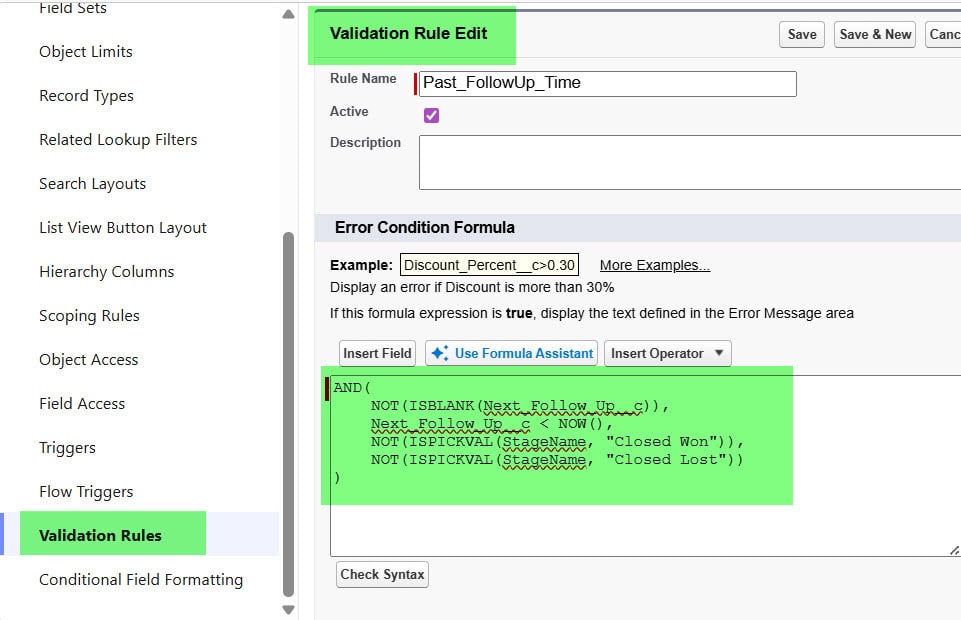
Use this error message:
Enter a follow-up date and time that is in the future.
Place the error message beside the Next_Follow_Up__c field so the rep knows exactly what to fix.
Here is what the logic does:
- Salesforce checks whether the follow-up field contains a value.
- It compares the entered value with the present date and time.
- It allows closed opportunities to keep historic follow-up dates.
- It blocks open opportunities when a rep enters a deadline that has already passed.
A validation rule is better than a report-only approach here because it prevents bad data from entering the pipeline. If you are new to formula-based data controls, see this guide on validation rules in Salesforce.
Salesforce NOW Function in Flow
A Record-Triggered Flow runs automatically when a record is created or updated. Unlike a formula field, a Flow can update records, create tasks, send notifications, or start an escalation process.
Use NOW() in Flow when you need Salesforce to take an action based on the current date and time.
For the same sales team, assume the manager wants Salesforce to create a task when a rep changes an Opportunity stage to Proposal/Price Quote but leaves the next follow-up empty.
Use the NOW () Function in a Record-Triggered Flow
Build the Flow with these steps:
- Go to Setup and search for Flows.
- Click New Flow.
- Select Record-Triggered Flow.
- Choose Opportunity as the object.
- Select A record is created or updated.
- Set entry conditions for StageName Equals Proposal/Price Quote.
- Choose Only when a record is updated to meet the condition requirements if the task should run once.
- Select Actions and Related Records for the optimization option.
- Add a Decision element named Follow-Up Missing.
- Create an outcome where Next_Follow_Up__c Is Null equals True.
- Add a Create Records element to create a Task.
- Set the Task due date to DATEVALUE(NOW()) + 1.
- Assign the task to the Opportunity Owner.
- Save, debug, test, and activate the Flow.
For the Task due date, use this formula resource:
DATEVALUE(NOW()) + 1
This formula converts the current Date/Time value into a date and adds one calendar day. The task is due tomorrow.
If you want to use the exact current date and time in a Flow assignment, create a Formula resource with the Date/Time data type and enter:
NOW()
For a complete setup walkthrough, read how to create a record-triggered Flow in Salesforce. You can also use this pattern when you create a task using Flow.
Practical Salesforce NOW Function Examples
Here are practical ways I use the Salesforce NOW function in client orgs.
Flag a Case Older than Four Hours
Create a Checkbox formula field on the Case object:
AND(
    NOT(IsClosed),
    (NOW() - CreatedDate) * 24 >= 4
)
This formula returns TRUE when an open case is at least four hours old.
Use this as a report filter, list-view filter, or condition in a Flow. Do not treat it as a full SLA calculation when your support team follows business hours, holidays, or regional service calendars.
Show an Upcoming Deadline within 24 Hours
Create a Checkbox formula field:
AND(
    NOT(ISBLANK(Contract_End_Date_Time__c)),
    Contract_End_Date_Time__c >= NOW(),
    Contract_End_Date_Time__c <= NOW() + 1
)
This formula returns TRUE when a contract deadline falls within the next 24 hours.
Because Salesforce represents one full day as 1, NOW() + 1 means exactly 24 hours from the time Salesforce evaluates the formula.
Show a Live Countdown in Hours
Create a Number formula field:
ROUND(
    (Next_Follow_Up__c - NOW()) * 24,
    1
)
This formula returns the remaining hours until the follow-up deadline.
A positive result means the deadline remains in the future. A negative result means the follow-up time has passed.
For example:
- 6.5 means six and a half hours remain.
- 0.0 means the deadline is now.
- -2.3 means the follow-up is two hours and eighteen minutes overdue.
Stop a User from Setting an Invalid Appointment Time
Suppose an HR team uses a custom object to manage interview appointments. The appointment must be at least 24 hours in the future.
Use this Validation Rule formula:
AND(
    NOT(ISBLANK(Interview_Date_Time__c)),
    Interview_Date_Time__c < NOW() + 1
)
Use this error message:
Schedule the interview at least 24 hours from now.
If the organization only cares about dates rather than exact appointment times, use the Salesforce TODAY function instead.
Salesforce NOW Function and Time Zones
Time zones cause many date-time formula issues. Salesforce stores Date/Time values in GMT and displays them according to the user’s time zone in many parts of the application.
NOW() returns the current Date/Time value, but your formula result can look different for users working in Pune, London, New York, or Sydney because Salesforce displays Date/Time values in each user’s configured time zone.
For example, a sales rep in India may view a follow-up due at 4:00 PM IST, while a manager in the United States sees the same instant as a morning time in their local zone. Both users view the same stored Date/Time value.
Use these practices to avoid confusion:
- Set accurate time zones on user records.
- Use Date/Time fields for global deadlines and scheduled actions.
- Use Date fields when the clock time has no business meaning.
- Test formulas with users in different time zones if your team works internationally.
- Avoid hard-coding a fixed time-zone offset because daylight-saving rules can change.
If you need to review or update your personal Salesforce time zone, see how to change the time zone in Salesforce.
Things to Keep in Mind
- Use the right return type: NOW() returns a Date/Time value, so compare it with Date/Time fields whenever possible. Convert it with DATEVALUE(NOW()) only when your formula needs a Date value.
- Formula values stay dynamic: A formula field using NOW() changes when Salesforce evaluates it. Use a regular Date/Time field and Flow if you need to save the exact time when an event occurred.
- Do not use NOW for business hours: NOW() – CreatedDate counts all elapsed hours, including nights, weekends, and holidays. Use a business-hours-aware automation design for formal SLA calculations.
- Handle blank values: Add ISBLANK() checks before comparing optional Date/Time fields with NOW(). This prevents misleading results and makes formulas easier to maintain.
- Test in a sandbox: Test validation rules and Flows with realistic dates, closed records, blank values, and users in different time zones before activation. Learn more about using a sandbox in Salesforce.
- Keep time logic readable: Create separate formula resources or helper fields when the formula grows too long. Clear names help the next Salesforce admin troubleshoot the logic quickly.
Frequently Asked Questions
What does NOW() return in Salesforce?
NOW() returns the current date and time as a Date/Time value. It does not require an argument or parameter. Use it when a formula needs the present moment rather than only today’s date.
What is the difference between NOW() and TODAY() in Salesforce?
NOW() returns both the current date and current time. TODAY() returns only the current date. Use NOW() for deadlines, elapsed hours, and time-sensitive validation rules.
Can I use the Salesforce NOW function in a formula field?
Yes. You can use NOW() in a Formula Field to show dynamic values such as overdue status, hours since creation, or hours remaining before a deadline. Salesforce recalculates the result rather than storing it permanently.
Can I use NOW() in a Salesforce validation rule?
Yes. Use NOW() in a Validation Rule to prevent users from entering a past date and time. For example, Appointment_Date_Time__c < NOW() can block an appointment scheduled in the past.
How do I calculate hours between CreatedDate and NOW() in Salesforce?
Use this formula: (NOW() – CreatedDate) * 24.
Salesforce subtracts Date/Time values as days, so multiplying by 24 converts the result into hours.
Does NOW() use the user’s time zone in Salesforce?
Salesforce stores Date/Time data in GMT and usually displays it in each user’s configured time zone. The same record can therefore show different local clock times to users in different locations, even though it represents one identical moment.
Conclusion
The Salesforce NOW function gives your formulas and automations a reliable way to work with the current moment, whether you are checking deadlines, calculating elapsed time, or preventing invalid scheduling data.
Start with a simple formula, test it with real record scenarios and different time zones, then add Flow automation only when your business process needs an action. I hope you found this article helpful.
You may also like
- Salesforce DATEVALUE Function
- Salesforce DATE Function
- Salesforce TIMENOW Function
- Salesforce Timevalue Function

I am Bijay Kumar, the founder of SalesforceFAQs.com. Having over 10 years of experience working in salesforce technologies for clients across the world (Canada, Australia, United States, United Kingdom, New Zealand, etc.). I am a certified salesforce administrator and expert with experience in developing salesforce applications and projects. My goal is to make it easy for people to learn and use salesforce technologies by providing simple and easy-to-understand solutions. Check out the complete profile on About us.