
If your company talks to customers every day through calls, emails, chat, or cases, managing all those conversations can be difficult.
- Who spoke to the customer last time?
- What issue did they face?
- Is the problem solved or still pending?
This is where Salesforce Service Cloud helps. Service Cloud is part of Salesforce and is specifically designed for customer support and service teams.
It helps companies manage customer issues, track cases, and give faster support from a single place.
In this article, we will learn about Salesforce Service Cloud, its features, benefits, and real examples.
What is Salesforce Service Cloud?
Salesforce Service Cloud is a part of Salesforce CRM, a customer service platform that helps support agents manage customer queries, complaints, and requests efficiently.
It allows support teams to:
- Track customer issues as Cases
- Communicate via Email, Phone, Chat
- View the complete customer history on one screen
- Resolve problems faster
Real-Time Example to Understand Service Cloud in Salesforce
Imagine you ordered a laptop from an online website. You received a damaged product. You call customer care.
Now what will happened in company site from which you bought the laptop:
- The agent creates a Case in Salesforce.
- Your complaint details are recorded.
- The agent can see your previous orders and history.
- The case is assigned to the concerned team.
- You get updates via email.
- Issue gets resolved.
All this is managed inside Service Cloud.
Salesforce Service Cloud Features
Below, I will explain the features of Salesforce Sales Cloud.
1. Case Management in Salesforce Service Cloud
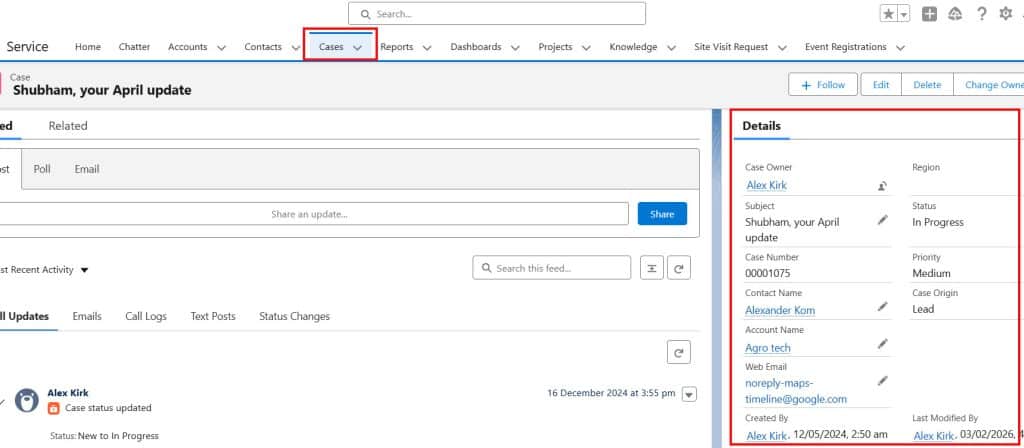
Case Management is the main part of Service Cloud. Whenever a customer raises an issue, a Case record is created with details like contact, account, problem description, priority, status, and owner.
You can automatically assign cases to the appropriate queue or agent based on rules (e.g., product type or region).
Users can update status, add internal notes, send emails from the case, and track all activities until the issue is resolved.
2. Omnichannel and Omni-Channel Routing in Salesforce
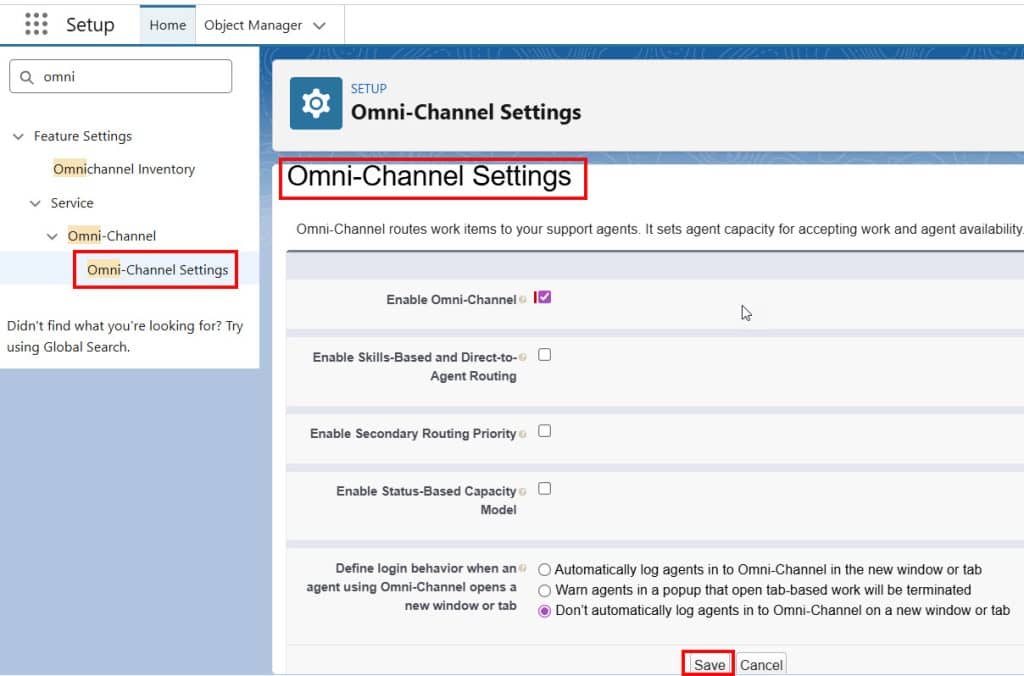
Whenever customers raise queries via email, phone, chat, web, social, or self‑service, Omni-Channel automatically sends them to users based on their skills, availability, and workload, so no case is missed and queues stay balanced.
Users can accept or decline work from the Omni‑Channel, and supervisors can monitor queues and workloads in real time. This improves response times and reduces manual assignment.
3. Knowledge Base Articles (Salesforce Knowledge)
The knowledge is pre-written articles that contain answers or resolutions to the queries customers raised. Support users use it to solve common problems.
For example, a customer can ask, “How to reset the password?”
For support users, instead of retyping the solution, they can share the knowledge article.
4. Email-to-Case in Salesforce
When a customer sends an email to report a problem, Salesforce automatically creates a case record from that email.
The email subject becomes the case subject, the email body becomes the case description, and the customer’s email is linked to the case.
This helps support agents manage, respond to, and track customer issues directly from Salesforce without manually creating records.
Salesforce is one of the most powerful and used customer relationship management tools. To deliver the best customer service, the case object helps the admin note complaints and issues.
However, the problem is that there are multiple ways to send their complaint, either by phone, email, or the web, and because of this, there may be a chance that the user handling the cases in Salesforce may have noted something wrong or incomplete information.

5. Web-to-Case in Salesforce
In Salesforce, the Web-to-Case feature lets us create a website so customers can raise issues or inquiries directly from our site without logging into the Salesforce Org.
When customers raise queries on the website, records are automatically created in Case Objects in Salesforce.
The Web-to-Case includes the following features:
- In the web form, we can add the required Case Fields. In those fields, customers can enter details and submit queries.
- When customers submit the web form, their information is saved in the Case Object in the Org, and Salesforce sends an Auto-Response Email to the customer.
- Then, our support team can see these records, manage them, and respond to the customers.

6. Reports, Dashboards, and Analytics in Salesforce Service Cloud
Service Cloud offers standard and custom reports and dashboards focused on service metrics. You can track KPIs like case volume by channel, first response time, average handle time, SLA breaches, and customer satisfaction (CSAT) scores.
Managers can use these dashboards to see which agents or teams are overloaded, which topics generate the most cases, and where automation can help. This data helps improve the support process continuously.
Benefits of Using Salesforce Service Cloud
Below, I will explain the benefits of using the Salesforce Service Cloud.
1. Faster problem solving
- When a customer contacts support, the agent can see all details in one place.
- They don’t have to search in emails or ask the customer again and again.
- This helps solve the issue quickly.
2. Better customer experience
- Customers don’t like having to repeat their problem.
- With Service Cloud, the agent already knows the customer’s history.
- This makes the customer feel valued and happy.
3. All customer issues are properly tracked
- Every complaint is saved as a Case.
- Nothing gets lost.
- You can always check what happened, who handled it, and when it was solved.
4. Complete customer history in one screen
- Agents spend less time searching for information and more time solving problems.
- They can handle more customers in less time.
Conclusion
I hope you have an idea of Salesforce Service Cloud, a powerful tool for customer support teams. It helps agents manage customer issues in a simple and organized way. From case creation to resolution, everything is handled in one system.
If a company handles many customer queries daily, Service Cloud becomes a must-have tool. For Salesforce admins and beginners alike, understanding Service Cloud is very important, as many companies use it for support operations.
You may like to read:
- Set Up Data Cloud in Salesforce Agentforce
- Comparison Between Oracle Sales vs Salesforce Sales Cloud
- Salesforce Service Cloud vs Zendesk
- Salesforce Data Cloud vs Snowflake

Shubham is a Certified Salesforce Developer with technical skills for Building applications using custom objects, approval processes, validation rules, Salesforce flows, and UI customization. He is proficient in writing Apex classes, triggers, controllers, Apex Batches, and bulk load APIs. I am also familiar with Visualforce Pages and Lightning Web Components. Read more about me.