
We enabled the Agentforce default agent and created the Service Agent and the Employee Agent. These agents help Salesforce users and external customers.
But what if a developer wants help while writing code, creating Apex classes, or building flows in Salesforce?
So Salesforce has just released Agentforce Vibe, or Vibe Coding, a Salesforce AI assistant platform for developers.
Using Agentforce Vibes, the developer asks, “Write an Apex class to calculate total order amount.” Vibe quickly gives the code, explains how it works, and even suggests improvements. This helps the developer save time and write better code faster.
In this article, we will learn about Agentforce for developers in Salesforce using Vibe, how to set it up, and how to use it to make Salesforce development tasks easier.
How is Agentforce Vibes useful for Salesforce Developers?
Agentforce Vibes is an AI-powered tool for Salesforce developers. It allows them to write and build Salesforce components using natural language instead of complex code.
Other AI coding tools already exist, but Agentforce vibes is special because it includes enterprise-level safety, like built-in guardrails, compliance, and governance through the Salesforce Agentforce Trust Layer.
It works together with the main Salesforce developer tools, such as:
- Salesforce Sandboxes for safe testing
- DevOps Centre, Salesforce DX, and Code Analyzer v5
- You can also use it with VS Code–compatible editors like Code Builder, Cursor, and Windsurf.
Below, I will explain the uses of Agentforce vibes for Salesforce developers, which make their tasks easier.
- Generate Apex code just by typing natural language prompts.
- Get code suggestions while typing in Apex or Lightning Web Components (LWC).
- Automatically create unit tests to meet test coverage requirements.
- Analyze and improve code, add better documentation, and handle complex workflows easily.
- Work in two modes:
- Plan Mode – for strategy and safe coding.
- Act Mode – for hands-on coding and deployment.
Get Started with Agentforce for Developers in Salesforce
Before Agentforce Vibes, Salesforce developers used Agentforce for Developers. It was enabled from the Salesforce org, and developers could use Agentforce in VS Code by installing the Agentforce for Developers extension pack.
With this setup, they could write SOQL queries, create Apex classes, build LWC components, and do many other development tasks directly in VS Code.
Now, for the Agentforce for Developers, you might know that its Dev Assistant had several limitations.
One major limitation was automatic file generation. This means that even if you gave a prompt, it generated the code but did not create actual files for that code.

The AI assistant could automatically generate Lightning Web Components (LWCs) or Apex classes from prompts in tools like Cursor.
However, the Agentforce Dev Assistant could not do this; it could only generate the code, not the files themselves.
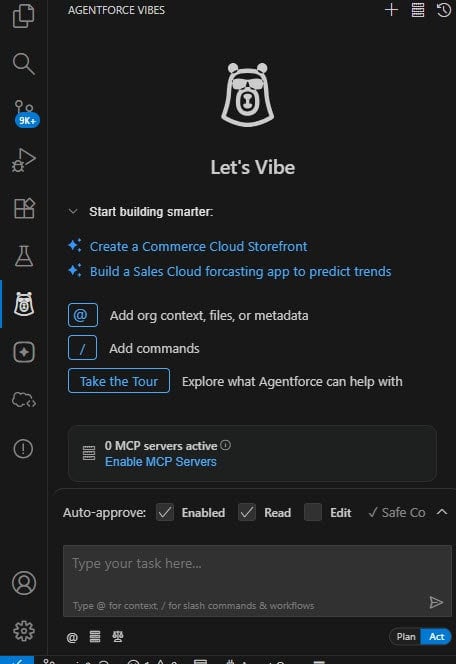
The image below shows the Agentforce Vibes UI for writing SOQL queries, creating Apex classes, and creating LWC components in Salesforce.
You can see that no MCP server is active here. You can see all the MCP servers from here in the installed one. You will see that Salesforce DX is already installed here.
So, the moment you enable it, most probably you will see that Salesforce DX is added. It may not be active.
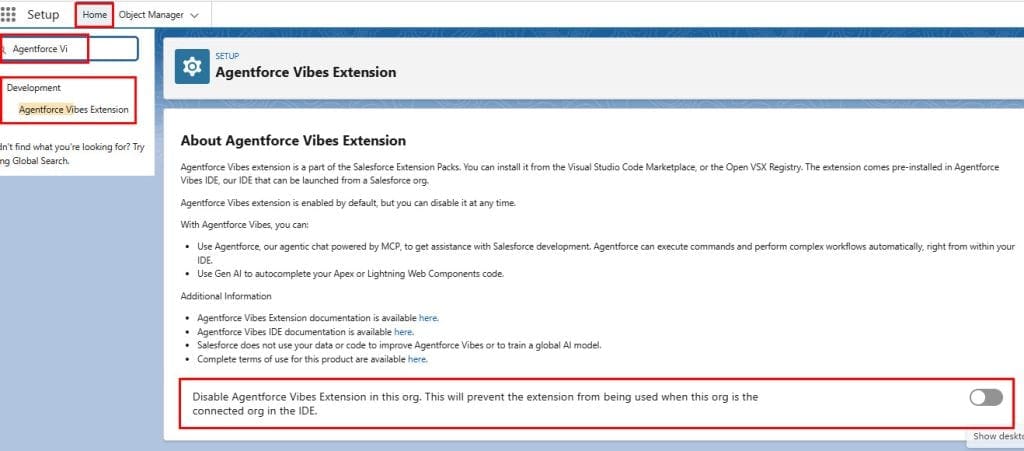
Earlier, in the Salesforce org, we had the Agentforce for Setup option, which has been changed to the Agentforce Vibes Extension. If you don’t want to use this, you need to enable the option.
Conclusion
I hope you have got an idea about the changes in Salesforce Agentforce for Developers, which is now replaced by Agentforce Vibes. It allows developers to write, generate, and manage Salesforce code using simple natural language with AI support.
You may like to read:
- Create An Agentforce Employee Agent for Users in Salesforce
- Build an Action for Task Creation Using Flow & Assign to Agentforce Employee Agent
- Inbound Omni-Channel Flow in Salesforce Agentforce
- Outbound Omni-Channel Flow in Salesforce Agentforce
- Agentforce Data Cloud & Data Library in Salesforce

I am Bijay Kumar, the founder of SalesforceFAQs.com. Having over 10 years of experience working in salesforce technologies for clients across the world (Canada, Australia, United States, United Kingdom, New Zealand, etc.). I am a certified salesforce administrator and expert with experience in developing salesforce applications and projects. My goal is to make it easy for people to learn and use salesforce technologies by providing simple and easy-to-understand solutions. Check out the complete profile on About us.