
The Salesforce Recycle Bin is a holding area where deleted records wait for 15 days before Salesforce removes them for good. Think of it as the lost-and-found box at a front desk: things sit there for a while, and anyone who knows what they lost can claim it back.
In Lightning, open the App Launcher, type recycle, and click Recycle Bin under Items. In Classic, it sits in the sidebar of the Home page. If you clean up data, import files or test automation, you will need it sooner or later. By the end you will know who sees which records, how restore works, and when the bin cannot help.
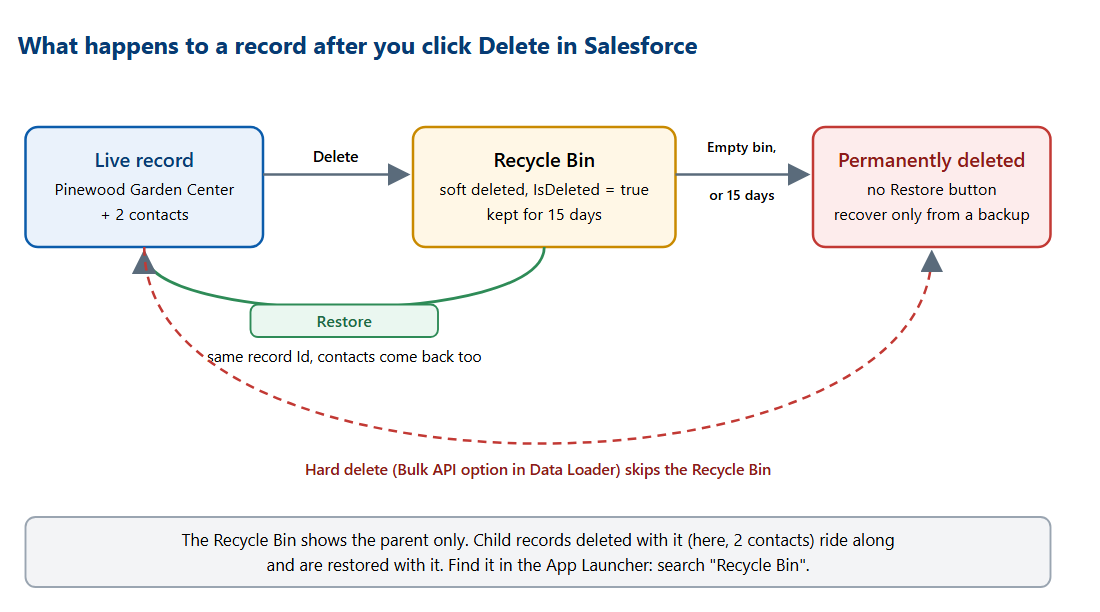
The diagram shows the whole life of a deleted record. A normal delete sends it to the bin. Restore sends it back. Emptying the bin, or 15 days passing, makes it permanent. A hard delete skips the bin entirely.