
If you’ve been working with Salesforce Apex for any amount of time, you’ve almost certainly run into this error at least once:
System.LimitException: Too many SOQL queries: 101
In this tutorial, I’ll walk you through what this error means, why Salesforce enforces it, what causes it in real code, and — most importantly — how to fix the error: System.LimitException: Too Many SOQL Queries, with practical examples you can use right away.
What Is This “System.LimitException: Too Many SOQL Queries” Error, Exactly?
Salesforce runs on a multi-tenant architecture. That means thousands of companies share the same infrastructure. To make sure one org’s runaway code doesn’t choke the entire platform, Salesforce enforces something called Governor Limits.
One of those limits is:
You can only run 100 SOQL queries in a single synchronous transaction. For asynchronous (like Batch Apex), that limit goes up to 200.
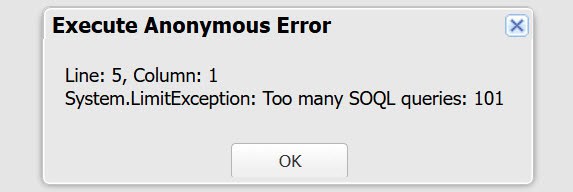
The moment your code tries to fire query number 101, Salesforce throws System.LimitException: Too many SOQL queries (101), so the entire transaction rolls back. It doesn’t warn you. It just stops.
This isn’t a soft warning you can ask Salesforce Support to increase. It’s a hard stop. There’s no way around the limit itself — the only fix is writing better code.
Why Does System.LimitException Usually Happens in Apex?
In my experience, this error almost always comes down to one of three root causes:
- SOQL queries inside a for loop — the most common culprit by far
- Recursive triggers — a trigger calls itself repeatedly, running queries on every cycle
- Too many automations stacking up — Flows, Process Builders, and Apex all running in the same transaction, each with its own queries
Let me go through each one with real code examples.
Cause 1: Using SOQL Query Inside a For Loop in Apex Trigger
This is the classic mistake. You’ve got a list of records, you loop through them, and inside the loop, you run a query to fetch related data. Seems logical, right? Wrong.
Here’s what the bad version looks like:
trigger AccountTriggers on Account (after insert) {

    for (Account acc : Trigger.new) {

        // BAD PRACTICE: Query inside loop

        List<Contact> contacts = [
            SELECT Id, Name, Email
            FROM Contact
            WHERE AccountId = :acc.Id
        ];

        for(Contact con : contacts) {
            System.debug('Contact Name: ' + con.Name);
        }
    }
}
To debug the trigger above, open the Execute Anonymous Window and run the following code.
List<Account> accList = new List<Account>();

for(Integer i = 0; i < 200; i++){

    Account acc = new Account(
        Name = 'Test Account ' + i
    );

    accList.add(acc);
}

insert accList;
If your trigger fires on 200 Account records, this code will try to run 200 separate SOQL queries. It works fine in the developer sandbox with 5 records.
But the moment a data load pushes 101+ records through in production, it blows up.
Fix Error: Query Once, Use a Map in Apex
The solution is to pull all the data you need in a single query before the loop, store it in a Map, and then reference that map inside the loop.
trigger AccountTriggers on Account (after insert) {

    Set<Id> accountIds = new Set<Id>();

    // Step 1: Collect all Account IDs

    for(Account acc : Trigger.new){
        accountIds.add(acc.Id);
    }

    // Step 2: Query all related contacts in ONE query

    List<Contact> contactList = [
        SELECT Id, Name, Email, AccountId
        FROM Contact
        WHERE AccountId IN :accountIds
    ];

    // Step 3: Store contacts grouped by AccountId

    Map<Id, List<Contact>> contactsByAccount = new Map<Id, List<Contact>>();

    for(Contact con : contactList){

        if(!contactsByAccount.containsKey(con.AccountId)){
            contactsByAccount.put(con.AccountId, new List<Contact>());
        }

        contactsByAccount.get(con.AccountId).add(con);
    }

    // Step 4: Use the map inside the loop

    for(Account acc : Trigger.new){

        List<Contact> relatedContacts = contactsByAccount.get(acc.Id);

        if(relatedContacts != null){

            for(Contact con : relatedContacts){
                System.debug('Contact Name: ' + con.Name);
            }
        }
    }
}
That’s it. One query instead of 200. This is called bulkification, and it’s the single most important habit to develop as a Salesforce developer.
Cause 2: DML and Queries Both Inside a Loop in Apex
Sometimes I see code where developers not only query inside a loop but also run DML (like update or insert) inside the same loop. This doubles down on the problem — you’re burning through both the SOQL limit (100) and the DML limit (150) at the same time.
Here’s a real example of what to avoid — updating Case records:
public class CaseStatusUpdaterBad {

    public static void updateCases(){

        // Query cases

        List<Case> caseList = [
            SELECT Id, Status
            FROM Case
            WHERE Status = 'New'
            LIMIT 105
        ];

        // BAD PRACTICE

        for(Case c : caseList){

            c.Status = 'Working';

            update c;  // DML inside loop
        }
    }
}
This code runs an UPDATE statement 105 times inside the loop. That’s going to hit limits fast.
Fix Error: Move DML Outside the Loop in Apex
public class CaseStatusUpdater {

    public static void updateCases(){

        List<Case> caseList = [
            SELECT Id, Status
            FROM Case
            WHERE Status = 'New'
            LIMIT 105
        ];

        // Modify records in memory

        for(Case c : caseList){
            c.Status = 'Working';
        }

        // Perform ONE DML operation

        if(!caseList.isEmpty()){

            try{
                update caseList;
            }
            catch(DmlException e){
                System.debug('Error updating cases: ' + e.getMessage());
            }
        }
    }
}
The loop only modifies the in-memory objects. The update run exactly once after the loop finishes. Clean, efficient, and well within limits.
Cause 3: Recursive Triggers in Apex
Recursive triggers are sneaky. Your trigger fires, makes a change, which fires the trigger again, which makes a change, which fires it again… until it hits the SOQL limit.
Say you have a trigger on the Contact object that updates a related Account. If that Account update triggers another Apex class that queries Contacts again, you’re in a loop.
Recursive triggers happen when:
- A trigger updates a record
- That update fires the same trigger again
- Which performs another update
- And the cycle continues
Eventually Salesforce throws:
Fix Error: Static Boolean Guard
The standard approach is to use a static Boolean variable in a helper class to make sure the trigger only executes once per transaction:
// TriggerHelper.cls

public class TriggerHelper {

    public static Boolean hasRun = false;

}

// ContactTrigger.trigger

trigger ContactTrigger on Contact (after update) {

    if(!TriggerHelper.hasRun){

        TriggerHelper.hasRun = true;

        List<Account> accountsToUpdate = new List<Account>();

        for(Contact con : Trigger.new){

            if(con.AccountId != null){

                Account acc = new Account(
                    Id = con.AccountId,
                    Description = 'Contact was updated'
                );

                accountsToUpdate.add(acc);
            }
        }

        if(!accountsToUpdate.isEmpty()){
            update accountsToUpdate;
        }
    }
}
Because static variables persist for the duration of a transaction, hasRun stays true after the first execution, and the trigger skips all subsequent recursive calls.
Cause 4: Salesforce Flow Executing Multiple Times
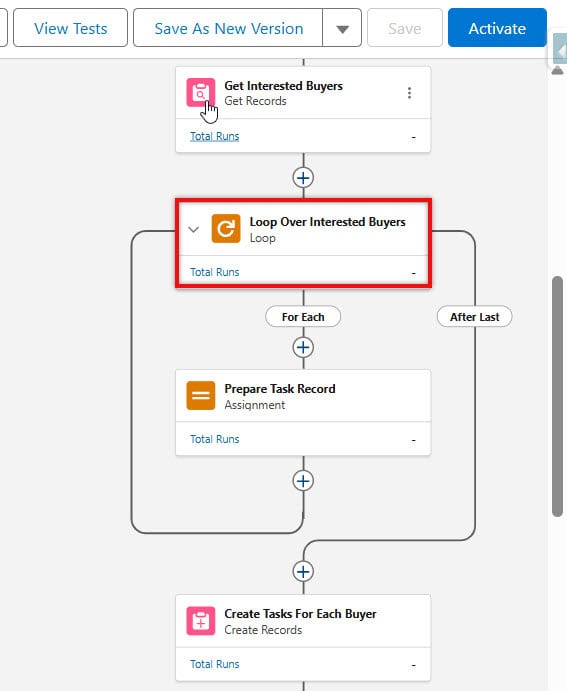
This one catches people off guard. Flows can also contribute to the 100-query limit, especially if:
- A Flow has a Get Records element inside a loop
- Multiple Flows are triggered on the same object
- A Flow triggers an Apex class that also runs queries
The fix in Flows is similar to the Apex fix: retrieve all the records you need in a single Get Records element before the loop, then use Collection Filters within the loop rather than additional Get Records elements.
If you’re hitting limits in production but not in sandbox, this is often the cause — you simply don’t have enough records in sandbox to trigger the limit, but production data volume exposes the problem.
How to Debug This Error
When you get this error, don’t just start randomly moving code around. First, figure out where the queries are being fired.
Here’s how:
- Enable Debug Logs — Go to Setup → Debug Logs → add a log for the running user with APEX_CODE set to DEBUG level
- Reproduce the error — Run the transaction that causes it
- Open the debug log — Search for SOQL_EXECUTE_BEGIN entries. Each one represents a query being fired
- Count and trace — You’ll see the line numbers where each query fired. Look for any query that appears in a loop (you’ll see it fire repeatedly with different values)
You can also use System.Limits.getQueries() In your code, check how many queries have been fired so far in the transaction:
System.debug('SOQL queries used so far: ' + Limits.getQueries());
System.debug('SOQL queries remaining: ' + Limits.getLimitQueries() - Limits.getQueries());
Drop these debug lines before and after suspicious code blocks. They’ll tell you exactly where you’re burning through your query budget.
Best Practices to Avoid System.LimitException Error
Here’s a checklist I keep in mind every time I write Apex:
- Never put SOQL queries inside a for loop — query once, use a map/list inside the loop
- Never put DML statements inside a for loop — collect changes in a list, then run DML once after the loop
- Use Map<Id, SObject> patterns to relate parent and child records efficiently
- Add recursion guards to all triggers using static boolean variables
- Use Limits.getQueries() to monitor query usage during development and testing
- Move heavy processing to @future or Batch Apex when dealing with large record volumes
- In Flows, avoid Get Records elements inside loops — get everything up front and filter in-memory
- Write tests with bulk data — always test with 200 records in your unit tests, not just 1 or 5
Conslusion
The System.LimitException: Too many SOQL queries error looks scary, but it’s really Salesforce doing you a favor — it’s telling you that your code isn’t ready for real-world data volumes.
The fix almost always comes down to the same thing: stop querying inside loops, bulkify your code, and think in collections rather than individual records.
Once you internalize the “query once, use a map” pattern, you’ll start writing this way naturally and hit this error a lot less often.
You may like to read:
- Unable to Activate the Apex Language Server
- Quick Actions Missing from Case in Salesforce Lightning
- Edit Button not visible on Salesforce Lightning Page

I am Bijay Kumar, the founder of SalesforceFAQs.com. Having over 10 years of experience working in salesforce technologies for clients across the world (Canada, Australia, United States, United Kingdom, New Zealand, etc.). I am a certified salesforce administrator and expert with experience in developing salesforce applications and projects. My goal is to make it easy for people to learn and use salesforce technologies by providing simple and easy-to-understand solutions. Check out the complete profile on About us.